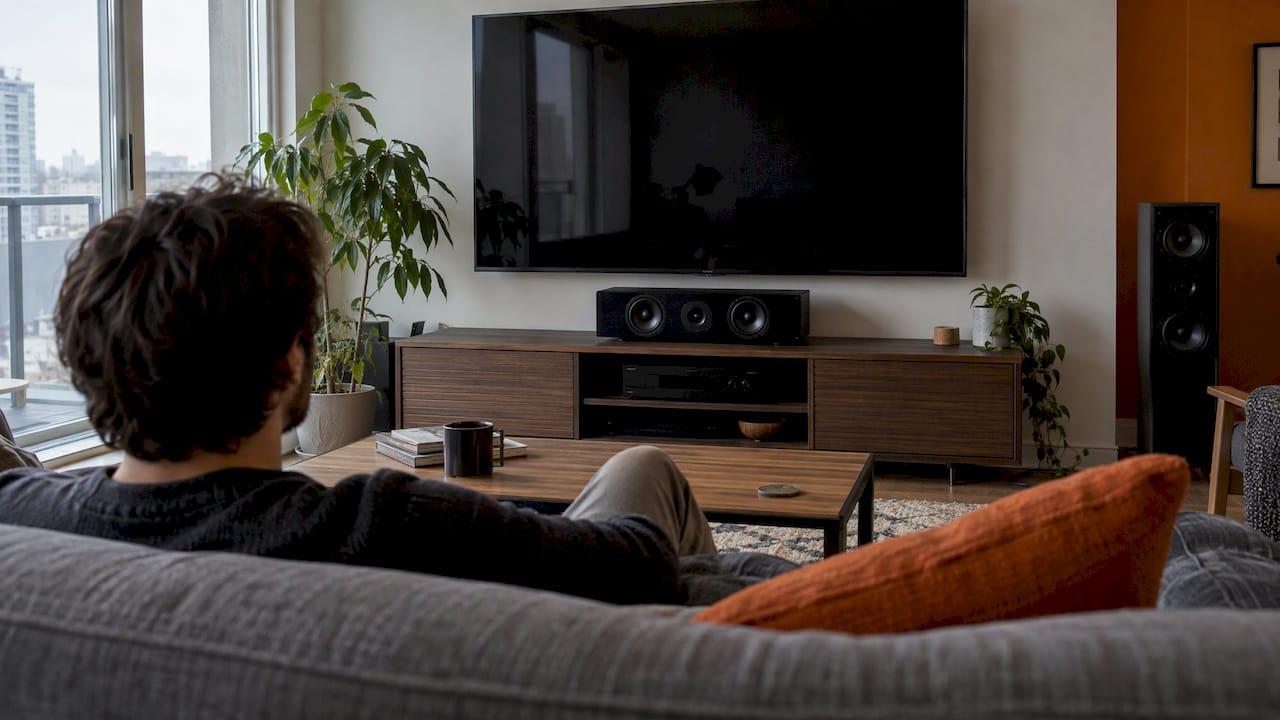
Put the center channel speaker directly on the vertical centerline of your screen, as close to the TV as you can get it, with its tweeter as near to seated ear level as the room allows. Below the screen is the usual choice and above works just as well. If the speaker sits lower or higher than your ears, tilt it so it points at them. Most dialogue problems we see in Calgary homes come from a center speaker that is too low, buried in a cabinet or aimed at the ceiling.
This guide covers where the speaker goes, how high, how to aim it and what to do when the room fights you.
TL;DR
- Centre it horizontally on the screen and keep it as close to the TV as possible, directly above or below.
- Aim for the tweeter at seated ear level, about 3.9 feet (1.2 m) from the floor, matching your left and right speakers where you can.
- If the speaker sits below or above ear height, tilt it toward the seats rather than leaving it flat.
- Keep the front edge flush with the shelf or stand, and never recess it inside a cabinet.
- Set the speaker size and level in your receiver after placing it, because placement and setup work together.
Table of Contents
- What the center channel actually does
- The basic rule: centred, close and aimed at your ears
- Center channel above or below the TV?
- Center speaker height: where the tweeter should sit
- Aiming and tilt
- Shelf, stand and cabinet mistakes
- Three real-world setups
- Set it up after you place it
- Perspective: what we do when we install a center channel
- Planning for a new build or renovation
- Want it done properly in Calgary?
- FAQ
- Sources
What the center channel actually does
The center channel carries most of the dialogue in a film or show, along with a good share of on-screen effects. Dolby's setup guide describes center speakers as primarily delivering dialog, and says that for the best effect the speaker should sit just below or above the TV so the sound comes directly at you.
That is why placement matters more than the price tag of the speaker. A very good center channel in a bad spot sounds worse than a modest one aimed properly. When voices sound hollow, boomy or hard to follow at normal volume, position is the first thing to check.
The basic rule: centred, close and aimed at your ears
Three things define a good position:
- Horizontally centred. The speaker sits on the vertical centerline of the screen, equidistant from the left and right speakers. This keeps voices anchored to the actors on screen.
- Close to the picture. A manufacturer's home theatre guide says the center channel should be as close to the TV as possible, with its tweeter at the same height as the left and right tweeters, ideally at seated ear level.
- Facing the listeners. The speaker fires straight at the seating area, not at the ceiling or a side wall.
If you cannot get all three, the same guide says to place the speaker immediately below the display's vertical centerline (preferred) or immediately above it, and to aim it at seated ear level.
Center channel above or below the TV?
Both work. The right answer depends on your screen height, your furniture and where your ears sit.
Below the TV
This is the most common setup. A speaker owner's manual notes that the most popular placement for its center speaker is on a shelf below a flat screen TV. It is easy to wire, easy to hide and works well when the TV sits on a low media console.
The catch is height. On a console the tweeter often lands at 20 to 28 inches, well under the 3.9 feet of a seated ear. That is fixable with a slight upward tilt, covered below.
Above the TV
Above the screen is often the better acoustic position. One European speaker maker's expert article says placing the centre speaker above the screen is often best for sound, because the sound disperses more freely and is not affected by furniture below the screen. It also notes that it integrates better with the picture psychoacoustically.
Above works best when the TV is mounted low enough that the speaker ends up near ear level. On a wall-mounted TV in a high position, this can push the speaker too far up. A speaker manufacturer's blog advises against placing a center channel more than 18 inches above the TV display, and recommends angling it downward.
How to decide
Another setup guide puts it simply: above or below depends on screen height, and the speaker's orientation relative to your ears matters more than which side of the TV it sits on. Use this as a quick check:
| Your situation | Best choice | Why |
|---|---|---|
| TV on a low console, eye level near screen centre | Below the TV, tilted up | Keeps the speaker close to the picture and easy to aim |
| TV wall-mounted at a comfortable viewing height | Above or below, whichever lands closer to ear level | Tweeter height is the deciding factor |
| Deep, crowded shelf or cabinet | Above the TV on a bracket or shelf | Avoids furniture reflections and blocked sound |
| Tall TV over a fireplace | Below, if the mantel allows; otherwise rethink the TV height | Above would be too high to aim well |
If you have not fixed your TV height yet, settle that first. Our TV mounting height guide walks through it, and the centre speaker position follows from the screen.
Center speaker height: where the tweeter should sit
The target is simple: the tweeter at the height of your ears when you are seated. Dolby's guide gives the best height for main speakers as about ear level when seated, approximately 3.9 feet from the floor. That is a good number to start with, then adjust for your own seating. Measure from the floor to your ear while you sit the way you normally watch.
The reason is the tweeter. Audioholics' 5.1 guide explains that the center channel tweeter is the most directional driver. The more it points above, below or beside your ears, the less accurate the frequencies you hear, and the harder dialogue becomes to understand.
Matching the left and right speakers matters too. When all three front speakers have tweeters at the same height, sound moves smoothly across the front of the room. When the center sits much lower, voices can seem to drop toward the floor.
Aiming and tilt
In most rooms the center speaker cannot sit exactly at ear level, so aim it. SVS Canada says a tweeter at or near head level when seated is optimal, and that if the center channel must be below head level, an upward tilt improves mid and high frequency response and dialogue intelligibility.
Practical ways to get the angle:
- Use the speaker's own feet or a tilt bracket if it came with them.
- Place a wedge or pads under the rear. Audioholics suggests rubber door stoppers or a purpose-made pad to get the tilt.
- Tilt downward when the speaker is high. The Axiom blog suggests that when a center sits on top of a big TV well above the seats, wedges or hockey pucks under the rear of the base help the front fire toward the listening area.
- Check with a laser pointer. Place it on top of the speaker at tweeter level and see where the dot lands on the seating.
How much tilt? In a center channel tuning article, the author recommends tilting the center up 5 to 10 degrees. Start in that range for a console-height speaker and listen from your main seat. A few degrees is often enough.
The second row problem
If you have two rows of seating, the front-row chairs can block the direct sound path to the back row. The same author found dialogue became less intelligible in the second row, and fixed it by raising the center channel a few inches and tilting it up 5 to 10 degrees, checking the aim with a laser pointer at the second row chair. Cinema rooms with risers need this kind of check at design time.

For seat positions in the first place, see our guide on home theatre seating distance.
Shelf, stand and cabinet mistakes
The speaker's position on its own surface matters as much as the height.
- Keep the front edge flush. Klipsch's guide says the front edge should be even with the edge of the shelf or stand to avoid unwanted diffraction. Their first home theatre guide adds that this maintains dialogue clarity.
- Do not recess it. The Axiom blog warns against recessing a center channel in any way on a shelf in an entertainment unit. Move it forward and angle it downward instead.
- Avoid side walls and furniture. Audioholics advises keeping the center out of furniture and away from walls where possible.
- Support the weight. Center speakers are heavy for their size. If you mount one above or below a wall-hung TV, use a bracket or shelf rated for it and anchor it into studs or blocking.
Media walls are where recessing tends to happen, because a built-in niche looks tidy. If you are building one, treat the speaker bay as an open shelf with a flush front, and consider acoustic panels for media walls around it to manage reflections instead of boxing the speaker in.
Three real-world setups
1. TV on a console in a condo living room. The TV centre sits about 40 inches off the floor and the sofa puts your ears near 38 to 42 inches. The center goes on the console directly below the screen, front edge flush, with a gentle tilt up if the tweeter is lower than your ears. A shallow console is ideal.
2. Wall-mounted TV above a fireplace. The screen is high, so a center below it on the mantel can sit awkwardly far from the picture, and above it can end up too high. This is a case for revisiting the TV height, or for a dedicated shelf just under the screen angled toward the seats.
3. Dedicated theatre with two rows. Here the front row must not block the center. Raise the speaker, tilt it up and check the second row aim. Where the screen is large, the speaker may sit above or below depending on the screen frame and design.
A soundbar is a different case: it replaces the separate center, left and right speakers. If that is your plan, our soundbar mounting guide covers the clearance.
Set it up after you place it
Placement is half the job. Once the speaker is in position:
- Pick the right size setting. The Polk manual recommends setting its center speaker to "small" in the receiver's bass management settings for best performance. Check your own speaker's manual for what suits it.
- Set the level. Audioholics suggests running the center about 1 dB hot from the front row so the back row is not drowned out by the surround speakers.
- Run auto calibration, then listen. Play a familiar dialogue scene at normal volume from every seat.
The rest of the system has its own height rules. Our guides to surround speaker height and Atmos speaker placement cover the other channels, and our Sonos home theatre setup guide helps if you are using a wireless system.
Perspective: what we do when we install a center channel
We treat the center channel as the most important speaker in the room, because most of what people want to hear comes from it.
Our approach is to plan it before the TV goes up. We decide the screen height, the seating position and the speaker position together, so the tweeter lands close to ear level without the speaker looking like an afterthought. That is how we design systems that disappear into the architecture while still sounding right.
In a custom home theatre, that planning goes further: the speaker position, the wiring and any shelf or bracket are settled with the room's design. Where possible, the speaker has its own properly supported spot with a flush front, not a hole in a cabinet.
For us, a good result is simple. You can follow every word from every seat at a normal volume, and nobody has to think about where the speaker is.
JupiterAV
Planning for a new build or renovation
The easiest time to get the center channel right is before drywall. Blocking behind the screen for a speaker shelf or bracket, and speaker wire runs to the right spot, cost little during framing and are a headache to add later. Builders can use our audio rough-in checklist, which is written around Canadian code. If your room will use in-ceiling speakers for the other channels, our ceiling speaker placement guide covers spacing. For rooms where sound leaking to the rest of the house is a concern, see our home theatre soundproofing plan.

Want it done properly in Calgary?
We design, supply and install home theatre and whole-home audio systems for homes, businesses and builders in and around Calgary. That includes the details in this article: where the center speaker goes, how it is supported, how the wiring is hidden and how the system is calibrated, with one point of contact from planning to ongoing support.

If you are planning a new theatre, a media wall or an upgrade to a room you already have, see what we offer in immersive sound and cinema and talk to us about your space.
FAQ
Is it better to put the center channel above or below the TV?
Either is fine, and the better one is whichever puts the tweeter closer to seated ear level. Below is the most common because it sits on the console. Above is often cleaner acoustically, as long as it is not more than about 18 inches over the screen. Tilt it toward the seats either way.
How high should a center channel speaker be?
Aim for the tweeter at seated ear level, about 3.9 feet (1.2 m) from the floor, and ideally level with your left and right speakers. Measure your own seated ear height, since it varies with the sofa. If you cannot reach that height, tilt the speaker so it points at your ears.
Can I put the center channel inside a cabinet?
It is best not to. Recessing the speaker on a shelf in an entertainment unit hurts dialogue clarity. If it must live on a shelf, pull it forward so the front edge is flush with the shelf edge and angle it toward the seats.
Do I need to tilt my center speaker?
Only when the tweeter is not at ear height. A speaker on a low console usually benefits from about 5 to 10 degrees of upward tilt, and a speaker on top of a tall TV may need a downward tilt. Use a wedge or pads, then listen from your main seat.
Does the center channel need to match my other speakers?
It helps for the three front speakers to share the same tweeter height, and ideally the same speaker family, so voices move smoothly across the screen. Speakers from one range are designed to blend well. Ask us to match them to your room and system.
Sources
- Rotel Home Theater 101
- Polk Audio T Series owner's manual
- Polk Audio, Dolby Atmos setup guide
- Dolby Atmos Speaker Setup 101
- Dynaudio, where to place the centre speaker
- SVS Canada, the art of speaker placement
- Audioholics, how to set up a 5.1 home theater speaker system
- Audioholics, improve center channel performance
- Axiom Audio, center channel intelligibility
- Klipsch, creating ideal surround sound
- Klipsch, buying and setting up your first home theater system