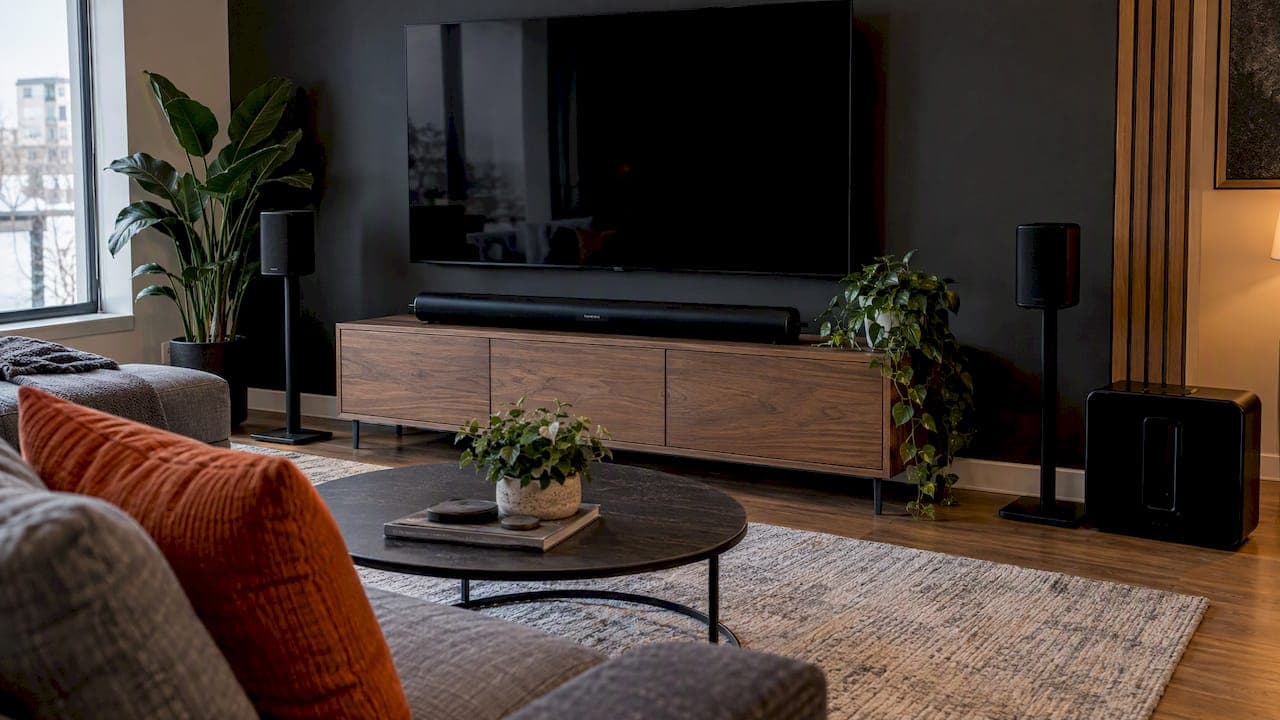
A Sonos home theatre is built in layers: a soundbar connected to your TV by HDMI, two wireless surround speakers, then a subwoofer. Each piece is added in the Sonos app, and the system grows with your budget. The setup itself is simple. The decisions around it (which speakers, where they go, how power and wiring are handled) are what separate a system that sounds good from one that sounds like a cinema.
This guide walks through the order we recommend, the placement rules that matter, what it costs in Canada, and the points where a professional installation saves you a second visit with a drill.
TL;DR
- Start with the soundbar on the TV's HDMI eARC port, then add surrounds, then the sub. Each step is a clear upgrade.
- Surround speakers matter more than most people expect. Place them at ear level or slightly above, beside or behind the seats, with power nearby.
- Atmos adds overhead sound. A 5.1.2 system means five ear-level speakers, one sub and two height channels.
- A full Sonos Atmos set with sub runs into the thousands of dollars in Canada, so plan the room before buying.
- Hidden wiring, in-wall or in-ceiling speakers and new builds are where professional installation pays for itself.
Table of Contents
- What a Sonos home theatre actually is
- The order to build it in
- Step by step: connecting the soundbar
- Adding surround speakers
- Adding a sub and getting the bass right
- Dolby Atmos: do you need the overhead layer?
- What it costs in Canada
- Mistakes we see in Calgary homes
- When Sonos is right, and when to look elsewhere
- Our perspective: the room decides, not the box
- Let us handle the install
- FAQ
- Sources
What a Sonos home theatre actually is
Sonos does not sell a boxed receiver-and-speaker kit. You assemble a system from separate products that talk to each other over your network. The core of it is a soundbar, which handles the front left, centre and right channels and receives the TV's audio. Wireless speakers join it as rear surrounds, and a subwoofer takes over the low end.
The advantage is flexibility. You can buy the soundbar today and add surrounds next winter. The same speakers also play music in multi-room mode, so the living room system is not locked to the TV.
If you see channel numbers such as 5.1.2 and want to know what they mean, What Hi-Fi explains the notation: the first number is the ear-level speakers (left, centre, right and surrounds), the second is the number of subwoofers, and the third is the above-ear-level speakers. So 5.1.2 is five ear-level speakers, one sub and two overhead channels.
The order to build it in
People often ask whether to buy the sub or the surrounds first. The honest answer depends on the room, but this sequence works for most Calgary homes.
- Soundbar. It fixes thin TV audio immediately and anchors everything else.
- Surround speakers. A pair of rears turns a good soundbar into a room-filling system. This is the step most people skip and later wish they had not.
- Subwoofer. Bass you can feel is what makes explosions and film scores land. In a condo or townhouse with shared walls, you may want to tune it down, so it can wait.
- Second sub or additional height speakers, if the room and budget justify it.
If you live in an apartment, adding two small surrounds before the sub often makes more sense, since a powerful sub is the speaker your neighbours notice first.
Step by step: connecting the soundbar
1. Use the right HDMI port
Plug the soundbar into the HDMI port on your TV labelled eARC (sometimes just ARC). This is what lets the TV pass Dolby Atmos and other high-quality audio to the bar. A port not marked for it may limit you to a basic stereo signal. If your TV has only one eARC port and your console is already using it, move the console to a standard input and let the TV handle the switching.
2. Turn off the TV's own speakers
In the TV's audio menu, select the external device or HDMI output rather than internal speakers. Then check that the audio format is set to pass-through or automatic, not PCM only, so Atmos content arrives intact.
3. Add it in the Sonos app
Power the bar on and open the Sonos app. It detects new products and walks you through adding them to your system. Keep everything on the same network and, during setup, in the same room.
4. Tune the room
Sonos offers room tuning in the app, and it is worth the five minutes. The bar adjusts its output to how sound bounces around your space. Redo it any time you move furniture or add speakers.
Adding surround speakers
The soundbar can simulate width, but real rear speakers create the sense that a helicopter passed behind you. A community walkthrough from Sonos users lists the compatible approach: pair a soundbar such as the Arc, Beam or Ray with two matching surround speakers, and a sub, with everything powered on and in the same room during setup. If the speakers were previously a stereo pair, remove that pairing in the app before reassigning them as surrounds.
Once added, you can fine-tune the rears in the Sonos app under the room's sound settings, including surround volume and whether music is played from the rears. Sonos documents this in its help centre under surround audio settings.
Where surrounds should go
- Height: around ear level when seated, or a little above. Not on the floor.
- Position: to the sides of, or slightly behind, the main seating position.
- Distance: roughly equal distance from the seats on both sides if you can manage it.
- Power: each speaker needs an outlet. This is the part that surprises people.
That last point is the real-world snag. A tidy living room with a sofa in the middle of the floor has no outlets behind the seats. Extension cords across the carpet are not a solution, and running cable behind finished drywall is not a weekend job. In a finished home, we usually solve it with an in-wall outlet or a speaker location planned around existing power. In a new build, it is much easier: we pre-wire before the drywall goes up.
Adding a sub and getting the bass right
Put the sub on the floor, usually near the front of the room, and avoid shoving it tight into a corner. Corners can make bass boomy and one-note. Start near the TV wall, play familiar content, and move it a metre at a time if the bass sounds muddy. Then adjust the sub level in the app.

If the sub is rattling things, that is often the room. Hollow walls, a lightly built basement ceiling and open ductwork all carry low frequencies. Our guide to soundproofing a home theatre covers realistic fixes, and acoustic panels for a home theatre explains where treatment actually helps.
Dolby Atmos: do you need the overhead layer?
Atmos adds sound from above, so rain falls, aircraft pass overhead and music has height. Many Sonos soundbars include upward-firing drivers that bounce sound off the ceiling, which works best with a flat ceiling of standard height. Vaulted, slanted or very high ceilings reduce the effect.
If your ceiling is awkward, there are two other routes: wireless surrounds that include their own upward-firing drivers, or ceiling speakers on a separate amplifier. Where speakers go matters a lot, and we have written about where to put Atmos speakers for the best overhead sound. If you are considering built-in options, read our in-ceiling speaker placement guide before anyone cuts a hole, and our overview of the best in-ceiling speakers for Canadian homeowners.
What it costs in Canada

Prices move, so check before buying. As an example, Sonos Canada's page for the Ultimate Immersive Set with Arc Ultra listed the Arc Ultra at $1,449 on its own and the full bundle with Sub 4 and a pair of Era 300 speakers at $3,661 at the time we checked. The same page showed a surround set with the Arc Ultra and two Era 300 speakers at $2,567.
That gives you a realistic planning range:
| Build | What you get | Where it fits |
|---|---|---|
| Soundbar only | Front stage, simulated width | Bedrooms, small condos |
| Soundbar + surrounds | Real rear channels | Most living rooms |
| Soundbar + sub | Deep bass, no rears | Large rooms with open walls |
| Soundbar + sub + surrounds | Full 5.1 or Atmos experience | Dedicated theatre or media room |
Installation is separate from the equipment. We do not publish a flat installation price, because a bar on a wall bracket is a different job than a pre-wired theatre with hidden power and an equipment closet. We quote after understanding the room.
Mistakes we see in Calgary homes
- Surrounds on a bookshelf behind the sofa. Too far from ear level and too close to the wall, which muddies the sound.
- The wrong HDMI port. The bar is plugged into a standard input and the TV never sends Atmos.
- Weak Wi-Fi. Wireless speakers need a solid network. Dropouts and "can't find product" errors usually trace back to the router, not the speaker. If that sounds familiar, see what to do when Sonos is not connecting.
- Buying a sub for an apartment first. Spend on surrounds instead.
- Ignoring the ceiling. Atmos from a soundbar needs a ceiling that will reflect sound.
- Fixing TV dialogue with volume. If voices are lost, it is a speech setting and placement problem. Our guide to fixing TV audio with Sonos goes through it.
When Sonos is right, and when to look elsewhere
Sonos suits people who want strong, simple sound, an app they can use, and the ability to expand a room at a time. It is less suited to a fully dedicated theatre with a projector, acoustic treatment and a dozen speakers, where a separate processor and amplifier give more control. If you are weighing options, our buyer's guide to Sonos alternatives in Calgary lays out the trade-offs by type of system.
Our perspective: the room decides, not the box
We install audio and video in homes and for builders around Calgary, and the same thing holds on almost every Sonos job: the equipment is the easy part. The problems are outlets, cable paths, ceiling heights and where the seats really are.
We design systems to disappear into the architecture. That means asking about the room before recommending products: where does the sofa sit, what is behind that wall, can we get power to the rears, will this be pre-wired or retrofitted? A Sonos system that is planned this way costs no more in hardware, yet it avoids cables on the floor and speakers perched wherever there was space.
Our advice for homeowners is to buy in stages but plan in one go. Decide now where the surrounds will eventually live and run power and cable there, even if the speakers arrive next year. For builders, put the wiring in during framing. It is a small line item on a build and an expensive one afterwards.
— JupiterAV
Let us handle the install
If you would rather not chase outlets and cables yourself, our team handles the whole job: choosing the right Sonos configuration, low voltage wiring, mounting, setup and tuning, with one point of contact from start to finish. We work with homeowners, businesses and custom or acreage builders in and around Calgary. See our Immersive Sound & Cinema service or get in touch through JupiterAV to talk through your room.
FAQ
Can I set up a Sonos home theatre myself?
Yes, the app-based setup is straightforward if you have an eARC HDMI port and power where each speaker will sit. The difficulty is physical: hiding cables, mounting a bar and getting power to the rear speakers. If you want in-wall or in-ceiling speakers, or a clean finish, use an installer.
Do I need a subwoofer for a Sonos surround system?
Not to get started. A soundbar with two surrounds already delivers a big improvement. Add the sub when you want film bass and music weight, and when your living situation allows it. Apartment and condo owners should be mindful of shared walls.
What does a 5.1.2 system mean?
It is a speaker layout notation: five ear-level speakers (left, centre, right and two surrounds), one subwoofer and two overhead speakers. A 5.1 system has the same layout without the overhead pair.
Why does my Sonos surround sound weak or one-sided?
Check that the surrounds are assigned correctly in the app, that they are at ear level and roughly equally spaced from the seats, and that surround volume is not set too low. Weak Wi-Fi can also cause dropouts. If problems continue, an installer can check the network and placement.
Sources
- How to use Sonos as a home cinema system, What Hi-Fi?
- Ultimate Immersive Set with Arc Ultra, Sonos Canada
- Build a surround with Arc and Sonos One(s), Sonos Community