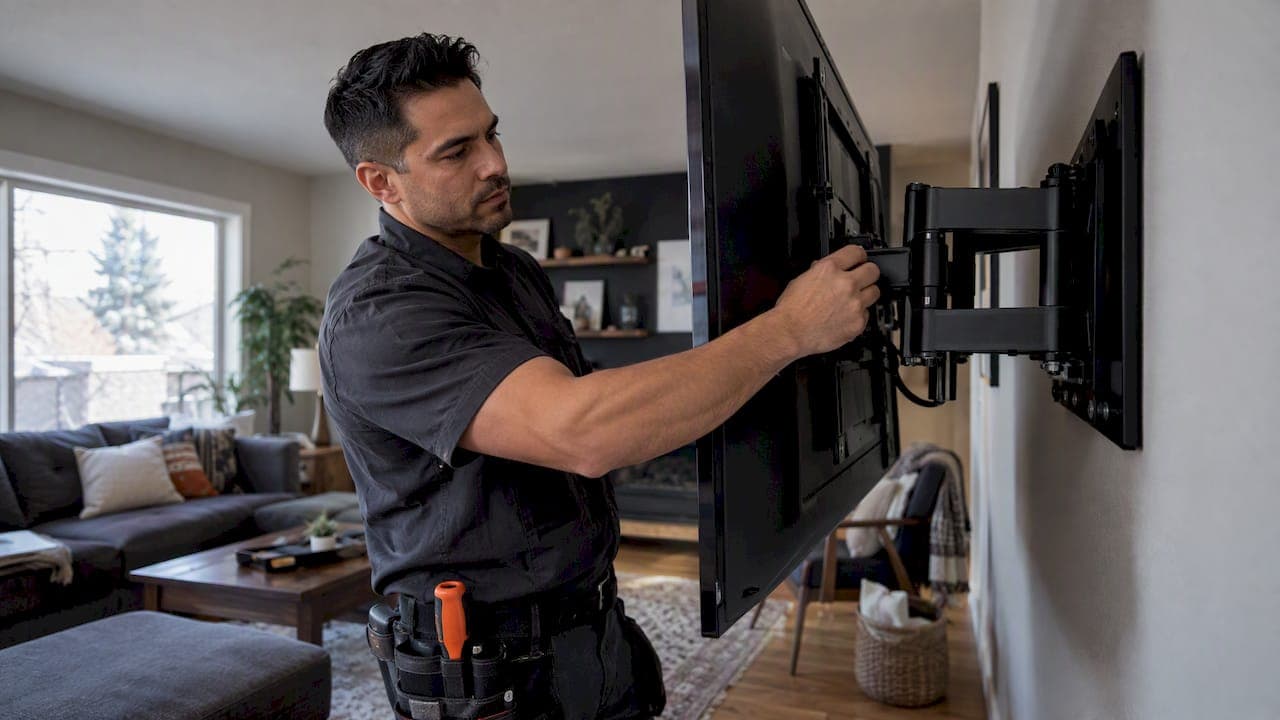
A TV mount holds the weight printed on its rating, and not a pound more. That number is a ceiling for the mount itself, tested under the maker's installation conditions. It says nothing about your wall. To mount a TV safely, you need the TV's weight to sit at or below the mount's rating, the mounting pattern and screws to match, and the wall behind it to be fastened into real structure.
This guide explains how to read the rating, how to check your own TV against it, and where most weight problems actually start, which is usually the wall and not the bracket.
TL;DR
- A mount is only compatible when the TV's weight is at or below the manufacturer's rated load. Check the weight of your TV, not just its screen size.
- Two mounts that fit the same screen size can have different weight capacities, so read the spec sheet of the exact mount.
- Drywall alone never carries a TV mount. The mount goes into studs, solid concrete or steel studs, following the instructions.
- Match the VESA pattern and use the screws the TV and mount manuals call for. Wrong screws can cause injury or damage.
- If the weight, the rating or the wall is uncertain, bring a second person or a professional installer.
Table of Contents
- What a TV mount's weight capacity actually means
- How to check your TV against a mount's limit
- Screen size is not the same as weight capacity
- The wall decides how much weight is really safe
- Does the mount type change the weight you can hang?
- Is a 75-inch or larger TV too heavy to mount?
- Hardware, screws and the small things that fail
- Where the TV goes matters too
- Our perspective: weight is a wall problem first
- When to hire a professional
- Let us mount it right
- FAQ
- Sources
What a TV mount's weight capacity actually means
Every wall mount comes with a maximum weight rating, usually printed on the box, in the manual and on the manufacturer's product page. It is the heaviest TV that mount is rated to carry. The guidance from Roku's Canadian support page is plain: choose a mount rated to handle your TV's weight, and treat the mount as compatible only if the TV is at or below the rated load.
Three details trip people up.
The rating covers the whole load, not only the panel. Some manufacturers state the limit as including accessories. One widely sold full-motion mount, for example, lists a 150-pound TV weight limit, including accessories. If you plan to attach a soundbar, a streaming box or a camera to the TV or mount, count their weight too.
The rating is for correct installation. A mount rated for a given weight is only rated that way when it is fastened as the instructions say. The same manufacturer warns that ignoring the instructions, such as using the wrong screws, can result in injury or property damage. The number on the box is not a promise that any wall or any screw will do.
The rating is not a target. A mount rated for 150 lb holding a TV that weighs a fraction of that is comfortable. A TV sitting right at the limit leaves no margin for the accessories, for the pull on an extended arm, or for a small installation error. When we have a choice, we pick a mount with headroom.

How to check your TV against a mount's limit
This takes five minutes and a spec sheet. Do it before you buy, not after the box is open.
- Find the TV's weight. Look in the manual or the manufacturer's spec page. Many listings give two figures, with the stand and without. For wall mounting, you want the weight without the stand, since the stand comes off. If you are unsure, use the higher number.
- Find the mount's maximum weight rating. It sits in the manual, on the packaging and on the product page. Confirm it is for the exact model you are buying.
- Compare them. TCL's Canadian guidance says to check that the TV's weight does not exceed the mount's maximum weight rating, and to verify the VESA pattern and correct screw length at the same time.
- Add accessories. Include anything that hangs on the TV or the mount.
- Check the margin. If the TV is close to the limit, step up to a mount with a higher rating.
A quick example. Say a TV weighs 30 kg without its stand and you plan to add a small streaming device. A mount rated for 35 kg technically works, but a mount rated for 45 kg or more gives you room. The cost difference between those two mounts is usually small compared with the cost of a fallen TV.
Screen size is not the same as weight capacity
Mount packaging often lists a screen-size range, such as 37 to 70 inches. That range is a guide to fit, not a statement about strength. Consumer Reports notes that two mounts supporting the same screen size do not necessarily share the same weight capacity, so you need to read each product's own specifications.
There are two separate checks that both have to pass:
- Weight: the TV's weight is at or below the mount's rating.
- Pattern: the TV's VESA hole pattern matches the mount. The StarTech selection guide frames mount selection as matching both the TV's size and weight range and its VESA pattern to the mount's specifications.
VESA is the standardized spacing of the four threaded holes on the back of most TVs, measured in millimetres horizontally by vertically. Roku says its TVs follow VESA and that you should choose a mount matching the TV's specific pattern. A mount with a large range of supported patterns gives you flexibility when you replace the TV later.
One caution on brand guidance. Some TV makers advise against third-party mounts and screws. Sony's Canadian support page, for instance, says it does not recommend third-party wall mounts and screws and tells owners to consult the TV and mount manuals for safety instructions. Read your TV's manual before you commit to a mount.
The wall decides how much weight is really safe
The mount rating is only half the story. A 100 lb-rated mount screwed into drywall alone is not a 100 lb installation. The wall is where most real-world failures start.
Drywall alone is not a mounting surface
Can drywall hold a 50-pound TV? Not by itself, and not with the mount fastened only to the board. The installation manual for a popular mount states that drywall alone is insufficient and must never be used to support a TV mount. The mount has to be fastened directly into structural supports such as wood studs, solid concrete or steel studs.
That is why the weight of the TV matters less than people think for a lightweight modern set, and the fastening point matters more. A lighter TV into the right studs is a sound installation. A heavier TV hung on anchors in plain board is not.
The safety factor behind the number
Some manufacturers also set a requirement for the wall itself. The same manual requires the wall to be able to support five times the combined weight of the TV and the mount. That margin is why you cannot judge a wall by looking at it. If you do not know what is behind the drywall, find out before you drill.
Check before you drill
Roku's guidance on installation lists the factors to get right: confirm the wall can support the TV, follow the mount's instructions on anchors or studs, use the right screws for the TV, and check for hidden pipes or wires before drilling. AVF's planning advice says the same: check the strength of the installation before the screen goes up, and look for hidden pipes or wires first.

In practice that means locating studs with a reliable finder, confirming their centres line up with the mount's slots, and being honest about what is behind the wall. A bathroom or kitchen wall, an exterior wall with a vapour barrier, or a wall with in-wall wiring all deserve a second look.
Masonry, stone and fireplaces
Solid concrete is an accepted fastening surface in mount manuals, but it needs the correct masonry anchors and bits. Stone and brick have their own quirks. If your TV is going on stone, see our guide on mounting a TV on stone with the right anchors. A TV above a fireplace adds heat, viewing angle and wiring questions on top of weight, which we cover in our TV over fireplace guide.
Does the mount type change the weight you can hang?
Yes, in practice. The three common types behave differently under load.
| Mount type | What it does | Weight consideration |
|---|---|---|
| Fixed | Holds the TV flat against the wall | Load is close to the wall, so it is the most forgiving on fastening points |
| Tilt | Angles the screen down a few degrees | Similar to fixed, with a small hinge that has its own rating |
| Full motion | Swings and extends on an arm | Rated weight is lower than it would be for a fixed mount of similar build, and extension puts more leverage on the wall fixings |
With a full-motion arm, the further the TV sits from the wall, the more leverage it puts on the studs and lag bolts. Manufacturers' size charts reflect this: many product lines show lower weight limits for extending models than for fixed ones, and a higher bracket in the same line can hold more. Always read the rating of the exact model, and for an extending mount, assume the wall is working harder than the number suggests.
If you want a mount that swings out, make sure the studs it fastens into are solid and that the mount's bolt pattern lands on them. If the studs do not line up with where the TV needs to be, a wall plate that spans multiple studs or added blocking behind the drywall is a better answer than weaker anchors.
Is a 75-inch or larger TV too heavy to mount?
Usually it is not. The TV itself is rarely the limit. What changes with size is the width of the mount, the number of studs it needs to span, and how awkward the lift is.
For any large TV, follow the same three checks:
- Read the TV's weight from its own spec sheet, not from a table of typical sizes. Weights vary a lot between models and between panel types.
- Pick a mount whose rating clears that weight with headroom, and whose VESA range includes your TV's pattern.
- Confirm the wall structure under the mount, with at least two studs or the equivalent in masonry.
Lifting is the other risk. Roku suggests that you use two people to mount the TV or call a professional mounting service. A big panel flexes and its edges are fragile. Two people also let one person watch the hooks engage while the other holds the weight.
For much bigger projects, such as several displays together, weight and structure become an engineering question. We walk through it in our video wall mounting guide.
Hardware, screws and the small things that fail
Most weight-related failures trace back to small parts. The screws that come with a mount are often matched to a range of TVs, and the TV's rear holes need screws of the right diameter and length. Too short and they barely engage. Too long and they can damage the panel's internals. TCL specifically lists correct screw length among the checks, alongside weight and VESA.
The principle is the same for any wall-hung item: follow the manual, and choose hardware designed for the load. A guide on choosing suitable mounting hardware for wall-hung mirrors shows the same logic at work, since the fixings have to suit the object's weight and the surface behind it.
A few more practical points:
- Choose a mount certified by an independent laboratory. Roku points to UL, CS or ETL marks as the signs to look for.
- Do not mix hardware between brands of mount unless the manual allows it.
- Keep the box and manual. The rating and the fastening instructions are what you will want when you replace the TV.
- Tighten firmly, but do not overtighten into the TV's threaded inserts.
Where the TV goes matters too
Weight capacity is one decision in a chain. Height, viewing distance and cable routing all affect which mount makes sense, and a mount that is perfect on paper can be wrong on the wall. Our guides on TV mounting height and how to size your TV by viewing distance help you settle those before you pick hardware. If you plan a soundbar beneath the screen, see how to mount a soundbar to your TV without clashing with the mount's arm.
If you are building or renovating, the cheapest time to solve weight is before the drywall goes up. Solid blocking behind the TV location, plus the right cable runs, lets you choose almost any mount later. Our prewire smart home checklist and the builder prewire checklist list what to ask for.
Our perspective: weight is a wall problem first
In our work as a Calgary installer of TVs, home theatres and smart home systems, we see the same pattern. Homeowners spend time comparing mount ratings, then hang the mount wherever the TV looks right. The rating is rarely the weak point. The fastening point is.
Our approach is to start at the wall. We confirm what the TV will be fastened to, choose a mount with comfortable headroom over the TV's weight, and plan the cabling so the installation disappears into the room. We would rather move a TV a few inches to land on solid structure than compromise the fixings. For a custom home or acreage build, we prefer to agree on blocking and wiring with the builder before the walls close, so the mount choice is never limited by what is behind the board.
We also encourage you to stay with the manufacturer's instructions. The rating, the screws and the wall requirement are written as a set, and an installation that ignores one of them is not covered by the number on the box. If something about the wall or the TV is uncertain, that is the moment to call someone, not the moment to guess.
— JupiterAV
When to hire a professional
A competent DIYer can mount a light TV on a fixed mount into two wood studs. Bring in a professional when:
- The TV is large or heavy enough that you cannot lift it comfortably with a helper.
- You cannot confirm what is behind the wall, or it is stone, brick, concrete or steel stud.
- The mount extends on an arm, or the TV goes above a fireplace.
- You want cables hidden inside the wall.
- The weight, the rating or the wall support is uncertain.
Roku's own advice is to contact a professional mounting service in these situations. If you are in Calgary and wondering what that costs, our breakdown of TV mounting costs in Calgary explains typical fees and how to avoid surprises.
Let us mount it right
JupiterAV designs, sells, installs and services TVs, home theatres, whole-home audio and video, smart home systems, security and CCTV, and commercial AV for homes, businesses and builders in Calgary. We supply the mount, confirm the wall, hide the wiring and stand behind the work with a single point of contact. If you want a TV on the wall without worrying about the weight rating, get in touch with JupiterAV.
FAQ
How much weight can a TV mount hold?
It depends on the model. Each mount has a maximum rating printed on its box and in its manual, and the TV's weight must be at or below it. Capacities vary widely between a small fixed bracket and a heavy-duty full-motion mount, so read the exact product's specifications, as Consumer Reports advises. The wall must also be fastened into structure.
What is the weight limit of a TV bracket if I add a soundbar?
Count everything the mount carries. Some manufacturers state their limit as including accessories, so add the soundbar, streaming device or any other attachment to the TV's weight before comparing it with the rating. If the total is close to the limit, choose a higher-rated mount.
Can drywall hold a 50-pound TV?
Not on its own. Mount manufacturers state that drywall alone is not enough and that the mount must go into wood studs, solid concrete or steel studs. The TV may be well within the mount's rating, but the fastening still has to reach structure.
Is a 75-inch TV too heavy to mount on a wall?
Generally no, as long as you check its actual weight against the mount's rating and fasten into proper structure. The practical challenges are a wider mount, more studs to span and a two-person lift. If you are unsure, a professional installer can confirm the wall before the TV goes up.
Does the VESA pattern affect how much weight a mount can hold?
Not directly. VESA tells you whether the TV's holes line up with the mount, while the weight rating tells you how much it can carry. You need both to match, plus the correct screws, before the mount is compatible.
Sources
- How to choose a wall mount for your TV, Roku Canada
- How to Choose the Correct Wall Mount, TCL Canada
- Mount installation manual, SANUS
- Wall mounting: compatible wall-mount brackets and screws, Sony Canada
- TV Mount Selection Guide, StarTech
- How to Choose the Best TV Mount, Consumer Reports
- TV Wall Mount Planning and Installation, AVF Group