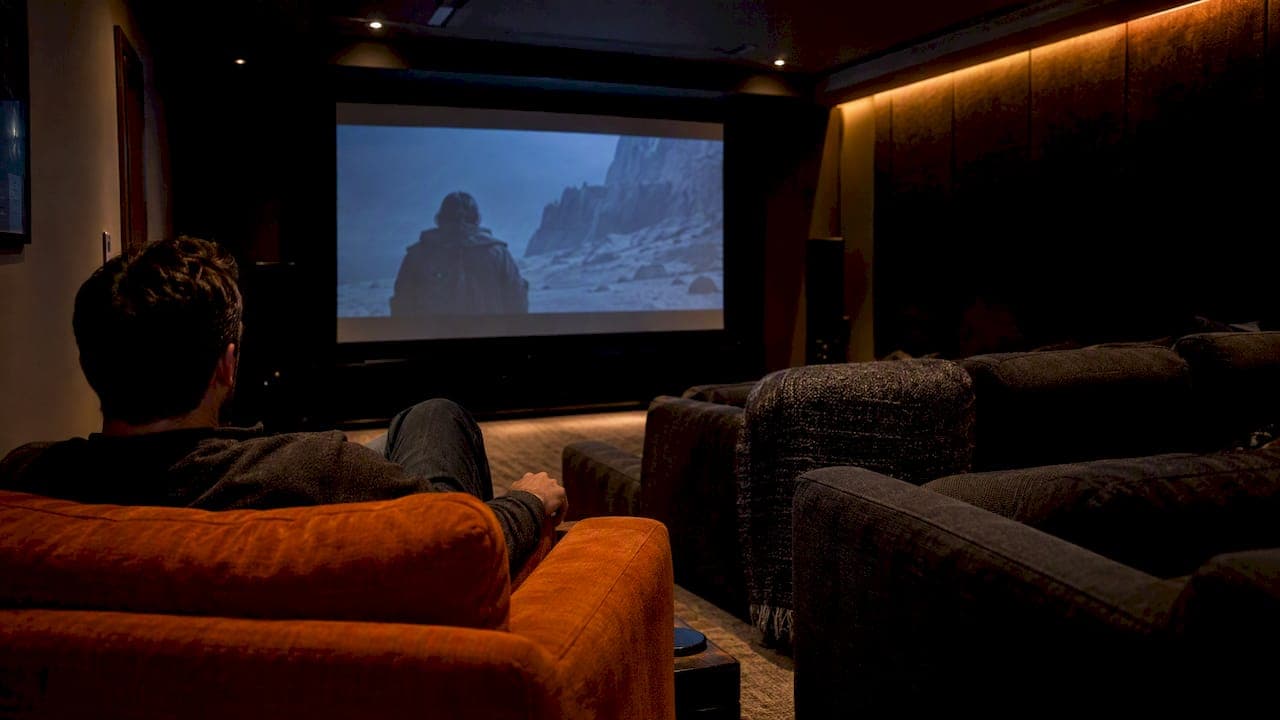
Good home theatre lighting control comes down to one idea: every light in the room sits on a dimmer, and one press of a button moves the whole room between "welcome in", "movie on" and "pause for snacks". The hardware can be as simple as a few wireless dimmers or as complete as a Control4 system that also starts the movie. What matters is that the lights are planned in layers, hidden from the screen, and recalled as scenes instead of being fiddled with one switch at a time.
We design and install these systems for Calgary homes, acreage builds and renovations. Below is how we think about the room, what each layer should do, which control platform fits which project, and what to settle before drywall goes up.
TL;DR
- Plan three layers: bias lighting behind the screen, warm ambient light, and low accent lighting for steps and aisles. Put every circuit on a dimmer.
- Use scenes (for example Welcome, Movie, Pause, Clean-up) so one press, remote tap or voice command sets the whole room.
- Lutron Caséta suits a single room or a modest retrofit. Control4 suits a theatre that also needs to run the display, audio and shades together.
- Decide fixture locations, wiring and the control platform before drywall. Lighting installs must follow the Canadian Electrical Code and use certified devices.
Table of Contents
- Why lighting is half of the theatre experience
- The three layers of theatre lighting
- Scenes: the real point of lighting control
- Choosing a control platform
- Hiding the technology
- What to settle before drywall
- Our perspective: control that stays out of the way
- Working with JupiterAV
- FAQ
- Sources
Why lighting is half of the theatre experience
A theatre can have an excellent projector and a well-tuned speaker system and still feel wrong because the lights are. Design writers describe two failures: rooms that are too bright during the film, so every reflection shows, or so dark between films that the room feels uncomfortable. The fix is not a darker room. It is control: the right amount of light, in the right places, at the right moment.
The same source warns against making the space read like an overlit furniture showroom. Good theatre lighting highlights the architecture or supports the film without drawing attention to itself as a separate design element. That is the standard we aim for: lighting that disappears into the room and only shows itself when you want it to.
That is also why the question "how do I control the lights?" cannot be separated from "where do the lights go?". Control is easy to bolt on later. Fixtures, drivers and wiring are not.
The three layers of theatre lighting
Most successful rooms use three layers, each on its own dimming channel so you can mix them.

Layer 1: bias lighting behind the screen
Bias lighting is a soft glow behind a television or around a screen. It is not mood lighting. Calibrated to 6500K (D65), it reduces eye strain by easing the stark contrast between a bright screen and a dark wall. The light must be indirect: LEDs that shine into the viewer's eyes defeat the purpose.
One published guide suggests 6500K neutral white set to roughly 10% of peak screen brightness. Colour matters if you care about picture accuracy. Specialists note that a warm 2700K strip can shift how the eye adapts and tint the image in your mind, so D65 is the neutral choice for colour-critical viewing. Some owners prefer a warmer 4000K to 5000K for a less clinical look, and that is a reasonable taste call for a family room that doubles as a theatre.
For projector rooms with a screen on a wall, the same idea applies to a wash around the screen, or simply to keeping the front of the room very dim.
Layer 2: warm ambient light
Ambient light is what you use to enter, find your seat and tidy up. The same guide places it at 2700K to 3000K, dimmed to roughly 5 to 10% during viewing. Typical sources are dimmable pot lights, wall sconces and cove lighting.
Two rules of thumb we follow:
- Keep fixtures off the screen wall and out of the line between viewers and the screen. Avoid placing lights directly above the screen to prevent glare, and light pathways and seating areas instead.
- Choose dimmers matched to the load. LED pot lights and LED tape each have their own dimming requirements, and mismatches show up as flicker or a light that will not go truly low.
Layer 3: accent and safety lighting
This is the low layer: step lights on risers, aisle lights, a discreet glow at the door. One design source suggests low-profile floor or riser tread lighting and subtle wall-wash or sconces for movement. It also recommends not running every zone at once, and relying on scenes to move between movie mode and room mode.

This is also where a ceiling feature earns its place. Fibre-optic star ceilings are a classic theatre accent, and they sit on their own dimming channel so they can fade up during credits. If you are weighing the options, our guide to star ceiling systems from DIY to turnkey covers the three routes.
Scenes: the real point of lighting control
Dimmers alone do not give you control; scenes do. A scene is a saved combination of light levels. In a Control4 system, scenes can be triggered from a keypad, touchscreen or voice command, so one action dims the house lights, brings up bias lighting and starts playback. Control4's own documentation notes that scenes can be set up by your Smart Home Pro or built by the homeowner.
A starting set that works in most rooms:
| Scene | Bias | Ambient | Accent / steps | When you use it |
|---|---|---|---|---|
| Welcome | Off or low | Mid | Low | Guests arriving, seating |
| Movie | On, steady | Off or 5 to 10% | Very low | Film playing |
| Pause | Steady | Up to roughly 25% | Low | Bathroom and snack break |
| Credits | Steady | Slowly rising | Low | End of film |
| Clean-up | Off | Full | Full | Cleaning, kids, cables |
The percentages are starting points, not rules. We set them in the finished room with your screen, your wall colour and your tolerance for brightness, then adjust after a few weeks of real use.
One detail people forget: the Pause scene should be a real scene, not "all lights on". Full brightness every time someone gets up wrecks your eyes' adaptation. A gentle 25% is usually enough to walk safely.
Choosing a control platform
There are three broad routes, and the right one depends on how much of the room you want to automate.
Wireless dimmers and a keypad (the lean route)
For a single dedicated room, a wireless dimming system with a keypad by the door and a remote at the seats does the job. One community thread on dedicated theatre lighting puts it plainly: for a single-room solution, Lutron Caséta is cheap and reliable. That is a forum opinion, but it matches what we see for modest retrofits.
Things to know before you commit:
- Caséta and the larger RadioRA 3 are both cULus listed and Industry Canada certified for Canadian installations, with Caséta handling up to 75 devices per system. If you are planning a bigger home, read our write-up on the Caséta 75-device limit.
- Wireless range matters in finished basements, where most theatres live. Lutron specifies roughly 60 ft (18 m) line of sight, or 30 ft (9 m) through walls. Concrete, steel and dense insulation can cut that further, which is why we cover practical fixes for Caséta range.
- If you want voice control, the bridge has to be properly connected. We explain how Alexa and Caséta work together in Canada, and what Matter support means for homeowners.
A full automation system (the integrated route)
If the theatre includes a projector or large display, a receiver, streaming sources and motorized shades, lighting becomes one part of a larger sequence. Here, a Control4-style system lets one button do the lot: lights dim, shades close, the display and amplifier switch on and the right input is selected. Control4 describes this kind of room as one where lighting, from accents to starlit ceilings and dimmable cans, is fully integrated.
The trade-off is cost and complexity, and it is only worth it if you will use the integration every day. If you are curious how such projects are priced, we wrote about itemized Control4 quotes for Canadian homeowners, and about fixing voice control failures that can frustrate new owners.
Do-it-yourself LED strips and smart bulbs
A plug-in LED strip and a smart bulb can improve a living-room TV for little money. They are not what we install, and they tend to be the weakest part of a bigger theatre: visible LED dots, inconsistent colour, apps that disagree with each other and no single place to recall a scene. If you are building a dedicated room, treat these as temporary.
Which route fits which room?
| Situation | Usually the best fit |
|---|---|
| Basement media room, existing wiring | Wireless dimmers, keypad, remote |
| New build with a dedicated theatre | Planned wiring, an integrated system, all lighting layers |
| Living-room TV with a few lamps | Bias strip and a few smart dimmers |
| Theatre with shades, projector and audio | Integrated automation with lighting scenes |
Hiding the technology
The best theatre lighting is the lighting you cannot see. Design experts emphasize tech that disappears: fixtures recessed or coved, drivers tucked out of the way and no bare strips visible from the seats. Compact in-wall dimming drivers can help here; one example is an LED driver with a built-in dimmer designed to fit inside a standard electrical box.
The same principle of concealed, glare-free lighting shows up in other building types too. If you are curious how designers think about it in workplaces, this piece on intelligent lighting that cultivates comfort in the office is a useful comparison. The setting is different, but the thinking is the same: light should support what people are doing, not compete with it.
Practical points for a clean result:
- Mount sconces and pot lights away from the screen wall and off the viewing axis.
- Use matte, dark finishes near the screen. Glossy surfaces return light as reflections.
- Keep LED tape inside a channel with a diffuser, or hide it so only the glow shows.
- Choose one colour temperature per layer and stay consistent across fixtures.
- Put the keypad where your hand lands as you enter, not behind the door.
What to settle before drywall
Retrofits are possible, but lighting is the part of a theatre that rewards early decisions. Before framing is closed in, agree these items:
- Fixture layout. Pot lights, sconces, cove, step lights, ceiling features and the bias location.
- Dimming type. Each load needs a compatible dimmer or driver. Mixed loads on one circuit are a common cause of flicker.
- Wiring. Control and low-voltage runs for keypads, shades, speakers and display belong in the same plan. Our low-voltage wiring work is done at this stage for builders and homeowners.
- Control platform. Pick it now so we can place keypads and neutral wires correctly.
- Shades. Even a basement window leaks light. Motorized blackout shades can join the same scenes.
- Inspection. Lighting installations in Canadian homes must follow the Canadian Electrical Code and use CSA or cUL certified devices. Always have a licensed professional confirm that wiring for custom homes and retrofits will pass inspection. Section 30 of the code covers the installation of lighting equipment, so ask your installer how they handle permits and sign-off in Alberta.
If you are building a new home or an acreage property, the best time to talk to us is before the electrician's rough-in, not after. Builders who bring us in at the plan stage avoid cutting into finished walls later.
Our perspective: control that stays out of the way
We are often asked for the "best" lighting control system. Our honest answer is that the best system is the one your family uses every day without thinking about it.
We have a few firm views, shaped by how we work as an AV and smart home installer in Calgary:
- One designer for the whole room. Lighting, audio, display and shades are one experience. When they come from one team with a single point of contact, the scenes actually match the room. When they come from several trades, someone has to coordinate the gaps, and it is usually you.
- Scale to the space. A 12-by-14 foot media room does not need the same system as a 20-seat dedicated theatre. We would rather install a simple Caséta setup well than oversell a system you will not use.
- Design the lights to disappear. Our installs are discreet by design. If you notice the fixtures during a film, we have not finished the job.
- Think about service. Scenes drift, bulbs and drivers age and firmware changes. Ongoing support is part of the system, not an extra.
- Start with the layers, then the app. People start with "which app?". We start with where light should fall and when. The app is the last step.
— JupiterAV
Working with JupiterAV
We sell, install and service home theatres, whole-home audio and video, smart home systems, Lutron Caséta smart lighting, Lutron and Clara motorized blinds, low-voltage wiring and fibre-optic star ceilings for homes, businesses and home builders in Calgary. If you want your theatre lighting designed with the screen, sound and shades as one system, see what we do at JupiterAV, or browse our blog for more installer-written guides.
FAQ
What is the best lighting for a home theatre?
Use layers: bias lighting behind the screen, warm dimmable ambient light and low accent lighting for steps and aisles. Keep every layer on a dimmer and keep fixtures out of the screen's line of sight. Then save the combinations as scenes so the room is ready with one press.
What colour temperature should bias lighting be?
For accurate colour, 6500K (D65) is the neutral reference, and it helps reduce eye strain by softening contrast with a bright screen. Some people prefer a warmer 4000K to 5000K for comfort. Whatever you choose, the light must be indirect so it does not shine into your eyes.
Do I need Control4 to control theatre lighting?
No. A single room can work well with wireless dimmers, a keypad and a remote. Control4 makes more sense when the lights need to work together with the display, audio, shades and voice control. We can help you decide based on how you will actually use the room.
Can I add lighting control to an existing basement theatre?
Often, yes. Wireless dimmers can replace existing switches without opening many walls, but range, neutral wires and load compatibility need checking first. Adding new fixtures or concealed LED lighting is easier if drywall is open, and any electrical work should be done by a licensed professional to meet the Canadian Electrical Code.
Can I control the lights by voice?
Yes, with a compatible platform. Alexa works with Lutron Caséta through a properly connected bridge, and Control4 supports voice commands too. We still recommend a physical keypad near the door, since guests and kids should not need an app to turn the lights on.
Sources
- Home Theater Automation & Control Solutions, Control4
- Using lighting scenes, Control4 documentation
- Home Theater Design Ideas That Feel Cinematic, Valencia
- Bias Lighting 101, AVS Forum
- The complete bias lighting guide, Lighting Line
- The right lighting fixtures for movie nights, Seus Lighting
- Lighting and Control Systems in Home Theater, Arendal Sound
- Dedicated Theater Lighting Control Suggestions, AVS Forum
- Lutron Caséta and RadioRA 3 documentation
- Magic Lite DimDrive LED driver, Electrical Industry News Week
- Built in Canada and Backed by EB Horsman & Son, Electrical Industry News Week
- Guide to the Canadian Electrical Code, Part I: Section 30