Caseta devices communicate reliably up to the range specified by Lutron, with guidance indicating up to about 30 feet from the Smart Bridge or a connected repeater, and longer distances possible in clear line-of-sight conditions. If a switch or sensor is dropping out, check the bridge's location first. Adding a Smart Wireless Repeater or a plug-in lamp dimmer as an extender typically adds another 30-foot radius of coverage without any rewiring.
TL;DR:
- The effective range of Lutron Caseta devices is about 30 feet through walls and up to 60 feet in clear line-of-sight, but home construction can significantly reduce this distance.
- Using a plug-in lamp dimmer first is a cost-effective way to extend coverage, as it also functions as an extender if placed within 30 feet of the bridge.
- A single repeater or plug-in dimmer can extend the system's range by roughly 30 feet, but stacking multiple extenders is unsupported and can cause issues.
- Large or metal-heavy homes often require a professional site survey and careful hardware placement to avoid coverage gaps.
- The system supports up to two extension devices, including one repeater and one plug-in dimmer, for larger or multi-storey homes.
Table of Contents
- What determines the Lutron Caseta range in the first place?
- Why your measured range might not match the spec sheet
- Repeater or plug-in dimmer: which extender do you actually need?
- How many devices can one Caseta system actually support?
- How do you fix a coverage gap yourself before calling in help?
- What installers wish homeowners knew before placing the bridge
- Try it yourself first, or call in a pro?
- Get reliable Caseta coverage without the guesswork
- Lutron documentation worth bookmarking
- Sources
- FAQ
What determines the Lutron Caseta range in the first place?
Caseta runs on Lutron's Clear Connect radio protocol operating in a dedicated frequency range rather than competing for bandwidth on your home Wi-Fi network. That dedicated channel is why Caseta tends to feel more consistent than Wi-Fi bulbs in a house full of routers, baby monitors, and streaming devices all fighting for the same 2.4 GHz space.
Lutron's own support documentation puts the standard device-to-device range at 30 feet, through typical interior walls, with up to 60 feet possible when there's a direct line of sight between the bridge and the device. Think of it less as a single number and more as a series of overlapping circles. Every switch, dimmer, or sensor needs to sit inside one of those circles, whether that circle is centred on the Smart Bridge or on an extender you've added later.
Why your measured range might not match the spec sheet
Lutron's figures assume reasonably open conditions, and most homes aren't that tidy. Concrete foundations, steel studs, foil-backed insulation, and even a large water heater or furnace between rooms can all cut into radio range far more than a standard drywall wall does.
Multi-storey homes add another wrinkle. A bridge tucked in a basement mechanical room has to punch through a floor, plus whatever's stored on that floor, to reach a second-storey bedroom switch. That's a lot to ask of a 30-foot radius.
A few things worth checking before you assume you need new hardware:
- Concrete, brick, and stone walls absorb far more RF energy than drywall or wood framing.
- Metal HVAC ducting, electrical panels, and appliances create dead zones on the far side.
- Large fish tanks, water tanks, and even densely packed bookshelves can dampen signal.
- Distance compounds with obstructions, so a 25-foot path through two walls behaves worse than 25 feet in open air.
To map problem areas, walk the house and test each device from its normal switch or app control, room by room, noting any lag or failed commands. Patterns usually point straight at either distance or a specific wall type.
Repeater or plug-in dimmer: which extender do you actually need?
Lutron builds two supported ways to stretch a Caseta system's reach, and the official repeater spec sheet lays out exactly how each one behaves.
The Smart Wireless Repeater (PD-REP-WH) is a dedicated, plug-in device with no lighting function of its own. It needs to sit within 60 feet of the Smart Bridge, and once powered up, it projects its own roughly 30-foot radius of coverage from wherever it's plugged in. It's the right call for garages, detached bonus rooms, or a far corner of the house the bridge simply can't reach.
The Plug-in Lamp Dimmer (PD-3PCL-WH) does double duty. It's a functional lamp dimmer, but the first one you add to a system automatically becomes a range extender too. It must be placed within 30 feet of the bridge, and it then adds its own 30-foot radius from that location.
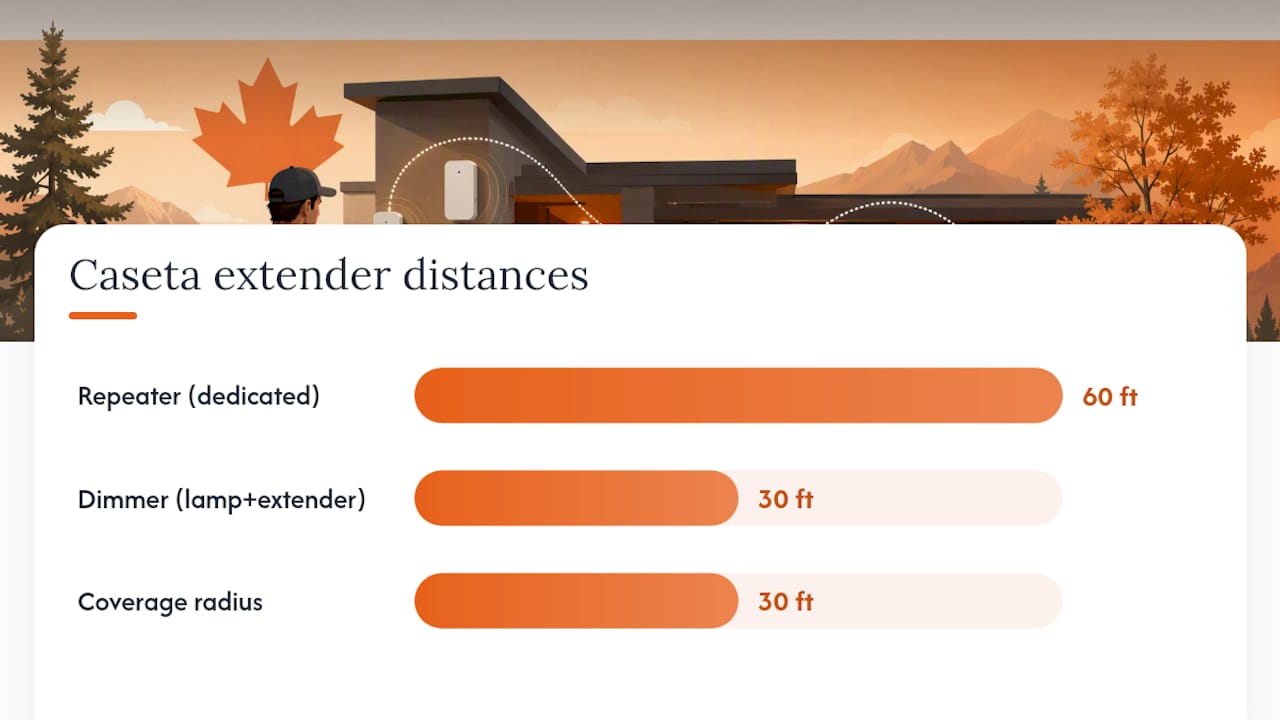
A Caseta system supports one repeater and one plug-in extender at most. Lutron's own guidance is blunt about this: stacking repeaters endlessly doesn't work, and very large or oddly shaped homes need proper planning rather than more hardware thrown at the problem.
Here's the order that tends to work best:
- If you already own or plan to buy a plug-in lamp, add it first. It's cheaper and does two jobs at once.
- Confirm it's within 30 feet of the bridge before pairing it.
- If coverage gaps remain after that, add the repeater, keeping it within 60 feet of the bridge.
- Test the previously unreliable device again before deciding you need a third piece of hardware.
Pro Tip: A plug-in dimmer costs less than a repeater and can double as a real lamp. Try it in the problem zone first. If it fixes the dead spot, you've saved yourself the repeater purchase entirely.
How many devices can one Caseta system actually support?
A Smart Bridge or Smart Bridge PRO handles up to 75 wireless devices total, and the repeater itself counts as one of those 75. That matters if you're planning a larger home with dozens of switches, dimmers, and Pico remotes. Pico remotes and motion sensors pair to specific devices or rooms, so their placement can force you to rethink where a repeater sits rather than just picking the most convenient outlet. If you're mixing in newer Matter-compatible accessories, the Smart Bridge Pro handles that integration differently than the standard bridge, which is worth checking before you commit to a hub.
How do you fix a coverage gap yourself before calling in help?
Start with the basics before buying anything.
- Confirm the Smart Bridge sits in a central, open location, not buried in a closet or behind a metal panel.
- Test each affected device from its wall switch and from the app, room by room, to isolate whether it's distance, a wall, or something else entirely.
- Borrow or buy a plug-in lamp dimmer and place it near the problem area as a temporary test extender.
- If that solves it, decide whether to leave the plug-in dimmer permanently or swap in a repeater for a fixed installation.
If the plug-in test doesn't fully solve it, or you're dealing with a multi-storey home with metal framing or long cable runs, a professional site survey is worth the call before you start guessing with hardware.
What installers wish homeowners knew before placing the bridge
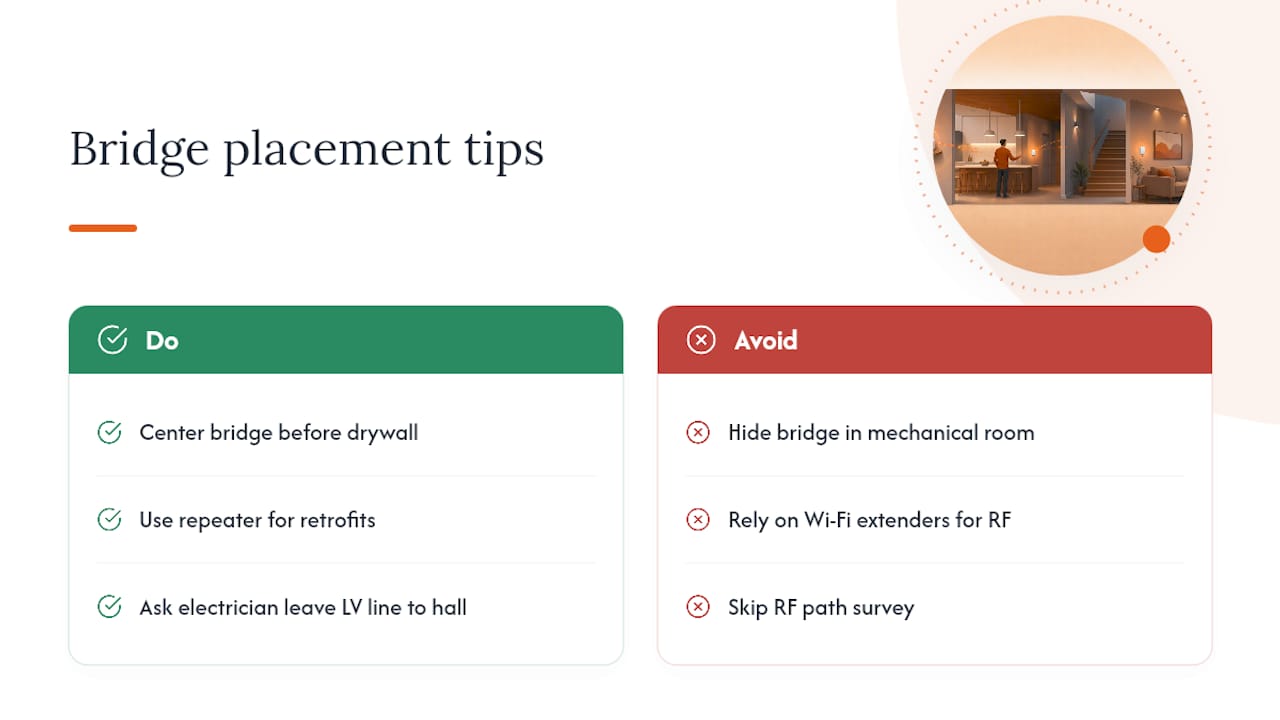
During new construction or a full prewire, the smartest move is centring the Smart Bridge in the house before drywall goes up, not after. Retrofits are messier: you're usually stuck working around existing walls, so a strategically placed repeater does more good than trying to relocate the bridge itself.
The most common mistake seen is a bridge shoved into an enclosed basement mechanical room, then buried further behind a Wi-Fi extender the homeowner assumed would help. Wi-Fi range has nothing to do with Clear Connect RF range, and the two systems don't reinforce each other. A proper survey checks actual RF paths through the home and often turns up a simple fix, like relocating a metal appliance a few feet, that avoids buying extra hardware altogether.
Pro Tip: If you're mid-renovation, ask your electrician to leave a low-voltage line to a central hallway or utility closet. That one detail saves a repeater purchase later.
Try it yourself first, or call in a pro?
Single-storey homes with one or two dead spots almost always solve cleanly with a plug-in dimmer. Larger, multi-level, or steel-framed builds benefit more from a repeater paired with a proper survey. DIY saves a service call, but a professional install protects your warranty and gets placement right the first time. Skip the Wi-Fi extender workarounds. Lutron's supported hardware exists for a reason.
— JupiterAV
Get reliable Caseta coverage without the guesswork
A professional site survey before recommending hardware checks bridge placement, wall construction, and device density so you're not buying a repeater you don't need or missing one you do.

A typical engagement covers bridge and repeater siting, pairing every switch and sensor correctly, and post-install testing room by room to confirm nothing drops out. For homeowners in the middle of a renovation, this pairs naturally with a proper prewire plan so the hub lands in the right spot before drywall closes it in. If your home also uses accent or holiday lighting, a colour-changing lighting setup can run alongside Caseta dimming without added complexity. Book a consultation through the JupiterAV site and get a coverage plan built around your actual house, not a spec sheet.
Lutron documentation worth bookmarking
For the exact range figures and extender rules, see Lutron's range troubleshooting guide and the repeater spec sheet. Canadian buyers can confirm current repeater availability through Home Depot Canada.
Sources
- Caséta Wireless Repeater spec submittal (3691131_eng.pdf)
- Caséta Wireless — Lutron product/overview pages
FAQ
How far will Lutron Caseta work?
Standard range between a Smart Bridge and any Caseta device is about 30 feet through typical walls, extending to roughly 60 feet with a clear line of sight.
What is the range of the Lutron Caseta hub?
The Smart Bridge itself follows the same 30-foot standard radius, with each added repeater or plug-in extender projecting its own separate 30-foot radius from its location.
What is the maximum range of a Lutron Caseta motion sensor?
Motion sensors follow the same RF rules as other Caseta devices, needing to sit within roughly 30 feet of the bridge or an active extender for reliable communication.
How many Caseta repeaters can you have?
A Caseta system supports one Smart Wireless Repeater plus one plug-in lamp dimmer acting as an extender, for a maximum of two extension devices per system.