Yes, Lutron Caséta works with Amazon Alexa, but only once you've added a Lutron Smart Hub (Smart Bridge) and enabled the Lutron skill inside the Alexa app. The hub is non-negotiable. Without it, Caséta dimmers and switches stay local to their Pico remotes and never reach Alexa at all. Once it's wired in, Alexa can control in-wall dimmers, plug-in dimmers, Serena shades, and any Scenes you've built in the Lutron app.
TL;DR:
- A wired Ethernet connection is mandatory for the Lutron Smart Bridge to ensure reliable communication with Alexa.
- Devices or Scenes must be explicitly enabled for Alexa access in the Lutron app to appear during discovery.
- Running device discovery multiple times, including via voice, can resolve lag or missing devices caused by cloud sync delays.
- Proper hub placement, range considerations, and avoiding no-neutral wiring issues prevent most setup failures.
- Scenes offer the best voice control experience by allowing multiple devices to be triggered simultaneously with short, simple commands.
Table of Contents
- What you need before connecting Alexa with Lutron Caséta
- How do you connect Alexa and Lutron Caséta step by step?
- What are good Scenes and voice commands to start with?
- Why isn't Alexa finding my Lutron Caséta devices?
- Does Alexa integration work the same as Google Home or HomeKit?
- Installer notes for Canadian homes: wiring, range and no-neutral boxes
- Can Alexa control my other smart home devices alongside Caséta?
- How do you get faster, more reliable voice responses?
- What should you know about privacy with voice-controlled lighting?
- When should you DIY versus hire a pro?
- Get Lutron Caséta and Alexa set up right the first time
- Sources
- FAQ
What you need before connecting Alexa with Lutron Caséta
Before you touch the Alexa app, get four things sorted. Skipping this step is the number one reason people end up re-doing their setup twice.
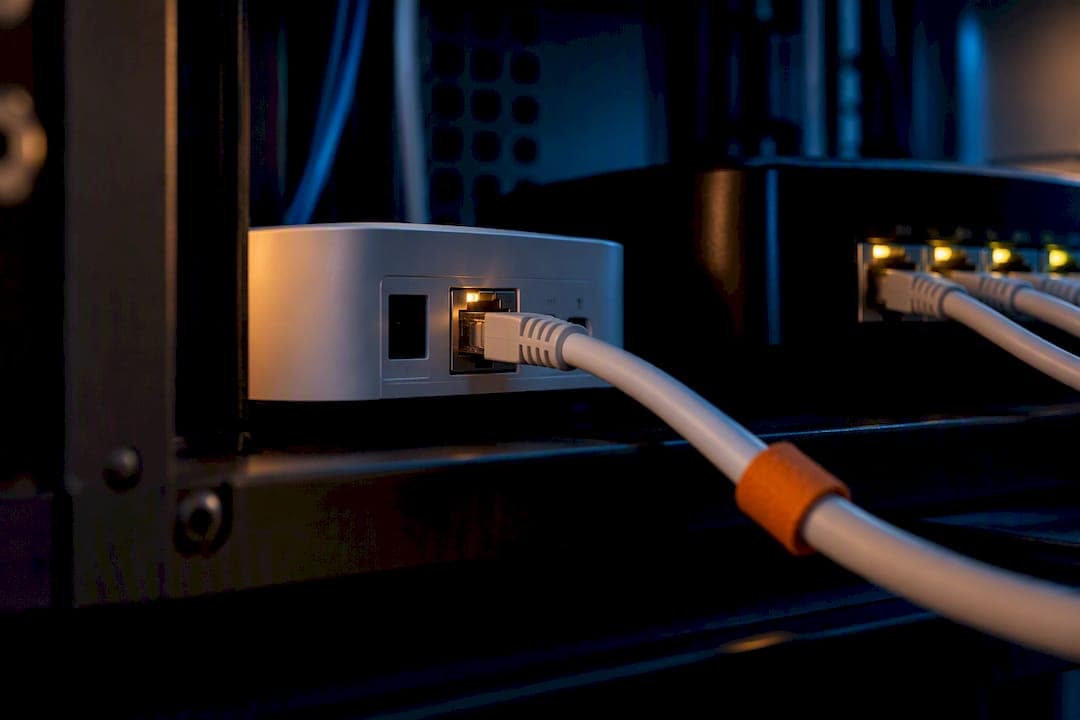
- A Lutron Smart Bridge (L-BDG2) or Smart Bridge Pro (L-BDGPRO2), connected to your router by an Ethernet cable, not Wi-Fi. The Caséta Smart Hub is what actually bridges your Caséta devices to Alexa's cloud, and it has no wireless network radio for that connection, so Ethernet is mandatory.
- The Lutron app, with an account (email and password) already set up and every Caséta device added and tested.
- An Alexa-enabled device — an Echo, Echo Dot, or Echo Show — linked to an Amazon account you can sign into.
- A clear list of which devices you want exposed to Alexa. Standard Caséta dimmers, switches, and Serena shades all qualify. If you're running smart bulbs through a Caséta dimmer, double check the bulb's dimming curve is compatible; some LED bulbs flicker or buzz on certain dimmer models regardless of the Alexa connection.
Open the Lutron app first and confirm every device turns on, off, and dims correctly, and that any Scenes fire the way you expect. If something is broken locally, it stays broken through Alexa.
How do you connect Alexa and Lutron Caséta step by step?
The actual linking process takes under ten minutes if your hardware is already behaving. Here's the order that avoids the most common snags.
- Confirm every Caséta device and Scene works inside the Lutron app. This is the single biggest predictor of a smooth Alexa setup.
- Plug the Smart Bridge into your router with an Ethernet cable and check the app to confirm it shows as online.
- Open the Amazon Alexa app, go to More, then Skills & Games, and search for "Lutron."
- Enable the Lutron skill and sign in using your Lutron app credentials when prompted, authorizing the Lutron Alexa Adapter.
- Run device discovery. Tap "Discover Devices" in the Alexa app, or simply say "Alexa, discover devices." According to Lutron's own Alexa setup instructions, this step is what pulls your devices and Scenes into Alexa's device list.
- Check that Scenes appear, not just individual devices. Scenes sometimes need a second discovery pass to show up.
- Rename anything confusing. Inside the Alexa app, rename devices or Scenes with short, distinct names so voice commands land correctly.
Pro Tip: Run discovery once, wait a full two minutes, then run it again before assuming something failed. Alexa's cloud sync occasionally lags behind the Lutron skill's handshake, and a second pass catches devices the first one missed.
If the mobile app stalls partway through discovery, you're not stuck. You can also trigger discovery by voice or through alexa.amazon.com on a desktop browser, which sometimes succeeds when the phone app hangs.
What are good Scenes and voice commands to start with?
Scenes are the real payoff of this integration. Controlling one light by voice is fine, but Lutron's own guidance on controlling Caséta with Alexa points out that Scenes let a single phrase trigger multiple devices at once, dimming six lights to different levels with one command instead of six.
Build these three first:
- "Movie Time": dims the living room to 20%, kills any overhead light, and leaves a single accent lamp on.
- "Goodnight": turns off every light in the house except a hallway nightlight.
- "Homework": brings the kitchen and office to full brightness.
Say "Alexa, turn on Movie Time" or "Alexa, set Goodnight." Keep Scene names short, skip punctuation and symbols, and avoid names that sound like other words in the house. "Kitchen" and "Chicken" have caused more than one household argument with a confused Echo.
Why isn't Alexa finding my Lutron Caséta devices?
Almost every discovery failure traces back to one of three things, and they're worth checking in this exact order.
- The Smart Bridge isn't actually online. Confirm the Ethernet cable is seated properly and the hub shows connected status in the Lutron app. This single issue causes the majority of failed setups.
- Devices or Scenes aren't enabled for Alexa inside the Lutron app. Some devices need to be explicitly toggled for third-party voice access even after the skill is linked.
- Alexa's cache is stale. Re-run discovery, try alexa.amazon.com instead of the mobile app, reboot the affected devices, or fully unlink and re-link the Lutron skill.
Range matters too. Pico remotes and some wireless interactions with the bridge follow a rough 9-metre (30-foot) guideline, and pushing past that distance, especially through multiple walls, causes intermittent dropouts that look like an Alexa problem but aren't.
Pro Tip: If your bridge goes offline randomly, test a different Ethernet port on your router and consider reserving its IP address in your router settings. An IP that keeps shifting can quietly break the Alexa connection without any obvious symptom.
For anything involving multi-way switches or boxes without a neutral wire, stop troubleshooting and call a licensed electrician or an installer. Those situations aren't an app setting problem.
Does Alexa integration work the same as Google Home or HomeKit?
Lutron's Smart Bridge officially supports Alexa, Google Assistant, and Apple HomeKit simultaneously, and Scenes you build once in the Lutron app get exposed to all three platforms. You don't need to separate Scene libraries for each voice assistant.
Matter is starting to change how some smart devices talk to each other, and Caséta has a defined path into that ecosystem, which is worth understanding if you're planning a broader smart home buildout. Even with Matter on the horizon, hub-based integration through the Smart Bridge remains the more reliable route for Caséta specifically. It keeps latency low and avoids the handoff issues that can appear when multiple standards are negotiating control of the same device.
Installer notes for Canadian homes: wiring, range and no-neutral boxes
A few fixes come up constantly on installer visits, and they save hours when you know them ahead of time.
- Always run Ethernet from the Smart Bridge to the router. Placing it on Wi-Fi isn't supported and causes exactly the kind of intermittent discovery failures described above.
- No-neutral electrical boxes are common in older Canadian homes. A LUT-MLC load correction accessory solves many of these, but wiring configurations vary enough that a licensed electrician should confirm the fix for your specific box.
- Detached garages and outbuildings often sit outside reliable range of the main hub. A dedicated network bridge or relocating the Smart Bridge closer to the structure usually resolves it.
- Multi-way switches and mixed-load dimming circuits (LED plus incandescent on the same switch, for example) are where DIY attempts burn the most hours. A professional install sidesteps that entirely.
Can Alexa control my other smart home devices alongside Caséta?
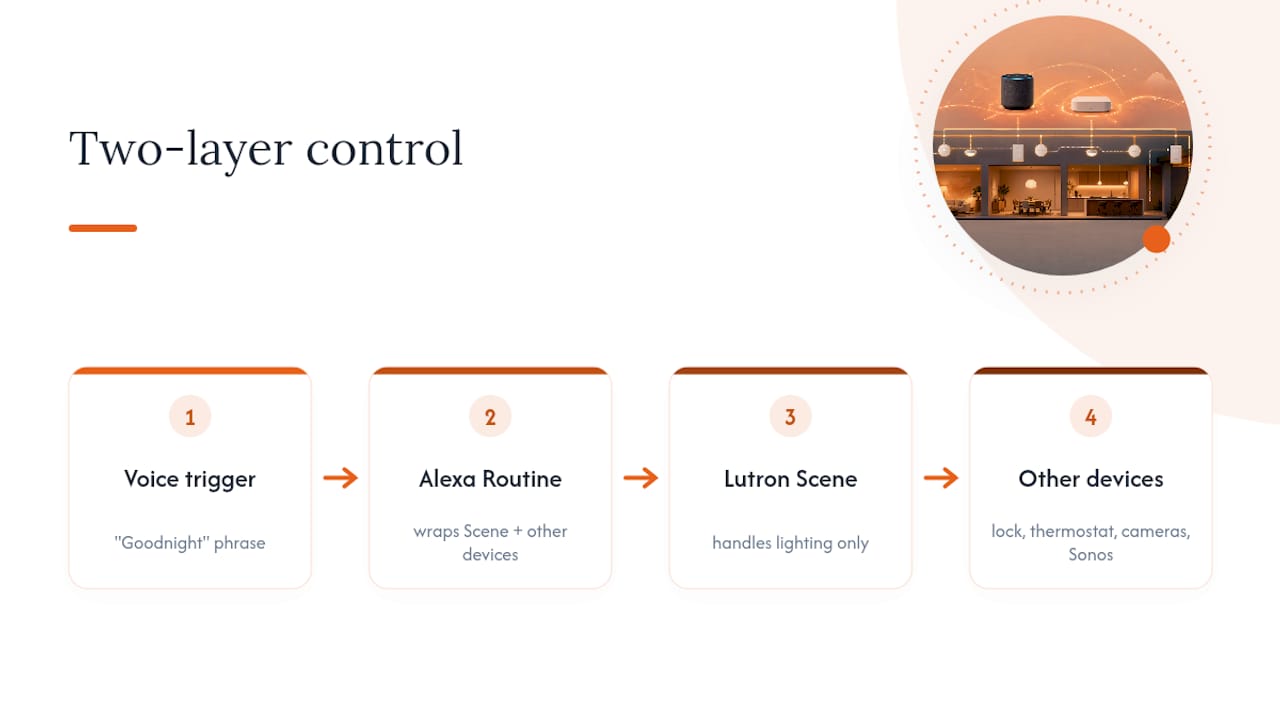
Once Alexa is talking to your Caséta system, it becomes the hub for everything else too. You can group a Caséta dimmer with a smart thermostat, a video doorbell, and a Sonos speaker inside a single Alexa Group or Routine, so one phrase touches every category of device in a room at once.
This is where the "Goodnight" Scene idea gets more interesting. Instead of just dimming lights, an Alexa Routine triggered by that same phrase can also lock a compatible smart lock, lower the thermostat, and confirm your security cameras are armed. Alexa Routines sit one layer above Lutron Scenes: a Scene handles the lighting piece, and the Routine wraps it together with everything else in your Alexa ecosystem.
The practical limit isn't Alexa, it's how many separate skills you're managing. Every additional brand means another account link, another discovery pass, and another place things can drift out of sync. Homes running five or six different smart home brands tend to see more voice command failures simply because there are more moving parts, not because any single integration is unreliable.
If you're building toward a genuinely unified system rather than a pile of separately linked gadgets, it's worth thinking about which devices actually need voice control versus which are fine on their own schedules and app controls. Motorized shades are a good example of a category worth adding deliberately rather than as an afterthought.
How do you get faster, more reliable voice responses?
Response lag with Alexa and Caséta almost always comes down to network health, not the devices themselves. A congested home network with dozens of devices fighting for bandwidth adds delay between saying a command and the light actually responding.
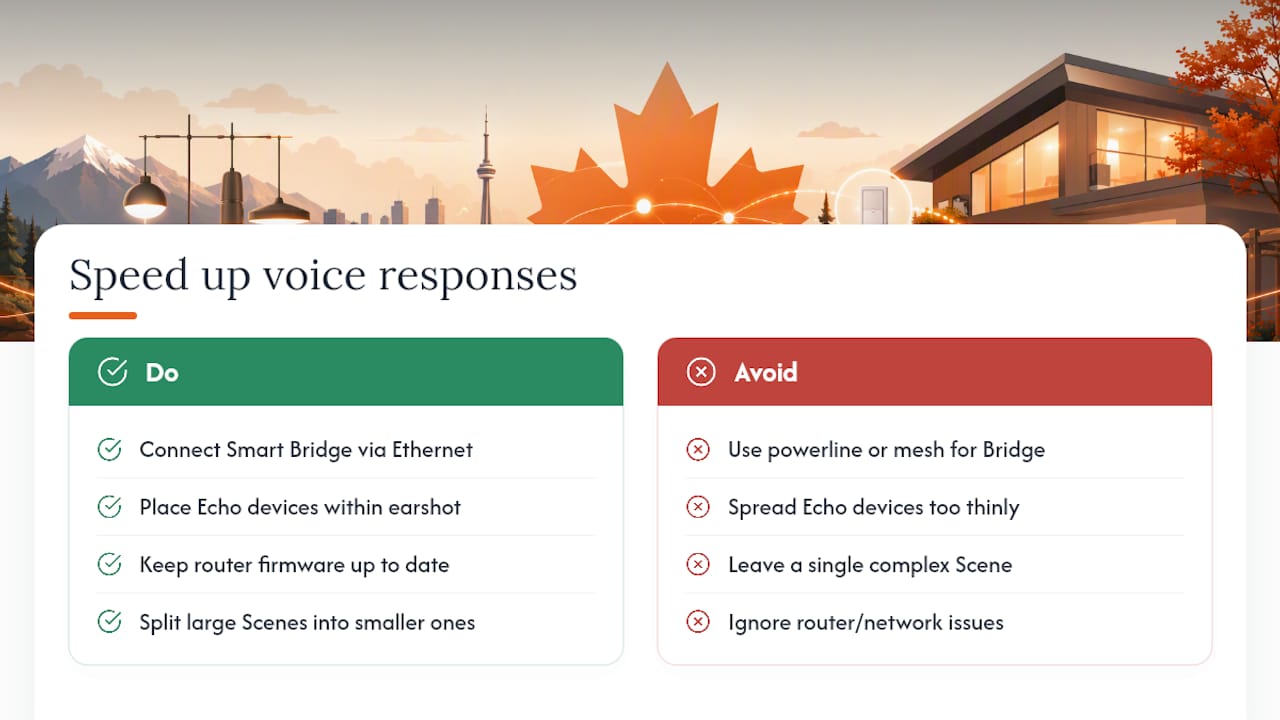
A few things make a measurable difference. Keep the Smart Bridge on a wired connection rather than powerline or mesh Wi-Fi extenders, since those can introduce inconsistent latency. Place your Echo devices within normal earshot of the areas you're controlling. Alexa devices spread too thin across a large home sometimes mishear commands simply because of ambient noise or distance from the microphone. Router firmware updates matter too. An outdated router occasionally mishandles device connections in ways that look like an Alexa problem but are really a networking issue underneath.
Reduce Scene complexity where you can. A Scene controlling two devices fires almost instantly. One juggling twelve devices with staggered dimming levels takes longer to execute, and that gap can feel like Alexa is "slow" when the delay is actually the Scene itself processing sequentially. Splitting a large Scene into two smaller ones, triggered back to back, often feels snappier even though the total work is the same.
What should you know about privacy with voice-controlled lighting?
Voice assistants listen for a wake word locally and only send audio to the cloud after they hear it, but that doesn't mean the setup is risk-free. Every device you link to Alexa, including your Caséta Smart Bridge, becomes part of your Amazon account's data footprint, and Alexa retains a history of commands unless you actively manage those settings.
Check your Alexa privacy settings periodically. You can review and delete voice recording history, and you can disable the option that lets Amazon use recordings to improve its services if that matters to you. On the Lutron side, the Smart Bridge itself doesn't include a camera or microphone, so the privacy exposure here is really about the Alexa layer, not the lighting hardware.
Network security matters just as much as app settings. A Smart Bridge sitting on a router with a weak or default admin password is a more realistic risk than anything Alexa itself does with your lighting commands. Basic hygiene, a strong router password, current firmware, and a guest network for less trusted devices, does more for your overall security than any single app toggle.
When should you DIY versus hire a pro?
DIY works fine for a single plug-in dimmer and a basic Scene or two. Once you're dealing with multi-box wiring, no-neutral situations, or a whole-house rollout, bring in an installer. Professional installers handle these edge cases daily across Alexa and Caséta projects.
— JupiterAV
Get Lutron Caséta and Alexa set up right the first time
Most of the setup headaches covered above, hub placement, no-neutral boxes, range issues in outbuildings, are exactly what turns a ten-minute app process into a weekend project. Some companies handle sales, installation, and ongoing support for Lutron Caséta and Alexa integrations directly, providing a single point of contact instead of requiring users to piece together app forums and product manuals on their own.

Before booking any installer for this kind of work, ask three things: how they plan hub placement and wiring, what their warranty and follow-up support covers, and whether they'll document the setup so future changes are simple. JupiterAV's Smart, Effortless Living service covers exactly this scope, from Smart Bridge placement and wiring to full Alexa Scene configuration. If your home also has motorized shades or blinds on the table, that same visit can fold Serena shade integration into the same system. Reach out through JupiterAV's site to get a quote for your space and wiring situation.
Sources
- Caséta Smart Bridge and device operating range (product document)
- How to Connect Lutron Caseta to Alexa
FAQ
Does Lutron Caséta work with Amazon Alexa?
Yes. Lutron Caséta works with Amazon Alexa once you add a Lutron Smart Hub (Smart Bridge) and enable the Lutron skill in the Alexa app. Without the hub, Caséta devices can't reach Alexa's cloud service at all.
What devices work with Lutron Caséta and Alexa?
In-wall dimmers, plug-in lamp dimmers, switches, and Serena smart shades all connect through the Smart Bridge and can be exposed to Alexa. Scenes built in the Lutron app also carry over, letting one voice command control several of these devices together.
Can Siri control Lutron Caséta?
Yes, Caséta officially supports Apple HomeKit through the same Smart Bridge used for Alexa, so Siri can control your devices and Scenes as well. You don't need separate hardware for each voice assistant; one Smart Bridge serves Alexa, Google Assistant, and HomeKit at once.
Does Google Home work with Lutron Caséta?
Yes, Google Assistant is officially supported alongside Alexa and HomeKit through the Lutron Smart Bridge. The setup process mirrors Alexa's: link accounts, then run device discovery to bring your Caséta devices and Scenes into Google Home.
What's the most common reason Alexa can't find my Lutron devices?
The Smart Bridge not being properly connected to the router by Ethernet causes most discovery failures. Confirm the hub shows online in the Lutron app first, then check that each device or Scene is enabled for Alexa access before re-running discovery.