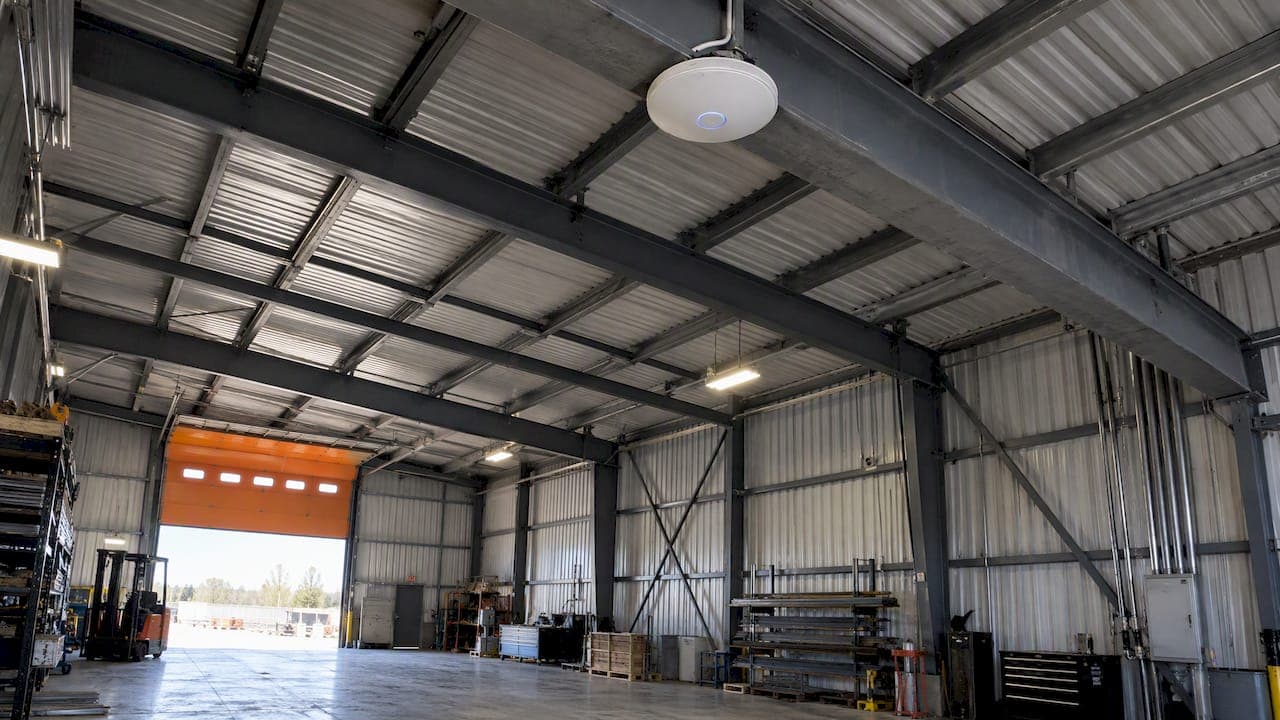
The fix for Wi-Fi in a metal building is almost never a stronger router. Steel walls and roofing reflect and absorb the signal, so the reliable answer is to get the internet into the building by cable or a wireless bridge, then put a wired access point inside, mounted high and central in the open. This guide walks through why metal causes the problem, the ways to bring a connection to a shop, barn or garage, and how to place and test the gear so it works on the first try.
TL;DR
- Metal siding, roofing and steel framing reflect and absorb 2.4 GHz and 5 GHz signals, so a router in the house rarely reaches a steel shop.
- Get the connection to the building first: a buried cable, or a point-to-point wireless bridge when trenching is not practical. Then add an access point inside.
- Mount the access point high and central, away from corners, steel shelving, cabinets and vehicles. Wire it with Ethernet where you can.
- Mesh can help in open metal spaces, but a wired access point inside each isolated room beats turning up the power.
- Test before you commit: walk the building with a phone, and for large or complicated buildings consider a proper site survey.
Table of Contents
- Why metal buildings are hard on Wi-Fi
- Step one: check what you have outside the building
- Ways to get internet to a metal building
- Placing the access point inside
- Do mesh systems work in a metal building?
- Testing and troubleshooting
- Planning ahead if you are building
- Our perspective
- Need it done properly?
- FAQ
- Sources
Why metal buildings are hard on Wi-Fi
Wi-Fi is radio, and metal is the one common building material radio does not like. Steel beams, aluminum siding and metal roofing reflect and absorb signals at both 2.4 GHz and 5 GHz, which leaves dead zones inside. The International Telecommunication Union, which publishes the reference guidance on this, notes that losses through buildings depend on the electrical properties and structure of the materials, including reflection from them and transmission through them.
That matters in two directions. A signal from your house has to get through the steel shell to reach the shop. And once inside, signal bounces around the interior. The ITU's indoor-propagation guidance lists reflection and diffraction around objects, loss through walls and floors, and multipath among the main impairments, and an all-metal interior produces plenty of all three.

Is a metal building really a Faraday cage?
Partly, and the effect is uneven. A true Faraday cage is a continuous conductive enclosure. A pole barn with steel sheeting, door openings, windows and gaps is not perfect, but it behaves like a leaky version of one. Heavy reinforced concrete with steel rebar can act the same way, and even metal lath inside a wall can act as a partial cage that limits coverage from room to room.
In practice you will see this: strong signal right beside a window or open overhead door, nothing ten metres in, and a phone that drops off the moment you step behind a steel partition. The cure is not to fight the cage from outside. It is to put the radio inside it.
Step one: check what you have outside the building
Before you buy anything, find out how good the connection is at the point where it will leave the house or the service entrance. A shop wired to a weak source stays weak.
- Test the source. Run speed tests where the router or modem sits, at several times of day. Repeating tests at each location gives a truer picture than one result; Cisco's guidance on cellular installations recommends running multiple tests at each location and checking signal strength, speeds and overall performance indoors and out.
- Walk the path. Note any line of sight between the house and the shop: trees, other buildings, equipment. This decides whether a wireless bridge is realistic.
- Is there signal outside the shop? If your Wi-Fi reaches the outside wall, a receiving antenna or bridge unit mounted on the exterior can pick it up and pass it inside on a cable.
A caution if the building will rely on a cellular modem: the same Cisco document puts typical signal loss from metal at 32 to 50 dB for cellular reception and suggests using a phone with the intended SIM to find stronger spots. That figure is about cellular, not a guaranteed Wi-Fi loss, but it shows why antenna location matters so much. An external or window-side antenna position usually beats one buried inside the steel.
Ways to get internet to a metal building
There are two broad approaches: a wireless bridge, or a buried line between buildings. From the point where the connection lands, a cable runs to an indoor access point. Which one fits depends on distance, ground and budget.
| Option | Best when | Watch for |
|---|---|---|
| Buried Ethernet or fibre | Short to moderate distance, ground that can be dug, a building that will be used for years | Digging, conduit and the need to have underground utilities located first |
| Point-to-point wireless bridge | Clear line of sight, trenching is difficult or costly, existing finished landscaping | Alignment, obstructions such as trees or equipment, mounting height |
| Powerline kit | Shop shares a power feed with the house and wiring is in good shape | Results depend heavily on the electrical wiring; not a fit for every building |
| Repeating the house Wi-Fi through the wall | A small steel garage with a window or door close to the house | Usually weak; the metal shell is exactly what it fights |
For most acreage and shop situations, the first two are the real choices. If you want the full walk-through of the bridge approach for Calgary-area properties, see our guide to an outbuilding network bridge without trenching. If you are building new, or already have a trench open for power, run cable and conduit at the same time. Our notes on home Ethernet wiring for Alberta homes cover the cabling basics.
How a wireless bridge works
A bridge is a pair of outdoor radios. One sits on the house and one on the shop, each aimed at the other. In the common setup, one device is configured as the access point and the other as the client, and the two are then roughly aligned before fine tuning. The shop-side unit connects by Ethernet to an access point inside, which is what your phones and laptops actually talk to.
The point people miss: the bridge only carries the internet across the yard. It does not replace the indoor access point. You still need Wi-Fi inside the shop, and that radio has to sit where the steel is not in the way.
A few practical rules:
- Mount both radios as high as is practical, with a clear path between them and nothing metal directly in front of the dish or panel.
- Keep the radios outside the metal shell. A bridge unit mounted inside the steel building loses the benefit.
- Power the shop-side unit and the indoor access point with a single Ethernet run where possible, using power over Ethernet, which keeps the install tidy and cuts the number of outlets you need.
- Check the link after wind, snow and freeze-thaw cycles. Alignment can drift on a loose mount.
Placing the access point inside
Once the internet is in the building, placement decides the experience. The advice from installers and manufacturers agrees: mount the access point high and central in an open spot, and stay out of corners and away from metal shelving and cabinets. Cambium Networks' deployment guide recommends central placement, avoiding exterior walls and obstacles like ducts and vents, and mounting ceiling units horizontally.
What to keep away from the access point
Steel beams, metal siding, HVAC ducts and foil-backed insulation block and reflect signals, so the access point should not sit tight against them. In working shops and barns, the usual interior blockers are tall steel shelving, metal cabinets, parked vehicles, farm panels, grain bins and tool chests.
A simple way to think about it: the access point wants a clear view of the places people stand. If you can draw a straight line from the unit to your workbench, the office corner and the area where the truck parks, and the line does not cross a steel obstacle, you have a good spot. Our guide to access point placement for homes and small venues covers the same rules in more detail.
Wire it, don't extend it
Wired Ethernet is the preferred uplink for commercial access points because it gives predictable latency and does not use up client airtime. That is the main reason cheap range extenders disappoint in metal buildings: they receive a weak signal and repeat it, using the same radio and the same airtime, in a space where the weak signal was the problem.
If the shop has a finished office, a lunchroom or a heated tack room, a wired unit inside that room is better than trying to push more power from a distance. When rooms are isolated by metal, a wired access point in that specific room is often the most effective fix. The same source's wider advice is that placement should overcome the obstruction rather than higher transmit power.
Do mesh systems work in a metal building?
Sometimes. Mesh systems use several interconnected units, so they can route data around obstacles in difficult metal environments. In a big open barn or riding arena with a few partitions, two or three mesh nodes can give seamless roaming between areas.
The condition is how the nodes connect. Nodes that talk to each other wirelessly through steel face the same problem as everything else. Nodes that connect to each other by Ethernet behave like ordinary wired access points, and that is where mesh works best. For a general look at picking a system for a house, see our mesh Wi-Fi roundup.
| Situation | What usually works |
|---|---|
| Small single-room steel garage | One wired access point, ceiling-mounted near the centre |
| Shop with a separate heated office | Access point in the shop and one in the office, both wired |
| Large open barn or arena | Several wired access points spaced along the length, same network name |
| Detached building far from the house | Wireless bridge or buried cable first, then indoor access points |
| Steel container or isolated metal room | Wired access point inside the room itself |
Testing and troubleshooting
You can learn a lot with no special tools. Walk the building with a phone and a speed test app, noting where the signal drops, and repeat at different times. Watch for local interference too: a site survey should look for sources such as microwave ovens and cordless phones.
A quick troubleshooting order that saves time:
- Test the source. If the speed at the house router is poor, nothing downstream will be better.
- Test the link. If you use a bridge, check the connection speed between the two radios and the alignment.
- Test the Ethernet. Plug a laptop directly into the cable at the shop end. If it is fast, the problem is the indoor Wi-Fi. If it is slow, the problem is upstream.
- Move the access point. Raise it, shift it toward the centre, and move it away from metal shelving.
- Check for local interference. Turn off suspect equipment and retest.
When a site survey is worth it
For a large building, a business with many users, or a place where connectivity affects revenue, a wifi survey and design work identifies signal barriers, interference sources and the best access point positions before anything is mounted. Professional surveys can pinpoint interference sources, dead zones and optimal equipment placement, and commercial Wi-Fi design guidance in Canada stresses proper site surveys, placement based on capacity, and enough wired backhaul for the load. For a small garage, a walk-through and a sensible placement are usually enough.
Planning ahead if you are building
The cheapest time to solve this is before the walls and ceiling are finished. If you are building a shop, barn or home with a steel portion, run Ethernet to the places where access points will go, and pull extra cable and conduit while trenches or walls are open. Our prewire checklist for smart homes lists what to run, and builders can use the builder prewire checklist and the notes on structured wiring panels to keep everything serviceable. Cabling that terminates at a tidy central point makes adding an access point later a short job.
Our perspective

We install networking and low voltage wiring in homes, businesses and new builds around Calgary, and the same pattern comes up on acreages and in shops: people buy a stronger router, then a second, and the building still has dead spots. The metal is not going away, so the design has to work with it.
Our approach is the one we apply to every system we install: scale the solution to the space, wire what can be wired, and make the equipment disappear into the building. That means cable to a small number of well-placed access points rather than a pile of extenders, and a single point of contact who understands both the network and the audio, video, security and automation that depend on it. A shop with cameras, a sound system and a media wall needs a dependable network underneath, and that is easiest to get when it is planned as one system.
— JupiterAV
Need it done properly?
If you would rather not climb ladders and align dishes yourself, JupiterAV designs and installs networking, low voltage wiring, security and CCTV, and audio and video systems for homes, businesses and builders in Calgary and the surrounding area. We can plan the connection to your shop or barn, wire it and set up the access points so the whole property works as one system. Start at jupiterav.ca and tell us about the building.

FAQ
What is the best Wi-Fi setup for a metal building?
A connection brought to the building by buried cable or a wireless bridge, feeding one or more wired access points mounted high and central inside. Wired uplinks give steadier performance than repeating a signal wirelessly. In larger buildings, add more wired access points rather than raising power.
Do Wi-Fi extenders work in a metal shop?
Usually poorly. An extender has to receive the house signal through the steel, then repeat it on the same radio, so a weak signal stays weak. A bridge or cable to an indoor access point is the more dependable route.
Where should I not put my router or access point?
Avoid corners, exterior walls, and the area around steel beams, ducts, metal shelving, cabinets, vehicles and tool chests. These reflect and absorb signal. A high, open, central position gives the best coverage.
Does metal really block Wi-Fi like a Faraday cage?
It behaves like one in part. Steel siding and roofing reflect and absorb signals at 2.4 GHz and 5 GHz, and openings let some through, so coverage is patchy. That is why the access point should be inside the building rather than outside it.
Sources
- How does wifi interference vary by building materials?
- Recommendation ITU-R P.2040-4: Effects of building materials and structures on radiowave propagation
- Recommendation ITU-R P.1238-10: Propagation data and prediction methods for indoor radiocommunication
- UniFi access point placement for plaster and stone homes
- MG Cellular Best Practices, Cisco Meraki Documentation
- Wi-Fi in a Metal Building: Access Points, Mounting, and Dust Guide
- CPE installation guide
- UAP-AC-M-PRO Quick Start Guide
- Multi-Dwelling Unit Deployment Guide, Cambium Networks
- Understand Site Survey Guidelines for WLAN Deployment, Cisco
- Commercial WiFi Design Guide for Canada