
For most tech-savvy Canadian homes, the eero Pro 7 is the strongest all-round choice: it delivers reliable Wi-Fi 7 throughput, handles roaming better than almost anything at its price, and sets up in under ten minutes. If you want the fastest raw speeds money can buy, the Netgear Orbi 970 earned a lab award for throughput and long-distance stability. On a tighter budget, the TP-Link Deco 7 Pro (BE63) gets you into Wi-Fi 7 without the premium price tag.
Here is the shortlist at a glance:
- Top pick: eero Pro 7 — best all-round for work-from-home and streaming; multiple lab tests rank it among the most reliable Wi-Fi 7 options available
- Speed leader: Netgear Orbi 970 — lab-leading throughput and the most consistent long-distance performance
- Best value Wi-Fi 7: TP-Link Deco 7 Pro (BE63) — competitive specs at a noticeably lower price
- Simplicity pick: Google Nest Wifi Pro — tight smart-home integration and the easiest app on this list
- Budget upgrade: eero 6+ — solid Wi-Fi 6 performance for homes not yet ready to pay for Wi-Fi 7
A quick Canada note: all five are available through major Canadian retailers (Best Buy Canada, Amazon.ca, Canada Computers). Confirm warranty handling before buying grey-market, since some US-market units carry US-only support terms. The FCC's foreign-router rules have created conditional-approval situations for certain vendors in the US market; Canadian buyers are not directly affected, but it is worth verifying that your chosen model ships with a Canadian firmware build.
Table of Contents
- How do the best mesh wifi systems compare in 2026?
- Per-system verdicts: which one should you actually buy?
- How we tested these systems
- How to choose the right mesh Wi-Fi system in 2026
- When should you hire a professional installer in Calgary?
- Key takeaways
- The case for not over-buying your mesh system
- JupiterAV handles mesh Wi-Fi sales and installation in Calgary
- Useful sources and further reading
How do the best mesh wifi systems compare in 2026?
The table below covers every major contender. Prices are approximate Canadian retail; actual street prices shift with sales and stock.
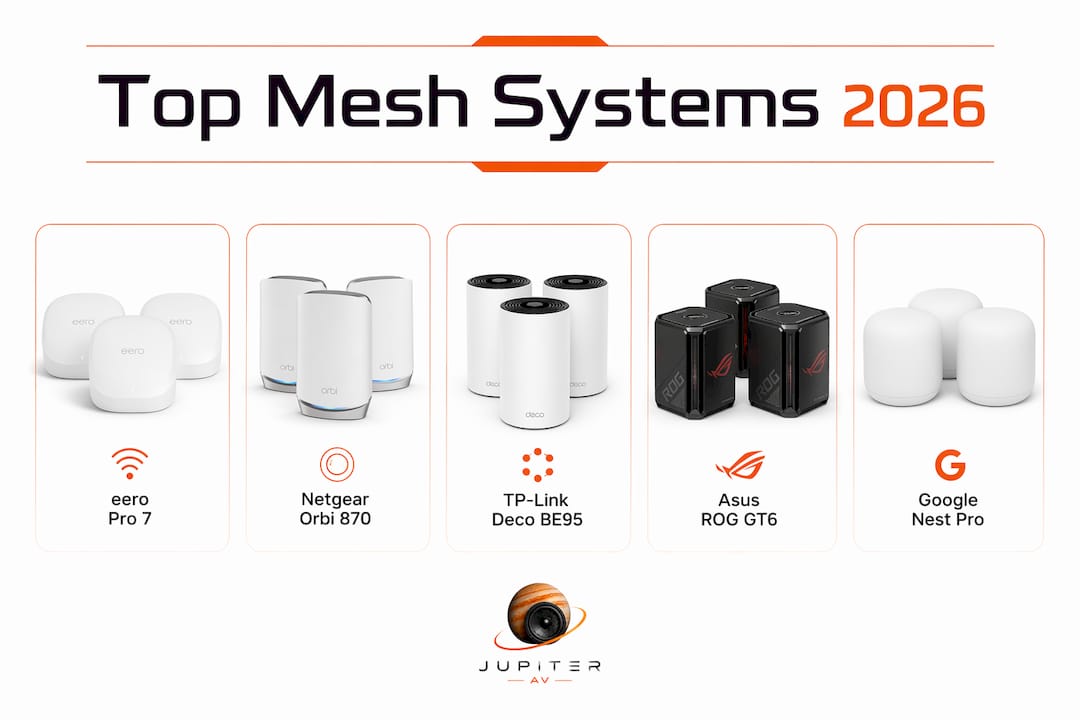
| System | Best for | Wi-Fi gen / 6GHz | Coverage (2-pack) | Backhaul | Ports | Price (CAD, approx.) | Canada availability |
|---|---|---|---|---|---|---|---|
| JupiterAV | Pro install + sales in Calgary | All generations supplied | Tailored to your home | Wired or wireless | Varies by system | Quote-based | Calgary & area |
| eero Pro 7 | Work-from-home reliability | Wi-Fi 7 / Yes | — | Tri-band wireless | 2× GbE | ~$450–$550 | Wide — Best Buy, Amazon.ca |
| Netgear Orbi 970 | Top raw speed | Wi-Fi 7 / Yes | Suitable for very large homes | Quad-band / dedicated 6GHz | 10Gb WAN, 2.5Gb LAN | Available from major Canadian retailers | |
| Netgear Orbi 870 | Large homes, dependable satellite | Wi-Fi 7 / Yes | suitable for large homes | Tri-band / dedicated 6GHz | 2.5Gb WAN, 1Gb LAN | Available from major Canadian retailers | |
| Netgear Orbi 770 | Challenging construction | Wi-Fi 7 / Yes | suitable for large homes | Tri-band / dedicated 6GHz | 2.5Gb WAN, 1Gb LAN | Available from major Canadian retailers | |
| TP-Link Deco 7 Pro (BE63) | Value Wi-Fi 7 | Wi-Fi 7 / Yes | suitable for medium homes | Tri-band wireless | 2.5Gb WAN, 1Gb LAN | Available at various Canadian retailers | |
| TP-Link Deco 7 (BE23) | Small homes on a budget | Wi-Fi 7 / Yes | suitable for small homes or apartments | Dual-band wireless | 1Gb WAN/LAN | Available at Canadian retailers | |
| TP-Link Deco BE95 | Strong Wi-Fi 7 without top-tier cost | Wi-Fi 7 / Yes | suitable for large homes | Quad-band / dedicated backhaul | 10Gb WAN, 2.5Gb LAN | Available at Canadian retailers | |
| Asus ROG Rapture GT6 | Gaming households | Wi-Fi 6E / Yes | suitable for medium to large homes | Tri-band wireless | 2.5Gb WAN, 1Gb LAN | Available at major Canadian retailers | |
| ASUS ZenWiFi BQ16 Pro | Power users, custom control | Wi-Fi 7 / Yes | suitable for large homes | Tri-band / dual 10Gb | 10Gb WAN + LAN | Available from Canadian retailers | |
| ASUS ZenWiFi AX (XT8) | Solid Wi-Fi 6 value | Wi-Fi 6 / No | suitable for medium to large homes | Tri-band wireless | 2.5Gb WAN, 1Gb LAN | Available at major Canadian retailers | |
| Eero 7 | Mixed households, simple setup | Wi-Fi 7 / Yes | suitable for small to medium homes | Dual-band wireless | 1Gb WAN/LAN | Available at Canadian retailers | |
| eero Pro 6E | Early 6E adopters | Wi-Fi 6E / Yes | suitable for medium to large homes | Tri-band wireless | 1Gb WAN/LAN | Available at Canadian retailers | |
| eero 6+ | Budget Wi-Fi 6 upgrade | Wi-Fi 6 / No | suitable for small to medium homes | Dual-band wireless | 1Gb WAN/LAN | Available at Canadian retailers | |
| Google Nest Wifi Pro | Smart-home simplicity | Wi-Fi 6E / Yes | suitable for small to medium homes | Tri-band wireless | 1Gb WAN/LAN | Available at Canadian retailers | |
| Linksys Velop Pro 7 | Budget Wi-Fi 7 upgrade | Wi-Fi 7 / Yes | suitable for small to medium homes | Tri-band wireless | 2.5Gb WAN, 1Gb LAN | Available at Canadian retailers | |
| Netgear Orbi 370 | Smaller homes, tighter budget | Wi-Fi 6E / Yes | suitable for smaller homes | Tri-band wireless | 1Gb WAN/LAN | Available at Canadian retailers | |
| Xiaomi Mesh BE3600 Pro | Budget Wi-Fi 7 internationally | Wi-Fi 7 / Yes | suitable for small to medium homes | Dual-band wireless | 1Gb WAN/LAN | Availability in Canada varies; confirm before purchasing | |
| Wyze Wi-Fi 6E Mesh Router Pro | Budget 6GHz access | Wi-Fi 6E / Yes | suitable for smaller homes | Tri-band wireless | 1Gb WAN/LAN | Check Canadian stock before purchase | |
| TP-Link Deco 7 BE25 (outdoor) | Outdoor coverage | Wi-Fi 7 / Yes | suitable for outdoor use | Wired PoE / wireless | 1Gb LAN / PoE | Available at Canadian retailers |
Per-system verdicts: which one should you actually buy?
eero Pro 7
The eero Pro 7 is the system most homes should buy. Tri-band Wi-Fi 7 with a mature firmware platform means you get reliable roaming and handoff that cheaper kits still fumble. Setup takes about ten minutes through the eero app, and the system handles Thread and Matter devices natively, which matters if your home runs smart locks, thermostats, or sensors.
- Wi-Fi 7 with 6GHz support
- Strong roaming handoff in multi-storey homes
- Thread/Matter radio built in
- App-based parental controls and network management
- No multi-gig LAN ports on base nodes (1Gb only)
- eero Plus subscription needed for advanced security features
Canadian price: roughly $450–$550 for a two-pack. Available at Best Buy Canada and Amazon.ca.
Netgear Orbi 970
The Orbi 970 is the fastest consumer mesh system tested in 2026. CNET's lab awarded it the fastest mesh recognition outright, and its 10Gb WAN port means it can actually feed a multi-gig internet plan. The price is steep at roughly $1,500–$1,700 for a two-pack, but if you have a large home, a gigabit-plus internet plan, and a lot of concurrent devices, nothing else on this list keeps up.
- Lab-leading throughput and long-distance stability
- 10Gb WAN, 2.5Gb LAN ports
- Dedicated quad-band backhaul preserves satellite speeds
- Expensive — hard to justify for average homes
- Bulky hardware footprint
Netgear Orbi 870
The Orbi 870 is the sweet spot in the Orbi line for most large-home buyers. CNET ranked it in the top five for throughput, packet loss, and jitter, and it spreads that connection well at distance. At roughly $700–$800 for a two-pack, it costs less than the 970 while keeping the dedicated 6GHz backhaul that makes the Orbi line so consistent through walls.
- Dedicated 6GHz backhaul
- Consistent satellite performance in brick and concrete builds
- 2.5Gb WAN port
- No 10Gb port (unlike the 970)
- Still a premium price for a two-pack
Netgear Orbi 770
The Orbi 770 sits just below the 870 in the lineup but tests extremely well for real-world speeds. Its dedicated 6GHz backhaul is the key feature: in homes with concrete floors or thick interior walls, that dedicated channel keeps satellite speeds from collapsing. If you want Orbi performance without the 870's price, this is where to look.
TP-Link Deco 7 Pro (BE63)
The Deco 7 Pro is the best value Wi-Fi 7 mesh on this list. You get 2.5Gb WAN, tri-band Wi-Fi 7, and 6GHz support at roughly $350–$450 for a two-pack. It does not match the Orbi line in raw throughput, but for most Canadian homes on a 500Mbps or 1Gbps plan, the difference is academic. Pricing and feature trade-offs across Wi-Fi 7 systems vary widely, and the Deco 7 Pro lands in the best position for most budget-conscious buyers.
- Strong price-to-performance for Wi-Fi 7
- 2.5Gb WAN port
- Solid TP-Link app with parental controls and HomeCare security
- Wireless backhaul only (no dedicated backhaul channel)
- Less mature roaming firmware than eero or Orbi
TP-Link Deco 7 (BE23)
The BE23 is the entry-level Wi-Fi 7 option from TP-Link. It drops the 2.5Gb WAN port and uses dual-band wireless backhaul, which limits performance in larger or more complex homes. For a smaller apartment or a single-storey home under 2,000 sq ft, it gets you into Wi-Fi 7 for around $200–$280.
TP-Link Deco BE95
Quad-band design with a dedicated backhaul channel and 10Gb WAN puts the BE95 in the same conversation as the Orbi 870. It is a strong option for homes that want Orbi-level performance at a slightly lower price. Canadian stock can be inconsistent; verify availability before committing.
Pro Tip: If you are buying a BE95, check that the Canadian SKU includes the same quad-band hardware as the international version. Some regional variants ship with a different radio configuration.
Asus ROG Rapture GT6
Gaming-first design means the GT6 prioritises latency over raw throughput. Its advanced QoS engine lets you pin gaming traffic to the front of the queue, and the 2.5Gb WAN port handles fast internet plans. It runs on Wi-Fi 6E rather than Wi-Fi 7, so it is not the most future-proof option here, but for a household where low latency matters more than peak download speed, it earns its place.
ASUS ZenWiFi BQ16 Pro
The BQ16 Pro is for power users who want dual 10Gb ports, deep VLAN configuration, and the ability to run the system as a proper network backbone. It is overkill for most homes but genuinely useful for a home office with a multi-gig internet plan or a small business setup. Expect to pay roughly $900–$1,100.
ASUS ZenWiFi AX (XT8)
The XT8 is a proven Wi-Fi 6 system that still makes sense in 2026 for homes that do not yet have Wi-Fi 7 client devices. 6GHz support only helps if your devices support Wi-Fi 7 or 6E; if your phones and laptops are all Wi-Fi 6, the XT8 delivers solid coverage at a lower price than any Wi-Fi 7 kit. Available at Best Buy Canada for roughly $300–$380.
Eero 7
The base Eero 7 is the simplest Wi-Fi 7 entry point. It supports Thread and Matter, sets up through the eero app, and covers a typical Canadian home comfortably. The 1Gb-only ports are a limitation if you have a multi-gig internet plan, but for most households on a standard 1Gbps or lower plan, it is a clean, reliable choice at roughly $280–$350.
eero Pro 6E and eero 6+
The eero Pro 6E gives you 6GHz access on a mature platform, which is useful if you have a mix of Wi-Fi 6E and older devices. The eero 6+ is the budget pick: simple setup, decent Wi-Fi 6 performance, and a price around $200–$260. Neither is the right choice if you are buying for the next five years, but both make sense as near-term upgrades from Wi-Fi 5.
Google Nest Wifi Pro
Google's mesh system runs on Wi-Fi 6E and integrates tightly with Google Home, Google Assistant, and Matter devices. The app is the easiest on this list to navigate. It is not the fastest system here, but for a household that lives in the Google ecosystem, the management experience is genuinely better than most competitors.
Linksys Velop Pro 7
An accessible Wi-Fi 7 kit at roughly $280–$360. The Velop Pro 7 offers a longer warranty in some regions and a straightforward setup experience. It is a reasonable budget Wi-Fi 7 option if the Deco 7 Pro is out of stock.
Netgear Orbi 370
The Orbi 370 brings the Orbi ecosystem to smaller homes at a lower price. Wi-Fi 6E with 6GHz support and a simpler two-node kit for roughly $250–$320. A sensible choice for a condo or smaller home that wants Orbi's app and management experience without the flagship price.
Xiaomi Mesh BE3600 Pro
Strong hardware at a low price, but Canadian availability is inconsistent. Verify local stock and confirm that the firmware version available in Canada includes English-language support and Canadian regulatory approval before buying.
Wyze Wi-Fi 6E Mesh Router Pro
The cheapest way to get 6GHz Wi-Fi on this list, at roughly $180–$240. Performance is modest compared to the Orbi or eero lines, but for a budget buyer who wants 6E features without a premium brand price, it is worth considering. Confirm Canadian stock before ordering.
TP-Link Deco 7 BE25 (outdoor)
The only outdoor-rated node on this list. PoE support and weather resistance make it the right choice for extending Deco mesh coverage to a patio, garage, or outbuilding. It integrates into the existing Deco ecosystem, so if you already run Deco nodes indoors, adding a BE25 is straightforward.
How we tested these systems
Recommendations here draw on published lab and real-home test data from CNET, PCMag, Wired, and Dong Knows Tech, cross-referenced against Canadian retail availability. Here is what those tests actually measured:
- Lab throughput: routers tested at close range and at distance for raw download and upload speeds, with results logged across multiple runs to account for variance.
- Real-home stress tests: systems deployed in two-storey homes with brick or concrete construction, where building materials attenuate Wi-Fi signals substantially and expose weaknesses in wireless backhaul designs.
- Mixed-device load: simultaneous connections from laptops, phones, smart-home devices, and streaming clients to simulate a realistic Canadian household.
- Roaming stability: handoff behaviour tested by moving between floors and rooms, measuring connection drop time and re-association speed.
- Firmware and date checks: all picks confirmed against 2026 firmware versions, since mesh performance can change significantly between firmware releases.
Key metrics that actually change a buying decision:
- Throughput at distance (not just close-range peak speed)
- Latency and jitter under load (critical for video calls and gaming)
- Backhaul resiliency (dedicated vs shared wireless backhaul)
- Roaming handoff time (how long a device takes to switch nodes)
Canadian availability was verified against Best Buy Canada, Amazon.ca, and Canada Computers listings. Systems with known grey-market or import-only availability in Canada are flagged in the table above.
How to choose the right mesh Wi-Fi system in 2026

Decision checklist
Before you buy, work through these questions:
- What is your internet plan speed? If you are on 500Mbps or less, any Wi-Fi 7 system here is more than enough. Multi-gig plans (1.5Gbps+) need a 2.5Gb or 10Gb WAN port.
- How large is your home? Under 2,000 sq ft: a two-node kit covers it. Over 3,500 sq ft or multi-storey with concrete: add a third node or choose a system with dedicated backhaul.
- How many devices? Homes with 30+ connected devices benefit from Wi-Fi 7's Multi-Link Operation (MLO), which lets devices use multiple bands simultaneously.
- Do you game or video-call heavily? Prioritise latency and jitter scores, not just throughput.
- What is your budget? Wi-Fi 7 two-packs range from roughly $200 (Deco BE23) to $1,700 (Orbi 970). Match the system to your actual internet plan and home size.
Buyer profiles
Single-storey condo or apartment (under 1,800 sq ft): The Eero 7 or TP-Link Deco 7 (BE23) covers the space comfortably. You do not need a three-pack or dedicated backhaul.
Large multi-storey home with concrete floors: This is where wireless backhaul falls apart. A system with dedicated 6GHz backhaul (Orbi 870, Orbi 770, or Deco BE95) holds satellite speeds much better through obstacles. If your home is pre-wired with Ethernet, wired backhaul is the most reliable option of all.
Smart-home heavy household: The eero Pro 7 (Thread/Matter radio) or Google Nest Wifi Pro (Google Home integration) are the natural fits. Both handle IoT device counts well and integrate with major smart-home platforms.
Value buyer upgrading from Wi-Fi 5: The eero 6+ or ASUS ZenWiFi AX (XT8) deliver a meaningful upgrade without Wi-Fi 7 pricing. If your devices are all Wi-Fi 6 or older, you will not notice the difference between Wi-Fi 6 and Wi-Fi 7 in daily use.
Wired backhaul: when it is worth the effort
Running Ethernet between nodes is the single biggest performance upgrade you can make to any mesh system. A wireless backhaul, even a dedicated 6GHz one, shares spectrum with client devices. A wired backhaul does not. For homes already wired with Cat 5e or Cat 6, enabling wired backhaul on any system here is a five-minute job. For homes without existing Ethernet runs, the cost of having a low-voltage technician pull cable typically pays off in years of better performance. New home builds are the easiest time to plan this wiring.
Pro Tip: If your home has a structured wiring panel or media cabinet, ask your installer to terminate Ethernet runs there. It makes future upgrades and troubleshooting far simpler.
Canadian retail tips
- Buy from Canadian retailers (Best Buy Canada, Amazon.ca, Canada Computers) to get Canadian warranty support.
- Regulatory changes in the US market have created conditional-approval situations for some vendors; Canadian buyers are not directly affected, but grey-market US units may carry US-only firmware and support terms.
- Check that the box shows Industry Canada (ISED) certification, not just FCC markings.
- Confirm the retailer's return window before buying: mesh systems sometimes need a second node to cover a home properly, and you want the option to exchange.
When should you hire a professional installer in Calgary?
Some installs are genuinely straightforward: unbox two nodes, plug one into your modem, follow the app. Others are not. Here is how to tell the difference.
Site survey checklist
A professional installer will check these before recommending hardware or placement:
- ISP demarcation point: where your internet enters the home and whether the modem/ONT placement is central or awkward
- Ideal router placement: central, elevated, away from microwaves and cordless phones
- Wiring paths: existing Ethernet runs, conduit access, and whether new cable can be pulled without opening walls
- Interference sources: neighbouring networks, thick concrete floors, metal HVAC ducts
- Device count and use cases: how many devices, whether any require wired connections, and whether smart-home integration is planned
What professional installation typically costs in Canada
Pricing varies by scope, but here are realistic ranges for Calgary:
- Basic node placement and configuration: $150–$300, covering physical placement, app setup, and a basic network test
- Single Ethernet run (wall fish, up to 15 metres): $200–$400 depending on wall construction and access
- Structured wiring for a new build or renovation (full home, multiple drops): $800–$2,500+ depending on home size and number of drops
Variables that push costs up: concrete construction, finished walls with no access, long cable runs, and integration with smart-home systems like Control4 or Lutron Caseta.
Questions to ask before hiring
- Do you handle warranty claims if a node fails after install?
- What firmware version will you configure, and will you update it before leaving?
- Do you offer post-install support if coverage issues appear after furniture is moved?
- Are you familiar with the specific mesh system I am buying?
JupiterAV handles the full scope of a mesh Wi-Fi project in Calgary: hardware sales, site survey, Ethernet wiring, node placement, and integration with smart-home systems including Control4, Lutron Caseta, and Sonos. If your home has concrete floors, a complex layout, or a high device count, a site survey before you buy hardware can save you from purchasing the wrong system entirely.
Key takeaways
Wi-Fi 7 with dedicated 6GHz backhaul is the right choice for most Canadian homes buying mesh in 2026, and the eero Pro 7 remains the strongest all-round option for the majority of buyers.
| Point | Details |
|---|---|
| Top pick for most homes | The eero Pro 7 delivers reliable Wi-Fi 7 throughput, strong roaming, and Thread/Matter support at a mid-range price. |
| Speed leader | The Netgear Orbi 970 earned a lab award for fastest mesh throughput and handles multi-gig internet plans with its 10Gb WAN port. |
| Wi-Fi 7 is worth it in 2026 | 6GHz support future-proofs your network as device counts grow, but only helps if your client devices support Wi-Fi 7 or 6E. |
| Canadian availability matters | Buy from Canadian retailers to get ISED-certified hardware and local warranty support; grey-market US units may carry US-only firmware. |
| JupiterAV for local installs | JupiterAV offers hardware sales, site surveys, Ethernet wiring, and smart-home integration for mesh Wi-Fi projects across Calgary. |
The case for not over-buying your mesh system
Most buyers shopping the best mesh wifi 2026 lists end up spending more than they need to. The Netgear Orbi 970 is a genuinely impressive piece of hardware. It also costs more than most Canadian households' annual internet bills. The honest question is whether your home actually needs it.
The systems that consistently perform well in real-world testing are not always the ones with the highest spec sheets. The eero Pro 7 beats more expensive competitors in roaming handoff because Amazon has spent years refining the firmware, not because the hardware is exotic. The Orbi 870 outperforms the 970 in some real-home tests at distance because the dedicated backhaul architecture matters more than peak throughput numbers in a house with furniture and walls in the way.
There is also a category of buyer this article does not address directly: the person whose home is already wired with Ethernet and who would be better served by a proper access-point deployment than any consumer mesh kit. Wired access points on an Ethernet backbone consistently outperform wireless mesh in stability and scalability. If your home has structured wiring, that conversation is worth having with a local installer before you spend $700 on a mesh kit.
The other thing worth saying plainly: firmware matters as much as hardware in 2026. A mesh system is a software product that happens to have radios in it. The eero platform, the Orbi platform, and the ASUS platform all have years of real-world refinement behind them. A cheaper system from a vendor with a shorter firmware track record is a gamble, regardless of what the spec sheet says.
JupiterAV handles mesh Wi-Fi sales and installation in Calgary
Picking the right system from a list is one thing. Getting it installed correctly in a Calgary home with concrete floors, a finished basement, or a smart-home system already in place is another.

JupiterAV supplies and installs the mesh Wi-Fi systems on this list, along with the Ethernet wiring, smart-home integration, and post-install support that make them actually work. The service covers hardware sales, site surveys, low-voltage wiring, and integration with Control4, Lutron Caseta, Sonos, and other platforms. If you are building a new home, JupiterAV works directly with builders to plan structured wiring before the walls close. For existing homes, the team assesses your layout and recommends the right system and node placement before you spend a dollar on hardware.
Get a quote from JupiterAV for a site survey or installation in Calgary.
Useful sources and further reading
The picks and analysis above draw on published lab tests, hands-on reviews, and Canadian retail checks. These sources are worth reading if you want to go deeper:
- CNET: Best Mesh Wi-Fi Routers for 2026 — Lab throughput data, packet loss and jitter scores, and hands-on verdicts. The source for the Orbi 870 and Orbi 970 lab rankings cited in this article.
- PCMag: The Best Wi-Fi Mesh Network Systems for 2026 — Broad roundup with eero Pro 7 reliability data and pricing context across the Wi-Fi 7 category.
- Wired: Best Mesh Wi-Fi Systems (2026) — Coverage of the FCC conditional-approval situation and its implications for buyers; useful for understanding import and warranty caveats.
- Dong Knows Tech: Best Wi-Fi 7 Mesh Systems — The most technically detailed source on this list; covers wired access-point alternatives and explains when consumer mesh kits are not the right answer.
- Medium/SWLH: Best WiFi 7 Mesh Routers (2026) — Hands-On Real-World Testing — Real-home testing in brick and concrete construction; the source for backhaul performance data in challenging builds.
- Wi-Fi Alliance: Wi-Fi CERTIFIED 7 — The official certification standard for Wi-Fi 7; useful for confirming that a system carries genuine Wi-Fi 7 certification rather than a marketing label.
- JupiterAV: Home Ethernet Wiring Guide for Alberta — Practical wiring cost and planning guidance for Alberta homeowners considering wired backhaul or structured wiring.
- JupiterAV: Best Wi-Fi Routers 2026 for Canadian Homes — Localized router and mesh buying guide with Canadian availability notes.