Control4 can commission and control a limited set of Matter devices today, primarily Wi-Fi and Ethernet products, through native drivers and third-party bridges, but Thread and Bluetooth Low Energy commissioning still aren't supported. Check your controller's OS version and confirm your network handles IPv6 before buying anything. For device-by-device details, commissioning steps, and when to call an installer, the sections below cover it all.
TL;DR:
- Control4's Matter support currently only works over Wi-Fi and Ethernet, with no native support for Thread or Bluetooth Low Energy devices.
- Compatibility is strongest with standard lighting, plug, and basic sensor devices, but lock and shade support is still maturing and should be tested before full deployment.
- Proper network setup, including IPv6 activation and correct VLAN configuration, is essential for successful device commissioning and multi-admin sharing.
- The native Matter driver provides local, stable control, but bridging methods like MQTT or Home Assistant can be used for unsupported device classes with more setup effort.
- Homeowners should verify driver support and network readiness before purchasing, and consider professional installation to ensure proper integration and troubleshooting.
Table of Contents
- What does Control4 Matter support actually mean?
- Where does Control4's Matter support stand right now?
- Which Matter devices actually work with Control4 today?
- How do you add Matter devices to a Control4 system?
- What should you know about commissioning and multi-admin control?
- What should homeowners and installers do right now?
- Our take on where Matter and Control4 are headed
- Get Matter working right in your Control4 home
- Sources
- FAQ
What does Control4 Matter support actually mean?
Matter is not a product. It's a specification published by the Connectivity Standards Alliance that standardizes how smart devices talk to each other over Internet Protocol. Matter 1.4 defines the commissioning process, security attestation, and how a device behaves when multiple controllers try to manage it at once. That last part, called multi-admin, is very important for anyone running Control4 alongside Apple Home or Google Home.
Certification tells you a device speaks Matter correctly. It says nothing about whether the controller you're using surfaces every feature that device offers. Google's own developer documentation on supported device types shows this clearly: Google Home exposes different device classes and cluster-level features than other ecosystems, even for products carrying the same Matter certification. Control4 works the same way. It picks and chooses which Matter clusters its drivers expose.
There are three distinct ways a controller like Control4 can relate to Matter devices, and mixing them up causes most of the confusion homeowners run into:
- Acting as a Matter controller, where Control4 itself commissions the device onto its own fabric and controls it directly over IP.
- Joining an existing fabric, where a device already commissioned by Apple, Google, or Amazon lets Control4 join as a secondary admin.
- Bridging through a driver, where Control4 doesn't speak Matter natively for that device class but reaches it through a translation layer, such as an MQTT bridge or a third-party integration.
Each path has different reliability, latency, and maintenance implications. A native driver tends to be the most stable for daily use. A bridge gets you working faster but adds a dependency you didn't have before.
Where does Control4's Matter support stand right now?
Control4's Matter integration runs through dedicated drivers rather than a single built-in feature baked into every controller out of the box. The most widely deployed option, listed on DriverCentral's Matter platform page, commissions Matter devices over Wi-Fi and Ethernet and gives Control4 local control without routing through a cloud service. That's the good news.
The limitation list is short but important. As of this writing, that driver pathway does not support Bluetooth Low Energy commissioning, and it does not support Thread. If a device ships as Thread-only, Control4 can't commission it directly today. You'd need a Thread border router feeding into a bridge, or you'd wait for that support to expand.
Requirements you need to check before buying anything:
- Your Control4 controller needs to be running a current OS release; older controllers on legacy firmware may not support the Matter driver at all.
- Your router or network gear needs functioning IPv6, since Matter's application layer runs over IP and many Matter devices default to IPv6 addressing.
- The controller and the Matter device need to sit on a network segment that can actually reach each other. VLANs configured for IoT isolation sometimes block this without anyone realizing why.
- Commissioning happens over Wi-Fi or Ethernet in the current driver, not BLE, so devices expecting a phone-based BLE handoff need a different onboarding step.
Quick numbers to keep in your head: Matter's core specification defines multiple fabric support as a baseline feature, meaning the standard itself was built for multi-controller households from day one, per the Matter 1.4 core specification. Whether a given controller implementation takes full advantage of that is a separate question entirely.
Driver changelogs for the Matter platform have historically added support in stages: first for basic lighting and switch clusters, then expanding to sensors and other device classes over subsequent releases. If you're planning a purchase around a specific device type, checking the driver's current release notes before you commit is worth five minutes of your time.
Which Matter devices actually work with Control4 today?
Not every Matter device category behaves the same way once it hits your Control4 system. Some are essentially plug-and-play. Others are still catching up.
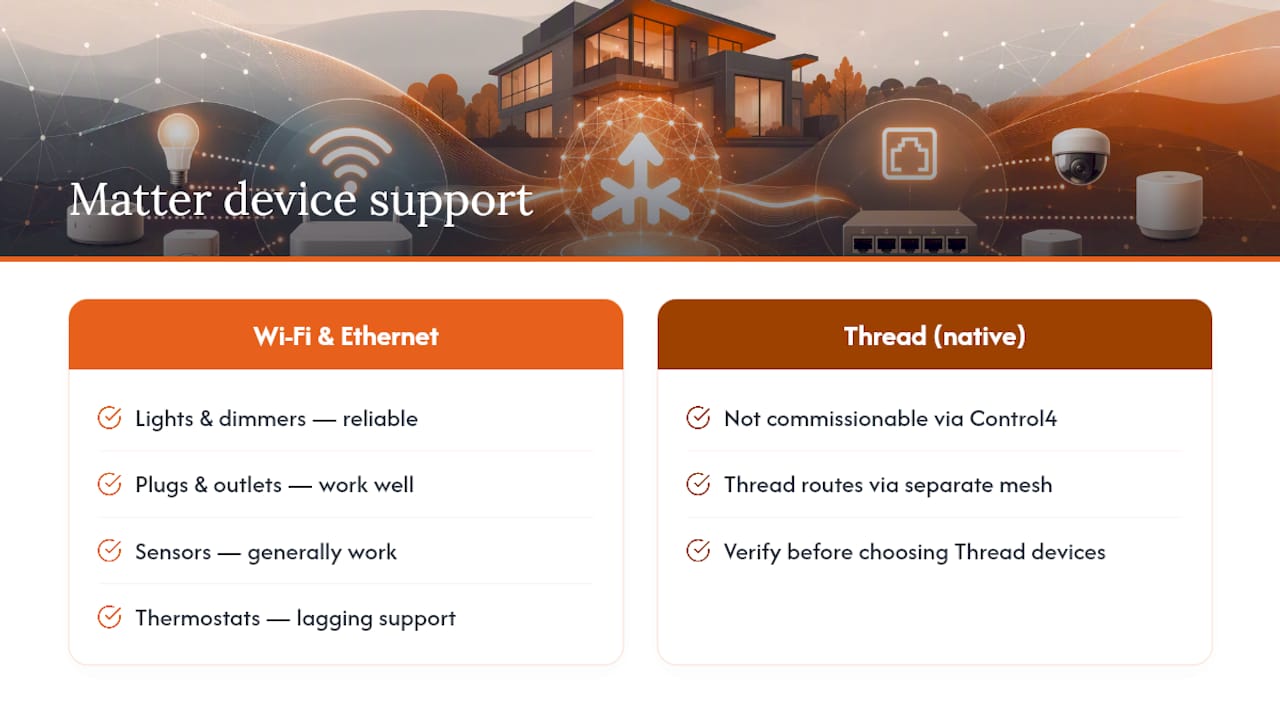
Lights and dimmers. This is the strongest category. Matter-certified lights and in-wall dimmers commission reliably over Wi-Fi and Ethernet and expose standard on/off and brightness controls without much fuss.
Plugs and outlets. Smart plugs tend to work well too, since their Matter device type is simple: on/off, sometimes power monitoring. Straightforward clusters mean fewer surprises.
Sensors. Basic occupancy and contact sensors generally work, though some advanced sensor clusters, like specific temperature or air-quality reporting formats, may not be fully exposed depending on the driver version you're running.
Thermostats. Support exists but tends to lag behind lighting, and feature parity with a manufacturer's native app is not guaranteed. Test before committing your whole HVAC control to it.
Locks. Matter locks are a newer device category across the entire ecosystem, and Control4 support here is still maturing. Verify commissioning behaviour with your specific lock model first.
Shades and fans. These device types exist in the Matter specification, but availability of Control4 drivers exposing full open/close position or fan-speed clusters varies. Some installers still prefer dedicated shade or fan protocols for this reason.
The transport layer matters as much as the device category. Wi-Fi and Ethernet Matter devices are the safe bet right now. Thread-based devices, which route through a separate low-power mesh network rather than your Wi-Fi, aren't commissionable through Control4's current native pathway. If you're weighing a Thread product against a Wi-Fi equivalent for a Control4 home, the difference between Matter and Thread is worth understanding before you buy either one.
How do you add Matter devices to a Control4 system?
You've got four real routes, and the right one depends on how patient you are and how comfortable you are with something a little less polished.
- Native Matter driver. This is the first thing to try for Wi-Fi and Ethernet devices. It commissions the device directly onto Control4's own fabric, gives you local control with no cloud round-trip, and supports multi-admin so the same device can still be managed from Apple Home or Google Home if you want.
- Third-party driver marketplaces. Beyond the core Matter driver, marketplace listings sometimes add support for niche device categories faster than official releases do. The trade-off is commissioning can be fussier, and long-term support depends on that developer staying active.
- MQTT bridging. When no driver exists for a device class you need, an MQTT-based bridge lets Control4 publish and subscribe to topics on a broker, effectively translating between systems that otherwise can't talk. This is a legitimate, local, non-cloud approach, but it requires someone comfortable configuring a broker and mapping topics correctly.
- Hub bridges like Home Assistant. Advanced integrators sometimes run Home Assistant alongside Control4 specifically to access newer or more experimental Matter features. Home Assistant's own Control4 integration documentation notes it treats the Control4 controller as a hub using local polling, and requires Control4 OS 3.0 or newer plus a reachable network path.
Pro Tip: If you're testing a new device category for the first time, commission it through the native driver path first, even if a bridge would technically work faster. Native support gets you local, direct control; bridges add a hop that can introduce latency or a second point of failure later.
What should you know about commissioning and multi-admin control?
Commissioning a Matter device onto Control4 follows a similar pattern to any Matter setup: the device needs to already be powered and reachable on your local network, and you'll scan or enter its setup code to begin the pairing handshake. From there, Control4's driver takes over negotiating the secure connection.
Before you start commissioning, confirm:
- The device is on the same network segment as your Control4 controller, with no VLAN or firewall rule silently blocking traffic between them.
- You have the device's Matter setup code or QR code on hand, since most commissioning flows need it upfront.
- Your DHCP server has capacity and isn't running low on available leases, which sounds trivial until it's the actual reason commissioning fails.
Multi-admin is where things get genuinely useful, and occasionally frustrating. Because Matter's core specification builds in support for multiple fabrics, a device already commissioned to Apple Home can, in many cases, be shared onto Control4's fabric as a secondary admin without starting over. In practice, some ecosystems make this smoother than others, and the exact steps to generate a sharing code vary by which app commissioned the device first.
Firmware updates for most Matter devices are handled over-the-air by the manufacturer, not by Control4, which means a device can gain or lose behaviour on its own schedule, independent of anything your integrator changes.
Pro Tip: If commissioning fails repeatedly, don't assume the device is broken. Reboot the Control4 controller, confirm IPv6 is actually enabled on your router rather than just listed as an option, and try commissioning again before troubleshooting the device itself.
What should homeowners and installers do right now?
Buy Wi-Fi and Ethernet Matter lights, plugs, and basic sensors with confidence. Hold off on Thread-only devices unless you already have infrastructure to support them, and test locks and shades on a small scale before committing a whole room to them.
Before you commission anything, run through this network checklist:
- Confirm your router and modem support IPv6, and that it's actually turned on, not just present in the settings menu.
- Set DHCP reservations for your Control4 controller so its IP address never shifts and breaks driver connections silently.
- Separate IoT device traffic onto its own VLAN if you're technically inclined, but verify that segment can still reach the controller. Good smart home networking prevents most commissioning headaches before they start.
- Keep a note of which devices are on Apple Home, Google Home, or Amazon fabrics already, since that affects how multi-admin sharing works.
For mixed ecosystems, an installer typically builds in a fallback approach: native driver first, MQTT or hub bridge as backup for whatever the native path doesn't cover yet. If a device refuses to commission after basic troubleshooting, that's the point to call a professional rather than spend a weekend fighting a router setting. Ask any installer you're considering three things: which Matter device types they've actually commissioned on Control4, how they handle multi-admin sharing with other ecosystems, and what their fallback plan is if a native driver doesn't cover your device.
Our take on where Matter and Control4 are headed
The Matter narrative sold to consumers implied a flip of a switch: buy any Matter logo, plug it in, done. That's not the reality on a Control4 system today, and pretending otherwise does homeowners a disservice. What Matter has actually delivered is something more useful for a professionally installed home: a common language that reduces the guesswork integrators used to face when mixing brands, even if full feature parity across every device cluster still takes driver development time to catch up.
We'd push back on the idea that Thread support gaps or BLE commissioning limits are a reason to avoid Matter devices in a Control4 home. They're a reason to sequence your purchases correctly. Wi-Fi and Ethernet Matter products are genuinely solid additions right now. Thread-based products are a "wait and confirm" category, not a "never" category.
There's a broader trend worth noting too: some homeowners are pulling back from piling on more standalone smart devices and instead asking for systems that just work reliably, a shift covered well in industry commentary on smart home fatigue. Matter, done properly through a controller like Control4, is arguably the antidote to that fatigue rather than another contributor to it. It's one standard doing the interoperability work instead of five apps doing it badly.
— JupiterAV
Get Matter working right in your Control4 home
Reading driver changelogs and testing commissioning flows yourself is one option. Having someone who's already done it across dozens of homes handle it for you is another, and it's the one that doesn't cost you a weekend.

Service providers build and service Control4 systems as part of Smart, Effortless Living work, which means experience helps identify which Matter drivers are stable or which device categories still have rough edges. Devices are commissioned with the right sequencing worked out. Whether adding a first batch of Matter lights or trying to bridge a lock that's fighting the native driver, network prerequisites, fabric sharing, and fallback plans are sorted out before installation. If you'd rather have Matter and Control4 working together correctly the first time than troubleshoot IPv6 settings on your own, get in touch with JupiterAV and tell us what you're trying to add to your system.
Sources
If you want to verify anything above yourself, start with the Matter device library specification, the authoritative list of device types and clusters any controller references. Home Assistant's own Control4 integration page documents the hub-bridge requirements in detail. For homeowners weighing dealer-installed Control4 against DIY approaches generally, this comparison lays out the trade-offs plainly.
- Matter 1.4 core specification — Connectivity Standards Alliance
- Home Assistant Control4 integration documentation — GitHub / Home Assistant
FAQ
How can I contact Control4 for technical support?
Control4 directs owners to their installing integrator as the primary support channel, since integrators hold the system configuration and handle firmware updates and troubleshooting directly, according to Control4's own owner resources. If you don't have an active integrator relationship, contacting a local Control4 dealer is the next step.
Which devices are compatible with Matter?
Matter covers device types including lights, switches, plugs, sensors, thermostats, locks, and shades, as defined in the Matter device library. Compatibility with a specific controller like Control4 depends on which drivers and clusters that controller currently implements, not just the Matter logo on the box.
Is Control4 still relevant with Matter's rise?
Yes. Control4 continues to add Matter support through dedicated drivers, and its multi-admin capability means Matter devices can be shared between Control4 and ecosystems like Apple Home or Google Home rather than forcing a choice between them.
What are some common problems with Control4 and Matter devices?
The most common issues are Thread-only devices that can't commission through the current native driver, IPv6 not being enabled on the home router, and VLAN or firewall rules blocking the controller from reaching the device on the local network.