
Yes, smart blinds work with Alexa, and the best ones now connect directly through Matter and Thread rather than a separate manufacturer bridge. If a product page mentions Matter, check that you have a Thread border router (most current Echo devices qualify) before you buy. If it doesn't mention Matter, plan on a hub. Either way, measure your windows and confirm power access before ordering anything.
TL;DR:
- Matter-compatible blinds connect directly to Alexa over Thread with no hub needed, but require a Thread border router like a compatible Echo device.
- Bridge-based systems depend on manufacturer hubs and skill setups, which introduce cloud reliance and potential service disruptions if servers go down.
- Choosing the right motor involves balancing battery, wired low-voltage, or plug-in options based on window size, usage frequency, and installation complexity.
- Proper device naming, room grouping, and routine setup are crucial for reliable voice control and automation, reducing command failures over time.
- Professional installation ensures accurate measurements, concealed wiring, optimal router placement, and thorough testing, providing more reliable long-term performance.
Table of Contents
- How Alexa compatibility actually works: Matter, Thread, and hubs
- Setting up Alexa-controlled blinds step by step
- Battery, plug-in, or hardwired: choosing the right motor
- How to compare blinds and vendors without getting fooled
- Fixing common Alexa blind problems
- Why a professional install matters more than most buyers expect
- Safety features and child and pet safety with motorized blinds
- Security and privacy with Alexa-enabled blinds
- How the major Alexa-compatible blind brands stack up
- Building automation scenes around Alexa blinds
- Energy savings from automated blinds
- When to DIY and when to call a pro
- Getting a quote for smart blinds and Alexa integration
- Sources
- FAQ
How Alexa compatibility actually works: Matter, Thread, and hubs
Two very different systems get marketed under the same "works with Alexa" banner, and mixing them up is the single most common buying mistake.
The newer system is Matter, a smart home standard that lets a device talk directly to Alexa without routing through a manufacturer's own cloud app first. Matter-compatible motorized blinds can pair straight to compatible Amazon Alexa devices, and when that pairing happens over Thread, a low-power mesh radio designed for exactly this kind of always-on home device, response times drop very low for near-instant control. That's the difference between saying "Alexa, close the office blind" and having it actually start moving before you finish the sentence, versus waiting a beat or two while a command bounces to a cloud server and back.
Thread only works if something in your home acts as a border router, the piece of hardware that lets Thread devices join your network. Most current Echo devices with a built-in hub, along with several Eero routers, do this job. The Thread Group maintains the official list of certified border routers and Thread-certified products, and it's worth a quick check against your existing gear before you commit to a Matter-only blind.
Bridge or skill-based integration is the older, more common setup. Here, your blinds talk to a manufacturer hub, that hub talks to a manufacturer cloud service, and Alexa talks to that cloud service through a "skill" you enable in the Alexa app. It works fine most of the time, but it adds a dependency: if the manufacturer's servers go down, so does your voice control, even though your Wi-Fi and Echo are working perfectly.
When you're comparing spec sheets, a few words tell you which system you're actually getting:
- "Matter certified" or "Works with Matter" means direct compatibility, no bridge required
- "Requires hub" or "Requires bridge" means cloud-dependent, skill-based control
- "Thread enabled" only matters if you also have a Thread border router in the home
- "Works with Alexa" alone, with no mention of Matter, almost always means the skill route
Manufacturers building genuinely Matter-native products, like MotionBlinds' pleated shade line, spell this out on the product page because it's a selling point. If a listing is vague about it, assume it's the older bridge model.
Setting up Alexa-controlled blinds step by step
Before you touch the Alexa app, confirm three things: you have an Echo device (or Eero) capable of acting as a Thread border router if you're going the Matter route, your Wi-Fi reaches the window in question, and the blind's motor or hub is charged or powered and sitting within range.
- Prepare the hardware. For Matter blinds, this usually means charging the motor and having the box's QR code handy. For bridge-based systems, plug in and power on the hub first, since it needs its own network connection before it can introduce anything else to Alexa.
- Add the device in the Alexa app. Tap the plus icon, choose "Add device," and either scan the Matter QR code directly (the workflow MotionBlinds documents for its Matter shades) or select the manufacturer's skill from the smart home list and log into that brand's account.
- Name it and assign it to a room. This step gets skipped constantly, and it's the one that causes the most frustration later.
- Test with a direct command before building any routines. Say the exact name you just gave it and confirm the blind actually moves the direction you expect.
On naming: installers rename every shade to something specific, like "Master bedroom left blind" or "Kitchen bay window," rather than leaving it as "Shade 1" or the default manufacturer string. Vague names are exactly why voice commands start failing, because Alexa has no reliable way to guess which "blind" you mean when three devices share a similar label.
Pro Tip: Group all the blinds in one room under a single group name (like "Living Room Blinds") in addition to their individual names, so "Alexa, close the living room blinds" works without you listing every window by name.
Once naming is sorted, routines are where Alexa blinds actually start paying for themselves. A morning routine can open bedroom blinds at sunrise, a "movie time" routine can close the living room shades and dim the lights in one phrase, and a "good night" routine can lower every blind in the house on a schedule, no manual walk-through required.
Battery, plug-in, or hardwired: choosing the right motor
Your window type and how often you'll actually use the blind should decide the power option, not brand preference.
- Rechargeable battery motors are the easiest retrofit option, need no electrician, and typically run for months between charges depending on how heavy the fabric is and how often the blind moves. Heavier blackout fabric and larger windows drain the battery faster because the motor works harder against more torque.
- Wired, low-voltage motors eliminate battery charging entirely and suit new builds or renovations where you can run low-voltage cable to the window during construction. They cost more upfront in labour but remove a maintenance task permanently.
- Plug-in motors sit between the two, drawing standard household power through a cord, which works well for a window near an outlet but limits placement options and can look untidy without careful cord management.
A retrofit kit, which adds a motor to an existing blind, is usually enough for one or two windows where you like your current shades. Full replacement makes more sense when you're doing several windows at once or want a cleaner, integrated look. Either way, headrail depth and clearance matter more than most buyers expect. Some motorized headrails are noticeably deeper than manual ones, and if your window trim is tight, that's a measurement problem better caught before ordering than after. For a realistic sense of how long batteries actually hold up in daily use, check real-world estimates rather than the marketing number on the box.
How to compare blinds and vendors without getting fooled
Skip the spec sheet for a minute and focus on five things that actually predict whether you'll be happy with the purchase in six months: the connectivity model (Matter versus bridge), the power option, warranty terms, motor noise level, and whether local install or service support exists at all.
Ask any vendor or installer these questions directly:
- Does this model support Matter natively, or does it need the manufacturer's hub and skill?
- If it needs Thread, does it require me to buy a specific border router, or will my existing Echo work?
- Will someone measure my windows on-site, or am I measuring and ordering blind?
- Where is the warranty actually serviced, and does that require shipping the motor somewhere?
Pro Tip: If a seller can't clearly answer whether their product is Matter certified or bridge based, that's your answer. Vague compatibility language on a product page almost always means bridge based.
A few red flags worth walking away from: no clear return policy on motors, a warranty that requires you to ship a bulky headrail across the country at your own cost, or a company that can't tell you whether their hub works with Thread at all. Budgeting realistically also helps here. Alberta homeowners planning a multi-room motorized blind project tend to underestimate install and wiring costs far more often than they overestimate them.
Fixing common Alexa blind problems
Blinds vanishing from the Alexa app or ignoring commands is usually a network issue, not a hardware failure, and most of it is fixable without a service call.
- Check your Thread border router first. If your Echo or Eero acting as the border router lost power or got unplugged, every Matter device connected through it goes dark at the same time. That's the quickest diagnosis: if all your Matter blinds disappeared together, it's the router, not the blinds.
- Restart the Echo device or hub. A simple power cycle resolves a surprising share of "device offline" issues, the same way it does for a router.
- Re-scan the Matter QR code if the device won't reconnect on its own. Manufacturer support documentation generally walks through this as the standard reset step, and it's faster than a factory reset.
- Move the border router closer to the affected room if the problem is isolated to one window. Thread is a mesh protocol, so range and interference from walls or other electronics matter more than people expect.
Battery care is straightforward: most rechargeable blind motors handle a few hundred charge cycles comfortably before capacity noticeably declines, so treating them like a phone battery, avoiding letting them sit fully drained for weeks, is reasonable practice. If problems persist after these steps, especially anything involving exposed wiring, a motor that won't respond to any command, or repeated automation failures across multiple devices, that's the point to call a professional rather than keep troubleshooting.
Why a professional install matters more than most buyers expect
DIY works fine for a single battery-powered blind on one window. It gets a lot less fine once you're doing eight windows, running low-voltage wiring, or trying to get everything talking to Alexa reliably as one system.
Professional installation scope covers the parts that are easy to get wrong alone: accurate on-site measurement, deciding between prewire and retrofit, concealing wiring so it disappears into the trim rather than sitting exposed, placing Thread border routers where they'll actually cover the whole home, and testing every voice command and routine before calling the job done. That last part matters more than it sounds. A blind that pairs successfully in the Alexa app isn't the same as a blind that reliably responds every time, and catching the gap between those two things is largely what installation experience buys you.
The practical difference between DIY and full-service install shows up mostly in time and consistency. A homeowner doing it alone might spend a weekend getting three blinds working, with one or two behaving inconsistently. A professional Alexa integration tends to get it right the first time, with the wiring hidden and the naming conventions set up correctly from day one.
Safety features and child and pet safety with motorized blinds
Cordless operation is the biggest safety advantage motorized blinds have over traditional corded ones, since it removes the strangulation risk that dangling cords pose to young children and pets, a concern regulators and paediatric safety groups have flagged with corded window coverings for years. Motorized blinds replace that cord entirely with a motor and a remote or app, so there's nothing hanging at grab height.
Most quality motors also include obstacle detection, which stops or reverses the blind if it meets resistance partway through its travel. That matters if a curious toddler or a cat decides to investigate a moving blind up close. Look for this feature explicitly on the spec sheet, since not every budget motor includes it.
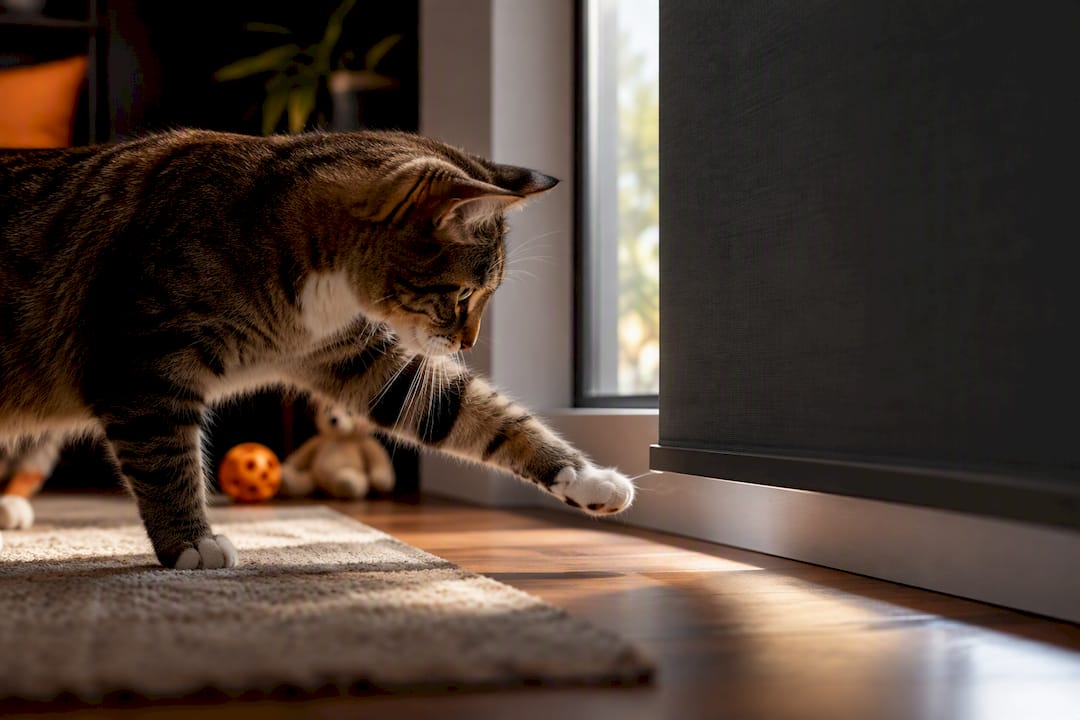
Voice control adds a layer worth thinking through separately: a young child who can talk to Alexa can, in theory, open or close a blind. If that's a concern in a bedroom or playroom, most Alexa smart home settings let you require a PIN or restrict certain devices from voice control entirely, or you can simply leave that specific blind out of any voice-accessible group. Battery-powered motors also tend to run at lower torque than hardwired ones, which is generally gentler if a pet's tail or a child's hand happens to be in the way during operation.
Security and privacy with Alexa-enabled blinds
Every smart device on your network is a potential entry point, and window coverings are no exception. The practical risk isn't that someone hacks your blinds specifically. It's that a poorly secured hub becomes a weak point on your home network generally.
Matter's design actually helps here. Because Matter-certified devices communicate through your own Thread network rather than a manufacturer's cloud server, there's less data leaving your home and less reliance on a third-party company's security practices. Bridge-based systems, by contrast, route your commands and usage patterns through the manufacturer's servers, which means you're trusting that company's security track record along with Amazon's.
The practical steps that matter most: keep your Alexa app and hub firmware updated, use a strong and unique Wi-Fi password, and avoid connecting smart home devices to a guest network that other visitors also use. If a product asks for unusual permissions, like access to your contacts or location history, that's worth questioning for something that only needs to open and close a window covering.
How the major Alexa-compatible blind brands stack up
The market splits fairly cleanly into two camps once you look past the marketing.
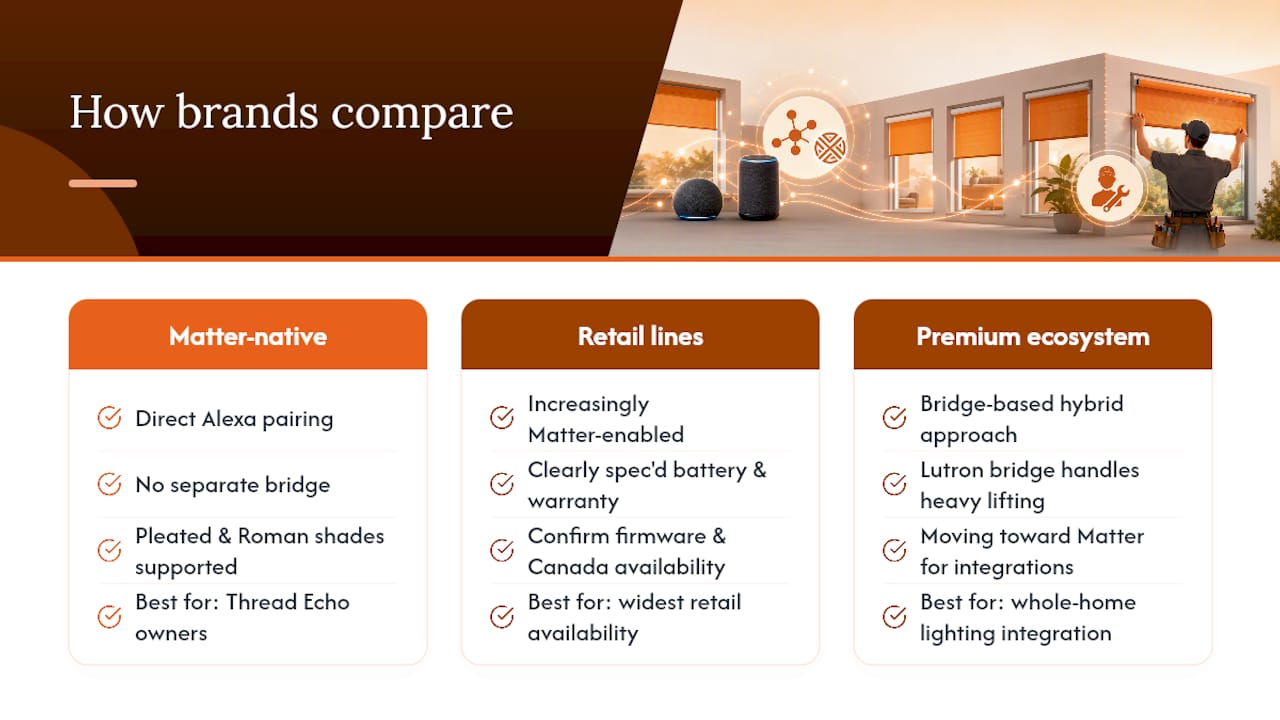
Matter-native brands, including motor systems built around the MotionBlinds platform, lead with direct Alexa pairing as their headline feature and typically support both pleated shades and Roman shade configurations without a separate bridge, based on how MotionBlinds documents its Matter integration. These tend to suit buyers who already have a Thread-capable Echo in the home and want the simplest possible setup.
Retail smart shade lines, like the GE Smart Shade, sit in a slightly different category: widely available, clearly specced on battery type and warranty, and increasingly Matter-enabled, but worth double-checking for firmware version and Canadian availability before assuming direct pairing will work out of the box.
Premium lighting and shading ecosystems, such as Lutron's Caséta platform, take a hybrid approach. Lutron's own bridge handles most of the heavy lifting, but the system has moved toward Matter compatibility for certain integrations, which is worth understanding if you're mixing shades with lighting control in the same smart home. None of these brands is universally "best." The right one depends entirely on whether you're optimizing for the simplest Matter pairing, the widest retail availability, or the deepest whole-home integration with lighting.
Building automation scenes around Alexa blinds
The real value of a motorized blind shows up once it starts working with other devices instead of on its own. A basic wake-up routine might open bedroom blinds at 7 a.m. and follow it with a voice prompt for the day's weather. A "leaving home" routine can close every blind in the house, lock connected smart locks, and drop the thermostat, all from a single phrase or an automatic trigger tied to your phone leaving a geofenced area.
Blinds also pair naturally with home theatre setups. Saying "Alexa, movie time" can lower the living room blinds, dim connected lighting, and turn on a WiiM streaming setup or a Sonos soundbar in the same breath, replicating what used to require three separate remotes and a few minutes of fumbling. Motion sensors add another layer: a blind that automatically adjusts based on detected sunlight, paired with a smart thermostat, keeps a room from overheating on a bright afternoon without anyone touching a switch. None of this requires exotic hardware. It just requires the blinds, the sensors, and the routines all living inside the same Alexa ecosystem so they can actually talk to each other.
Energy savings from automated blinds
Blinds that adjust automatically based on time of day or sunlight do real work against your heating and cooling bills, not just your comfort level. Closing west-facing blinds in the late afternoon during summer blocks a meaningful amount of solar heat gain before it ever reaches your thermostat, which means your air conditioner runs less to compensate. In winter, opening south-facing blinds during sunny midday hours lets passive solar heat in, and closing them again at dusk helps hold that heat in overnight.
The advantage of tying this to Alexa rather than a simple mechanical timer is flexibility. A routine can factor in actual sunrise and sunset times, which shift throughout the year, rather than running on a fixed clock schedule that becomes wrong by an hour or more depending on the season. Pair that with a smart thermostat, and you've effectively automated a decades-old passive heating and cooling strategy that most homes never bother implementing because doing it manually, every single day, is unrealistic to keep up with.
When to DIY and when to call a pro
A single battery-powered blind on one window is a reasonable DIY project for most homeowners. Multiple windows, hardwired motors, or anything involving Thread border router placement across a whole house is where a full-service install earns its cost back. The up-front price difference is real, but reliability and resale value tend to favour the professional route once you're past two or three windows. If you're planning ahead, budget for measurement and ordering to take a week or two before install day, since motors and fabric are rarely sitting in local stock.
— JupiterAV
Getting a quote for smart blinds and Alexa integration
JupiterAV's advantage over piecing this together yourself is straightforward: one company measures, wires, conceals, and tests everything as a system, so you're not the one troubleshooting Thread border router placement at 9 p.m. on a Tuesday. That fully engineered, single-point-of-contact approach is the whole model, and it's built specifically so blinds, lighting, and audio all work together instead of as separate DIY projects stitched together after the fact.

An on-site estimate typically starts with measuring every window you're considering, discussing whether battery, plug-in, or hardwired motors fit your situation, and reviewing fabric and headrail options in person rather than guessing from a product photo. From there, next steps are simple: request a quote, ask about free swatches if you're still deciding on fabric, or book a site visit directly. Every install comes with concealment done properly and support afterward if something needs adjusting. Visit JupiterAV to start that conversation and get your windows measured properly the first time.
Sources
- Alexa developer docs: Matter support
- Thread Group — What is Thread / Certified products
- GE Smart Shade — product page
FAQ
Can I control my smart blinds with Alexa?
Yes. Modern motorized blinds pair with Alexa either directly through Matter if the blind and your Echo both support it, or through a manufacturer's hub and Alexa skill if it doesn't. Check the product listing for the word "Matter" specifically before assuming either way.
Can I connect a 3 Day Blinds motorized shade to Alexa?
Motorized shades from mainstream retail brands generally connect to Alexa through that brand's own hub and Alexa skill rather than direct Matter pairing, unless the specific model explicitly lists Matter certification. Check the product's own support page or manual for its exact integration method, since this varies by model and manufacturer.
Which smart blinds are the best for Alexa?
There's no single best option. The right choice depends on whether you want the simplest direct Matter pairing, the widest retail availability, or full integration into an existing lighting and audio setup. For anyone unsure how to weigh those tradeoffs, a professional measurement and consultation narrows it down fast based on your actual windows and network.
Which smart blinds work best with Home Assistant?
Matter-certified blinds generally integrate more cleanly with Home Assistant because Matter is an open standard rather than a proprietary cloud protocol, which reduces the need for custom integrations or workarounds. Confirm Thread border router compatibility on your existing hardware before buying, since Home Assistant setups often rely on the same Thread network Alexa uses.
Do I need a hub for smart blinds to work with Alexa?
Not if the blind is Matter certified and you already own an Echo device or Eero capable of acting as a Thread border router. If the blind isn't Matter certified, you'll need the manufacturer's own hub and its corresponding Alexa skill for voice control to work at all.