Alexa poses real privacy risks, and Amazon's March 2025 shift toward Alexa+ made things measurably worse for anyone who wants voice data kept off the cloud. That change ended the "do not send voice recordings" local processing option on compatible Echo devices, so nearly everything you say to an Echo now travels to Amazon's servers before any generative AI feature can act on it, according to TechCrunch's reporting.
If you own an Echo, do three things today:
- Open the Alexa Privacy dashboard and review, then delete, your voice history.
- Mute the microphone during sensitive conversations, especially in bedrooms and home offices.
- Check whether Voice ID and personalized features are still worth the trade against cloud-only processing.
The FTC's 2023 enforcement action against Amazon already found the company had mishandled children's voice recordings, which tells you the risk isn't theoretical.
Key Takeaways
Alexa's biggest privacy shift in years arrived with the March 2025 Alexa+ rollout, which traded local processing options for mandatory cloud handling of voice data.
| Point | Details |
|---|---|
| Cloud processing is now standard | The March 2025 change removed the local-only option for compatible Echo devices, sending voice requests to Amazon's servers. |
| Human review has happened before | Amazon employees and contractors have reviewed voice recordings historically, and the FTC has enforced deletion failures. |
| Voice ID requires stored data | Disabling recording storage can break Voice ID and personalized features, a direct trade-off of the 2025 change. |
| Network segmentation cuts risk fastest | A guest SSID or VLAN isolates Echo devices from household computers and limits lateral exposure. |
| Skills need regular audits | Remove unused third-party skills and revoke stale linked accounts every few months. |
| Professional installs close gaps | JupiterAV builds segmentation and deliberate device placement into Alexa and Control4 installs from the start. |
Table of Contents
- How Alexa privacy concerns start with data capture
- The real privacy risks behind Alexa's data trail
- What changed in 2025 and why it matters now
- Step-by-step privacy controls you can apply right now
- Third-party skills and smart-home integrations: what to audit
- JupiterAV's practical hardening checklist for privacy-conscious homes
- Installer perspective: balancing convenience and privacy in real homes
- Get a privacy-aware smart-home install done right
- Frequently asked questions
- Sources
How Alexa privacy concerns start with data capture
Every Echo device runs two modes of listening, and the distinction matters more than most owners realize. The device locally scans ambient audio for its wake word ("Alexa," or a custom name) without sending anything anywhere. Once it detects that word, or you press the action button, it starts streaming audio to Amazon's cloud for processing, and that recording gets stored.
What actually gets saved:
- The audio clip itself, tied to your account and device ID.
- A text transcript of what Alexa understood you to say.
- Voice ID data, a biometric profile Amazon builds to distinguish your voice from other household members.
- App metadata: timestamps, device location, and which skill or feature handled the request.
Amazon encrypts this data in transit, which protects it from casual interception on your network or Wi Fi. Encryption does nothing, though, to stop internal review, use in model training, or retention past what you'd expect. That's the gap privacy-conscious users keep tripping over: transport security and data-use policy are two separate promises, and only one of them gets marketed loudly.
Older Echo models offered a genuine alternative here. Certain devices could process simple commands locally, on-chip, without a round trip to Amazon's servers. That option is gone for most current hardware.
The real privacy risks behind Alexa's data trail
The scariest part of smart speaker privacy isn't the microphone. It's everything that happens to a recording after it leaves your living room.
Human access is documented, not speculative. Amazon has previously employed teams and contractors who listen to voice clips to improve transcription accuracy, a practice confirmed in reporting summarized by Forbes. Employees reviewing your recordings for quality control is a different privacy exposure than a hacker breaking in, but it's exposure all the same.
Regulatory action confirms the pattern. The FTC's stipulated order against Amazon required the company to delete improperly retained children's voice data and build stronger deletion controls, following allegations that Amazon kept kids' recordings far longer than its own policy allowed.
Misdelivery happens. In one widely reported incident, an Echo user received 1,700 audio files belonging to a complete stranger after requesting his own data. That's not a hypothetical edge case. It's proof that access controls on this kind of data can fail in ordinary, boring ways.
Academic researchers monitoring smart speakers in lab settings have also documented unintended activations and data leakage tied to how these devices integrate with other connected gadgets, which widens the exposure well past the speaker itself.
What changed in 2025 and why it matters now
Amazon removed the local processing toggle for eligible Echo devices starting March 28, 2025, forcing voice requests through the cloud even for users who'd deliberately opted out before, as Ars Technica reported at the time. Amazon's stated reason is straightforward: Alexa+, the generative AI upgrade, needs cloud compute to handle natural conversation, follow-up questions, and multi-step tasks. Local, on-device processing simply can't run that kind of model.
The trade-offs are concrete, not abstract:
- Voice ID, the feature that recognizes individual speakers in a household, breaks or degrades for users who decline to save recordings.
- Personalized responses and shopping suggestions depend on Amazon retaining a data trail to draw from.
- Some longtime users have discovered that opting out of storage now means opting out of features they'd relied on for years.
That leaves three realistic paths: accept broader cloud processing to keep full functionality, accept a stripped-down Echo with fewer smart features, or stop using Echo devices for anything sensitive. There's no setting that gives you Alexa+ convenience with 2019-era local privacy. Malwarebytes' analysis of the change put it plainly: advanced AI and strict local-only privacy are now mutually exclusive on this platform.
Step-by-step privacy controls you can apply right now
You don't need to abandon your Echo to cut your exposure meaningfully. Work through these steps in order.
- Open the Alexa Privacy dashboard. In the Alexa app, go to More, then Alexa Privacy, then Review Voice History. Delete anything older than 24 hours, or set automatic deletion on a rolling basis.
- Decide your Voice ID trade-off. Voice ID improves multi-user recognition but requires stored voice profiles. If that trade doesn't sit right with you, disable it under Recognized Voices.
- Mute strategically, not permanently. The physical mute button cuts power to the microphone circuit, which is the only guarantee that nothing is listening. Muting during sensitive calls or family arguments, then unmuting for routine use, works better long-term than leaving a device muted and useless.
- Audit skill permissions. Under Skills & Games, remove anything you haven't used in the past few months and check what each remaining skill can access.
- Remove linked accounts you no longer use. Old integrations (a former streaming account, an ex-partner's calendar) are dead weight and dead risk.
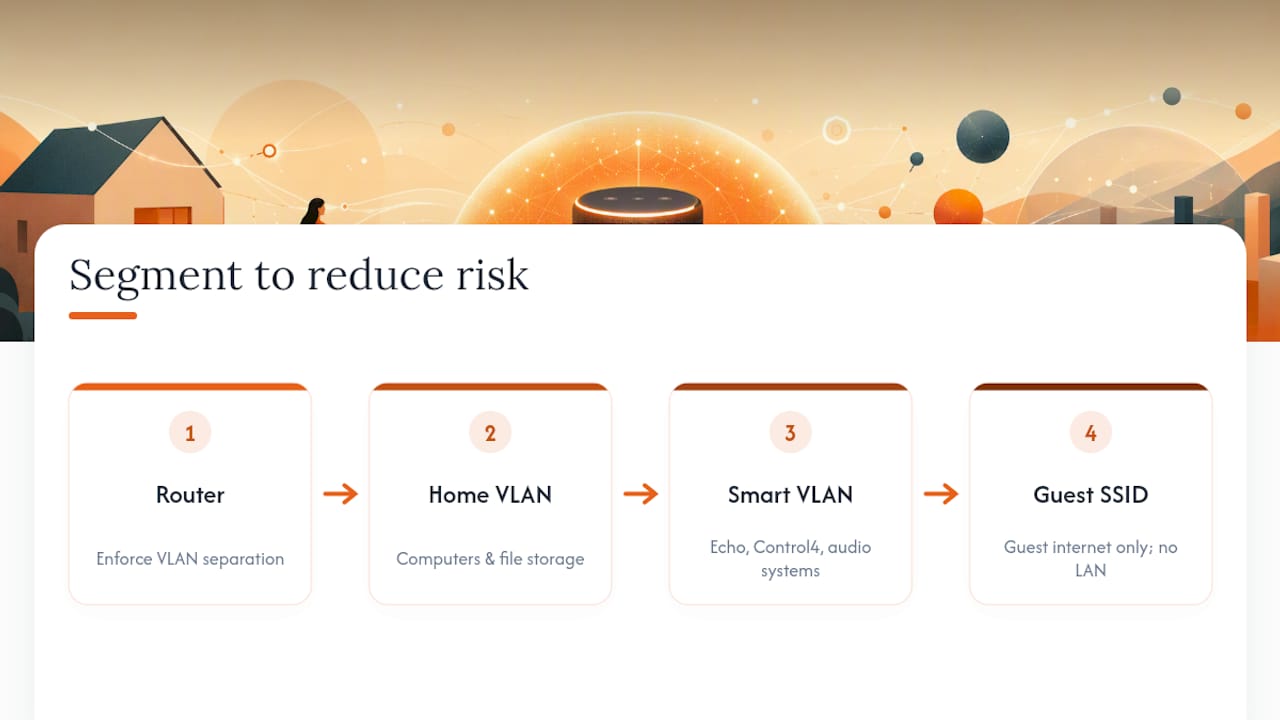
- Segment your network. Put Echo devices, along with other IoT gadgets, on a guest SSID or separate VLAN so they can't reach your laptops or file shares if compromised. Our guide to smart home networking walks through the router settings involved.
- Update firmware regularly. Both the Echo device and your router need current firmware to close known vulnerabilities.
Pro Tip: Set a recurring monthly reminder to check the Alexa Privacy dashboard. Amazon's retention defaults change more often than most users notice, and a five-minute check keeps your data trail from quietly growing.
Third-party skills and smart-home integrations: what to audit
Alexa's privacy exposure doesn't stop with Amazon. Third-party Skills, the voice apps that add functionality like ordering pizza or controlling a thermostat, request their own permissions and can store data independently of Amazon's core privacy dashboard. Researchers at NC State have documented skill vulnerabilities that let malicious or poorly built skills collect more than users realize they're granting.
Connected devices raise a parallel issue. Cameras, robot vacuums, and smart thermostats linked to Alexa often keep their own logs and metadata on separate vendor servers, outside Amazon's control entirely.
Run this audit every few months:
- Remove any skill you haven't opened in 90 days.
- Check exactly what data each remaining skill can access under its permissions page.
- Revoke linked accounts for services you've stopped using.
- Read the privacy policy of any camera or sensor before linking it. If it's vague about retention, that's a signal.
- Keep integrated device firmware current, since outdated firmware is the most common entry point for exploits.
JupiterAV's practical hardening checklist for privacy-conscious homes
We install Alexa, Control4, and whole-home audio systems across Calgary, and the same handful of principles come up on nearly every privacy-conscious job.
Segment first. A guest SSID or dedicated VLAN for smart devices keeps them isolated from your household computers and file storage. It's the single most effective mitigation short of not having smart speakers at all, and it's something our smart home networking guide covers in more depth.
Place devices deliberately. Keep Echo units out of bedrooms and home offices where sensitive conversations happen, and use the mute button before, not during, a call you'd rather keep private.
Bring in a professional for wiring and segmentation. VLAN configuration, secure Wi Fi backhaul, and proper device placement during a build or renovation are easier to get right the first time than to retrofit. This matters even more in ageing-in-place setups where monitoring devices carry higher stakes.
Pro Tip: Ask your installer to document every device's network path during setup. A simple network map makes it obvious which devices can talk to what, months or years later.
Installer perspective: balancing convenience and privacy in real homes
Most clients don't choose between privacy and convenience. They choose segmentation plus smart placement, keeping Echo devices in living areas and off the network their laptops sit on. The rule of thumb we give people: if you wouldn't say it in front of a stranger standing in the room, don't say it near an always-on microphone.
Get a privacy-aware smart-home install done right
You've seen the trade-offs: cloud processing versus local control, convenience versus exposure. If you'd rather not manage VLANs and skill audits yourself, JupiterAV builds that protection in from the start, not as an afterthought bolted onto a rushed DIY setup.

We handle secure Alexa and Control4 installs with proper network segmentation baked into the design, deliberate device placement so microphones aren't sitting where your sensitive conversations happen, and a privacy audit of existing skills and linked accounts if you're already living with a system that's grown unwieldy. Unlike a weekend of trial-and-error with router settings, we get the isolation and firmware configuration correct on day one. If your smart-home devices are chattier than you'd like, or you're planning a new build and want privacy handled at the wiring stage, book a consultation with JupiterAV and we'll map out a setup that fits your household.
Frequently asked questions
Is Alexa always listening to everything I say? No. The device only processes audio locally to detect its wake word. It starts streaming to Amazon's cloud once it hears that word or you manually activate it, though unintended activations do happen and account for a share of stored recordings.
Is Alexa safe to use for privacy-conscious households? It carries real, documented risks, from human review of recordings to past regulatory violations involving children's data. It isn't unsafe in a way that makes it unusable, but it needs active management through the privacy dashboard, skill audits, and network segmentation.
How do I permanently delete my Alexa voice recordings? Go to the Alexa app, select More, then Alexa Privacy, then Review Voice History, and delete by date range or set automatic deletion. Deleting recordings can affect personalization features and Voice ID accuracy.
Does muting the Alexa microphone actually stop it from listening? Yes. The physical mute button cuts power to the microphone circuit, which is a hardware-level guarantee rather than a software setting. It also disables all voice-activated convenience until you unmute it.
How does Alexa compare to Google Assistant and Siri on privacy? All three major voice assistants have faced similar scrutiny over human review of recordings and data retention. Apple has generally marketed Siri around more on-device processing, while Google Assistant and Alexa both lean heavily on cloud processing for advanced features, a trend Amazon's 2025 change accelerated rather than reversed.
What data protection laws apply to Alexa recordings? Regulations like the GDPR in the European Union and the CCPA in California give residents rights to access, delete, or limit use of personal data, including voice recordings. Canadian users fall under federal and provincial privacy law rather than either of those frameworks, so specific rights depend on where you live.
Sources
- Amazon’s Echo is ending its 'Do Not Send Voice Recordings' feature, starting March 28 | TechCrunch
- Everything you say to your Echo will be sent to Amazon starting on March 28 - Ars Technica
- Stipulated Order for Permanent Injunction, Civil Penalty Judgment, and Other Relief
- Alexa just became less private — what the March 28 Amazon changes mean | Forbes