The professional target for audio lip sync is under ±40 milliseconds of offset between what you hear and what you see. Most people never notice a small mismatch, but anything past that threshold starts to feel wrong, even if you can't say why. The fastest way to find out where your system stands is to open a browser AV sync test like Tonal on the TV, soundbar, or projector you actually use every night, and write down the millisecond reading it gives you.
TL;DR:
- Most home AV systems aim for a lip sync delay within approximately ±40 milliseconds to ensure viewers do not notice a mismatch.
- Running quick browser tests like Tonal can reveal if your audio is early or late by a few milliseconds, suitable for home calibration.
- Manual adjustments using your display's audio delay settings should be made in small increments, and each input may require individual tuning.
- Complex setups with multiple sources or distributed audio over networks often need professional calibration for accurate and lasting sync.
- Relying solely on automatic tools like HDMI eARC's latency protocol generally isn't sufficient; proper documentation and manual measurement are more reliable.
Table of Contents
- What is audio lip sync and how is it measured?
- How do you troubleshoot audio sync problems step by step?
- Which tools give you the most accurate lip-sync correction?
- When should you call a professional AV installer for lip sync?
- What actually matters when you're calibrating lip sync
- Get your system professionally calibrated by JupiterAV
- Sources
What is audio lip sync and how is it measured?
Audio lip sync, more formally called audio-video synchronization, is the timing relationship between sound and picture in a TV, home theatre, or commercial AV system. When it drifts, dialogue lands a beat before or after the mouth moves, and the effect ranges from mildly distracting to genuinely hard to watch.
The ITU-R BT.1359 recommendation is the benchmark most AV engineers still reference. It found that viewers generally don't notice a timing error until audio runs about 45 milliseconds ahead of the picture or 125 milliseconds behind it. Audio arriving early bothers people faster than audio arriving late, because a voice that beats the mouth movement reads as a bad dub, while a slight lag can pass for natural room acoustics. Professional calibration aims for a delay smaller than the typical noticeable range, often under about ±40 ms, to ensure consistency across varying content and viewer sensitivity.
Three ways to check where a system actually sits:
- Perceptual check: slow down a scene with hard plosive consonants (Ps, Bs, Ts) and watch whether the mouth and sound line up frame by frame.
- App or browser test: run Tonal or a similar AV sync test on each source; it reports direction (early or late) and a millisecond value.
- Instrument-grade measurement: a Rohde & Schwarz application note describes using a lip-sync test generator and dual-channel oscilloscope for precision down to a few milliseconds.
Broadcast production holds an even tighter line: the EBU's R37 recommendation caps audio lead and lag within narrow limits to maintain strict synchronization. That's overkill for a living room, but it explains why streaming apps sometimes feel slightly off even when your TV's own hardware is calibrated correctly.
How do you troubleshoot audio sync problems step by step?
Lip sync problems rarely have one cause. They usually stack: a slow video processor here, a Bluetooth speaker there, an HDMI switch adding its own delay somewhere in between. The fix is methodical, not a single setting.
- Strip the chain down. Bypass extra devices (soundbars, AV receivers, matrix switchers) where possible and test the TV speakers alone first, so you have a clean baseline.
- Turn off heavy video processing. Motion smoothing and interpolation modes add real delay to the picture, which throws sound out of sync even when the audio path is fine.
- Test one input at a time. A cable box, a game console, and a streaming app can each take a different decoding path through the same TV, so a fix on one input rarely carries over cleanly to the next.
- Adjust in small steps. Most displays and receivers have a manual audio delay setting, often labelled "lip sync" or "AV delay." Move it in 5 to 10 ms increments and re-test after each change rather than guessing at a large jump.
- Check special cases separately. Bluetooth speakers add their own latency on top of everything else, optical connections sometimes introduce processing delay that HDMI doesn't, and matrix switchers or AV-over-IP setups may need network buffer or DSP delay adjustments rather than a simple menu tweak.
- Document the final settings. Write down the delay value for each input and leave the client a simple two-minute re-test procedure, because firmware updates and app changes can quietly shift the numbers again.
Pro Tip: Test with real dialogue, not music or sports highlights. Talking-head content exposes small offsets far faster than a soundtrack does, because your brain is comparing lip movement against speech in real time.
Distributed audio setups need their own pass. If a system routes audio over Dante or another AV-over-IP network, syncing it to a central video reference sometimes means adjusting network latency settings rather than a device-level delay control.
Which tools give you the most accurate lip-sync correction?
The right tool depends on how precise you actually need to be, and pushing lab-grade gear on a simple two-device living room setup wastes everyone's time.
For a quick perceptual read, a browser test does the job. tonal.fm's AV sync test plays a signal designed to expose offset and gives you a millisecond value in under a minute, which is plenty for most homeowners checking a single TV and soundbar pairing.
For edit-level accuracy, professionals often fall back on a clapperboard or frame-by-frame scrub in a video editor, paired with a dual-channel capture in a digital audio workstation. That method catches drift that a casual glance misses, particularly on longer content where sync creeps rather than jumps.
For lab-grade work, especially in commercial installs or multi-zone systems, technicians use a signal generator like the R&S DVSG paired with an oscilloscope, which measures delay with a light-to-voltage converter and repeats the test across different picture modes and inputs, since scaling and motion processing change the latency each time.
| Method | Typical accuracy | Best suited for |
|---|---|---|
| Perceptual (plosive check) | Rough, human-judged | Quick sanity check on a single input |
| Browser/app test (tonal.fm) | Within a few ms | Per-input home theatre calibration |
| Clapperboard/DAW capture | High, frame-level | Editing and multi-source verification |
| Oscilloscope + test generator | Precise, lab-grade | Commercial installs, distributed audio |
HDMI's eARC connection helps here too. Its Latency Indication Protocol lets the display send dynamic latency updates to the audio system, which is a real improvement over the static handshakes older ARC connections rely on. That said, Auto Lip Sync features built on this protocol can still fail in layered systems with multiple processing stages, so manual verification stays worthwhile even on eARC-equipped gear.
When should you call a professional AV installer for lip sync?
A single TV and soundbar usually doesn't need a technician. Complex systems almost always do.
Call a professional when your setup includes multiple video sources feeding one display, a matrix switcher distributing signal to several rooms, distributed audio over Dante or another AV-over-IP network, or any commercial install expected to meet broadcast-adjacent standards. Home builders wiring a media room from scratch fall into this category too, since sync issues discovered after drywall is closed up cost far more to fix.
A properly commissioned visit should leave you with:
- Baseline measurements taken before any adjustment.
- A documented delay setting for every input, not just the one tested during the visit.
- Written configuration notes the next technician (or you) can reference.
- A simple re-test procedure for after firmware updates or new device additions.
This kind of calibration is often handled as part of standard TV and home theatre installation work, measuring each input individually rather than assuming one fix covers every source. Expect the visit to run longer than a basic TV mount, since per-input testing takes real time, and ask about follow-up support if a streaming app update throws things off again later.
What actually matters when you're calibrating lip sync
Most guides treat lip sync like a one-time fix: find the delay, punch in a number, done. That's the wrong mental model. Every input on a modern system takes a different route to the screen, and firmware updates shift the numbers without warning. The real skill isn't finding a single correct delay value. It's building a process that catches drift before you notice it in the middle of a movie.
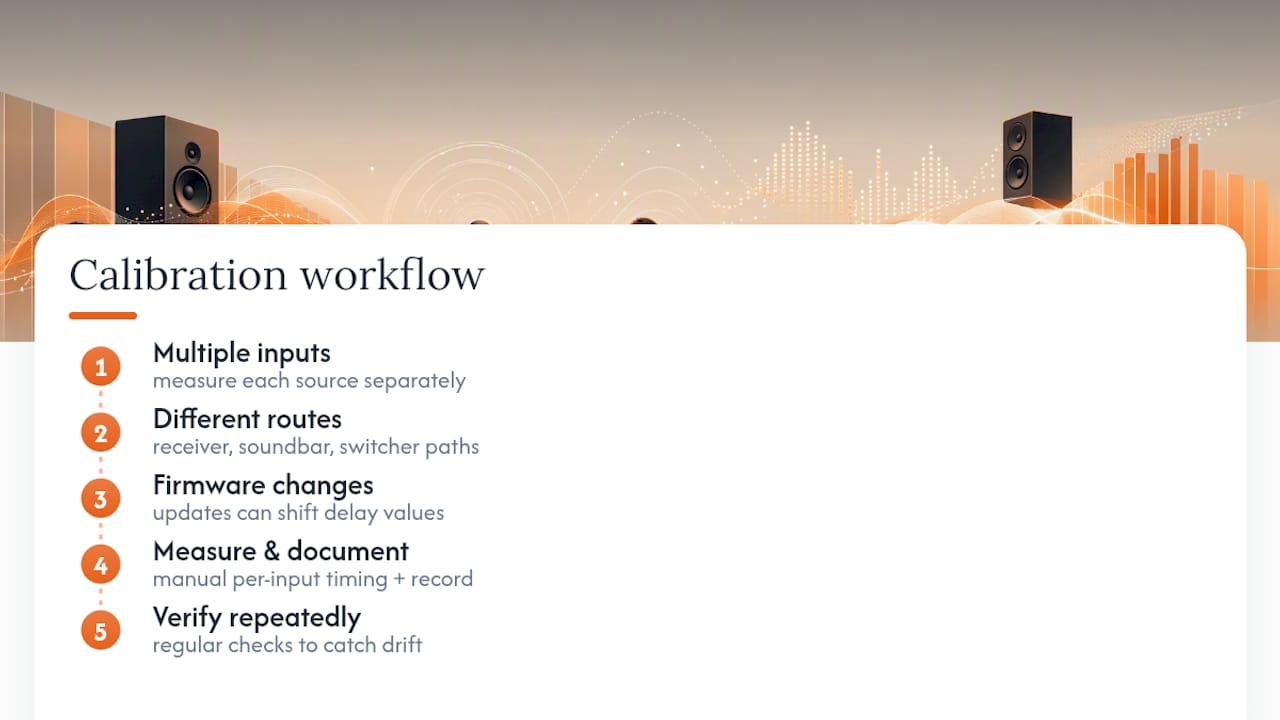
The other place conventional advice goes wrong is over-trusting automatic correction. HDMI eARC's Latency Indication Protocol is a genuine improvement, but leaning on Auto Lip Sync alone in a system with a receiver, a soundbar, and a switcher stacked together is asking one feature to do a technician's job. Manual measurement, done per input and documented properly, still beats automation in anything more complex than a two-device setup.
If you take one thing from this, prioritize the documentation step over the fix itself. A delay value with no record of which input it applies to is worthless the moment you add a new streaming device.
— JupiterAV
Get your system professionally calibrated by JupiterAV
Sales, service, and installation for TVs, home theatre systems, and whole-home AV setups can include lip-sync calibration as part of the work rather than an upsell. A key difference from a generic installer is that every input gets measured and tuned individually, not just the one the technician happened to test during setup.

A typical visit can include baseline measurement on main sources, per-input delay tuning, and written documentation of the final settings so a future service call doesn't start from zero. If your system routes audio through a switcher, a soundbar, or multiple rooms, that documentation matters even more, since one setting rarely fits every path through the chain. Related work like Atmos speaker placement and acoustic treatment often gets addressed in the same visit if the room needs it.
If dialogue has been drifting out of sync on your TV, soundbar, or home theatre system, book a calibration or installation visit with JupiterAV and get it measured properly instead of guessing at a delay setting.
Standards and test tools worth reading
- ITU-R BT.1359: the tolerance standard behind the ±40 ms professional target.
- Tonal: quick browser-based check for any TV, soundbar, or projector.
- Rohde & Schwarz LipSync application note: the oscilloscope and test-generator method used for lab-grade measurement.
- Practical Home Theater Guide: plain-language steps for adjusting delay on consumer gear.
Sources
- ITU-R BT.1359 (lip-sync tolerance guidance / related ITU recommendations)
- Tonal
- Lip-Sync measurement application note (Rohde & Schwarz)
- HDMI eARC technical exploration (DPL Labs)
- What causes audio delay in home theaters and how do I sync it? (Practical Home Theater Guide)