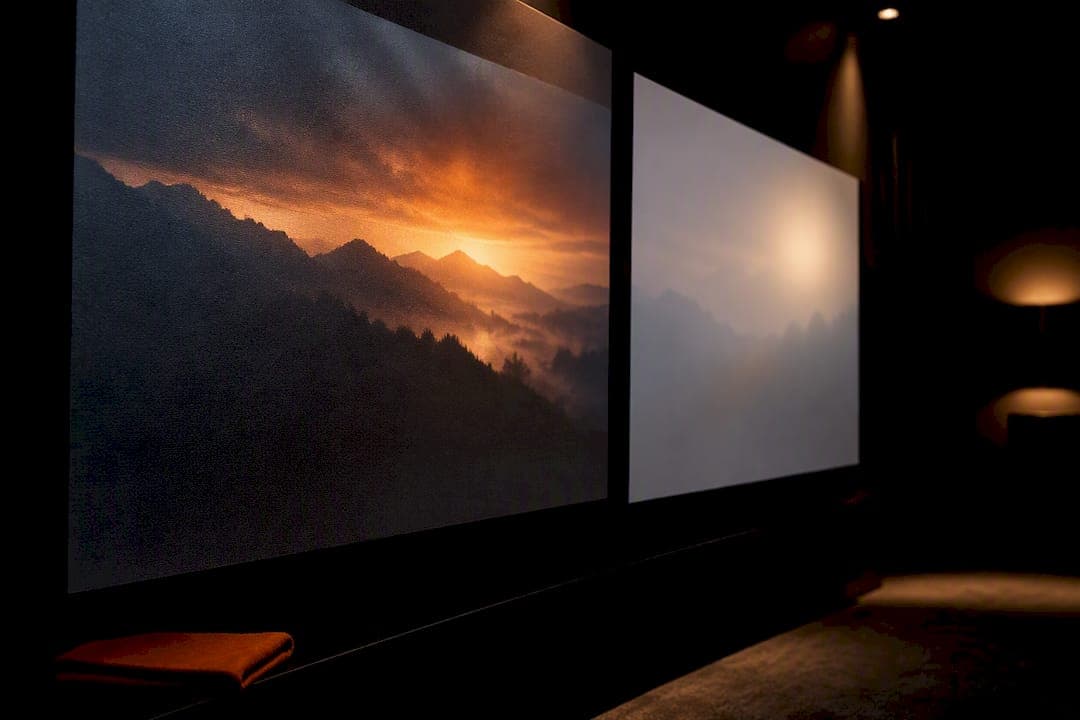
Projector screen gain measures how much light a screen surface reflects back toward your eyes compared to a standard reference material. Most home theatre rooms with controlled lighting do best with a unity gain screen in the 1.0 to 1.1 range. Bright living rooms with windows or ceiling lights should look at ambient light rejecting (ALR) screens in the 0.6 to 0.9 range instead, while higher gain (1.2 to 1.5) only makes sense for narrow, centred seating or specific venue constraints.
TL;DR:
- Screens with gain above 1.3 are prone to hotspots, color shifts, and reduced viewing angles, especially in rooms with wide or sectional seating arrangements.
- An ALR screen with a gain of 0.6 to 0.9 often outperforms high-gain white screens in rooms with ambient daylight or uncontrolled lighting, due to their light-rejecting properties.
- For most home theaters, a screen gain between 1.0 and 1.1 provides a wide, even brightness zone, while higher gains are suitable only for specific niche setups.
- Projector sizing and lumens must be matched to screen size first, with gain used for brightness adjustment, to prevent oversaturating lamps or creating uneven images.
- Regular cleaning and careful handling can preserve a screen’s gain performance over time, preventing dust buildup, fingerprints, and creases from degrading image quality.
Table of Contents
- What projector screen gain actually measures
- How screen gain narrows your seating and viewing angle
- The real trade-offs: hotspots, colour shift, and ambient light
- Matching screen gain to your room, projector, and seating
- ALR, UST, and the surfaces that break the usual gain rules
- Installer-tested checklist: match gain, size, and output before you buy
- Screen gain, lamp life, and energy use
- Keeping screen gain performance from degrading over time
- Why installers usually land on neutral gain
- Sources
- FAQ
What projector screen gain actually measures
Gain is a ratio, not a brightness boost. It compares how much light your screen reflects at the centre axis against a reference standard, typically magnesium oxide or a matte white diffuser panel. That reference surface is rated at 1.0 gain, meaning it scatters light evenly in every direction with no directional bias.
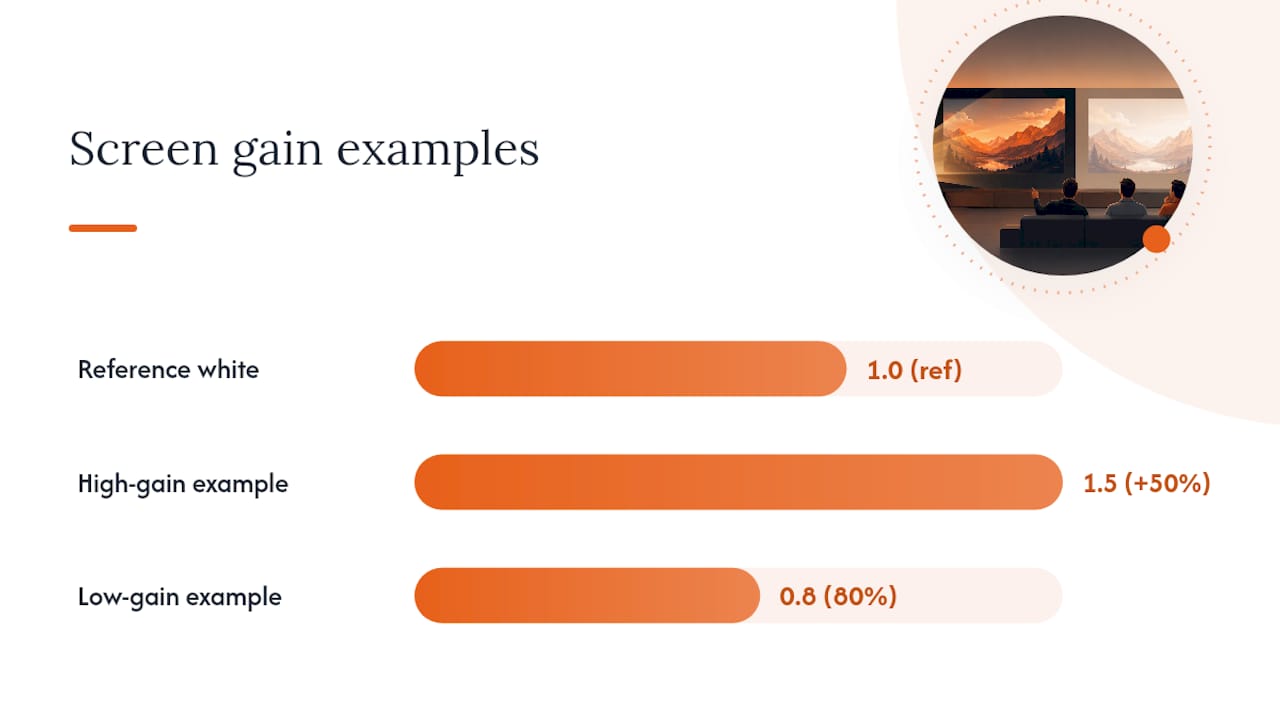
Once you understand that baseline, the rest of the spec sheet starts making sense. A screen rated 1.0 reflects light the same way the reference does. A screen rated 1.5 reflects roughly 50 percent more light at the centre axis than that reference. Drop to 0.8 gain and you're looking at a surface that only returns about 80 percent of the reference brightness on-axis. Barco's technical glossary frames it the same way: gain is a reflectivity measurement, and it shapes brightness, contrast, and viewing experience together, not brightness alone.
Here's what trips people up when they compare projector screen brightness across spec sheets:
- The number is measured at zero degrees, straight on. It tells you nothing about what happens when you're sitting off to the side.
- Gain doesn't create light. It redirects the light your projector already produces, concentrating it toward the centre seat instead of spreading it evenly.
- Two screens with the same gain rating can behave very differently depending on the material's scattering pattern, so the number is a starting point, not a full spec.
A projector screen gain of 1.3 sounds impressive next to 1.0, but that number only describes the sweet spot directly in front of the screen. Everything else about your room, your projector's lumen output, and where your furniture sits still needs to line up before that number means anything useful.
How screen gain narrows your seating and viewing angle
Higher gain doesn't just brighten the picture. It also shrinks the zone where that brightness holds up, a relationship ProjectorCentral's screen gain measurements describe as one of the most misunderstood parts of screen selection. As gain climbs, the half-gain viewing angle gets smaller, and viewers sitting off to the side see a noticeably dimmer image than the person parked dead centre.
The half-gain viewing angle is the point, measured in degrees from the centre axis, where brightness drops to half of the peak on-axis value. It defines your practical viewing cone, the seating area where the image still looks acceptably bright.
Pro Tip: Ask for a viewing-angle plot, not just a single gain number, before you buy. A screen rated 1.3 gain with a wide half-gain angle behaves very differently in a real living room than one with the same rating and a narrow cone.
Typical patterns by gain band look roughly like this:
- Unity gain screens (1.0 to 1.1) usually hold a wide, forgiving cone, often 45 degrees or more off-centre, so side seating stays usable.
- Moderate gain screens (1.2 to 1.5) narrow that cone noticeably, which is fine for a couch centred on the screen but rough on corner seats.
- High gain surfaces (above 1.6) can restrict acceptable viewing to a fairly tight wedge directly in front, which is why they suit narrow, single row seating far more than a wide sectional.
If your seating spans a wide sectional or includes a bar area off to one side, a high gain screen will leave those seats looking washed out and grey while the centre chair looks great. That mismatch is one of the most common regrets homeowners bring up after buying based on the gain number alone rather than their actual room layout.
The real trade-offs: hotspots, colour shift, and ambient light
Chasing a higher gain number often costs you more than it gives back, and this is where a lot of screen shopping goes wrong. Here's what actually happens as you move up the gain scale:
- Hotspotting gets worse above roughly 1.3 gain. You'll notice a bright, concentrated patch near the centre of the image that fades toward the edges, most visible during scenes with large areas of flat colour like sky or snow.
- Colour shifts appear with viewing angle on reflective surfaces. Highly directional materials scatter light unevenly, so the same frame can look warmer or cooler depending on where you're sitting relative to centre.
- Contrast can actually suffer in bright rooms, even with a higher-gain screen, because ambient light bounces off the same reflective surface that's supposed to be showing you the picture.
- ALR screens with low nominal gain often outperform high-gain white screens in daylight, since they're built to reject stray room light rather than just reflect more of everything, including light you don't want.
That fourth point deserves attention because it upends the assumption most first-time buyers make. A 0.6-gain ALR screen can outperform a 1.3-gain white screen in a room with windows or overhead lighting, purely because the ALR material is engineered to absorb or redirect ambient light away from the viewer's eyes while still bouncing the projector's own light forward. The white high-gain screen, by contrast, reflects everything hitting it, including the ceiling light washing out your blacks.
Pro Tip: If your room has any daytime light or fixtures you're not willing to kill during movie night, stop comparing gain numbers and start comparing ambient light rejection. It's a different spec, and for your situation it matters more.
High gain still earns its place in specific scenarios. A narrow conference room with a long throw distance and dim projector, or a large venue where the projector's lumen output can't cover the screen area on its own, are legitimate cases where boosting reflected light toward a defined seating zone solves a real problem.
Matching screen gain to your room, projector, and seating
Pick your gain range based on your room, not the biggest number on the spec sheet. Four practical bands cover almost every situation you'll run into:
- 0.6 to 0.9 (ALR or CLR materials): Best for living rooms and multi-purpose spaces with windows, pot lights, or evening use before blackout. Preserves contrast by rejecting ambient light rather than fighting it.
- 1.0 to 1.1 (unity gain): The default for dedicated or semi-dark home theatres. Even brightness across a wide seating area, no meaningful hotspotting, accurate colour from most angles.
- 1.2 to 1.5 (modest boost): Useful when your projector is underpowered for the screen size, or seating is tightly centred, such as a single row of theatre-style recliners.
- Above 1.6 (special venues): Reserved for long-throw commercial setups, narrow viewing zones, or situations where projector lumens genuinely can't be increased.
The order of operations matters more than most buyers expect. Matching projector lumens to screen area comes first; gain is a fine-tuning tool, not a fix for an undersized projector. Calculate roughly how many lumens per square foot your screen area needs, then use gain to nudge brightness up or down from there.
A rough guide to how this plays out by space:
| Room type | Typical gain | Why |
|---|---|---|
| Living room with ambient light | 0.6–0.9 (ALR) | Rejects stray light, preserves contrast |
| Dedicated dark theatre | 1.0–1.1 | Wide cone, even colour, no hotspotting |
| UST projector setup | 0.6 (CLR) | Designed to reject overhead ceiling light |
| Large venue, long throw | 1.2–1.6+ | Concentrates limited lumens toward seating |
If you're weighing a projector against a flat panel for the same room, it's worth reading through how projectors and TVs compare for different spaces before locking in a screen at all. Gain only matters once you've committed to projection.
ALR, UST, and the surfaces that break the usual gain rules
Nominal gain numbers get misleading fast once you're shopping ALR or ultra short throw (UST) specific screens. A CLR or CLR-like surface built for UST projectors often carries a low nominal gain, around 0.6, yet it can look brighter and punchier in a lit room than a plain white 1.0 screen because it's engineered to reject light coming from above and pass through light coming from below, where a UST projector sits.
That's the core reason UST owners are consistently steered toward CLR or CLR-like surfaces despite the modest gain rating. The screen isn't trying to reflect more light overall. It's trying to reflect the right light, from the projector, while rejecting the wrong light, from ceiling fixtures and windows.
Fresnel and lenticular ALR designs complicate the picture further:
- Fresnel-based ALR screens use fine circular ridges to redirect light, which can push nominal gain higher than a flat ALR surface, but often at the cost of a narrower usable cone.
- Lenticular ALR designs layer microscopic lenses that reject ambient light from above while still passing projector light from a UST throw angle, again trading a wider cone for stronger ambient rejection.
- Neither should be judged on gain number alone. Ask specifically about the half-gain angle and ambient rejection rating together before comparing two ALR products side by side.
If you're set on a UST projector, prioritize a CLR or CLR-like surface over a flat ALR panel, and confirm the ambient light rejection spec matches your room's actual lighting conditions, not just a showroom demo.
Installer-tested checklist: match gain, size, and output before you buy
Professionals don't rely on a spec sheet number alone before recommending a screen. A practical, repeatable sequence catches problems before they become an expensive mistake:
- Take a centre-axis lux reading with the projector running and the room in its typical lighting condition, not blacked out for a demo.
- Run a half-gain seating sweep. Sit in every seat you actually use, not just the primary chair, and check brightness dropoff as you move off-axis.
- Do a visual hotspot test using a scene with flat colour, sky or snow works well, and watch for a bright patch that doesn't match the surrounding image.
- If brightness or evenness falls short, work through the fix options in order: increase projector lumens first, reduce screen size second, adjust seating third, and only then consider a different gain or an ALR surface.
- Confirm mounting and throw geometry align with the screen's designed viewing axis. A screen mounted slightly off the projector's centreline throws off every gain calculation before you even sit down.
Pro Tip: Ask to see a physical sample of the screen material under your actual room lighting before installation, not a showroom sample under ideal light. Gain behaves differently under fluorescent office lighting than it does under warm living room fixtures.
Throw distance and mounting angle affect how evenly that gain translates across your seating area, which is worth understanding before you finalize a screen order. Confirming projector placement early avoids the awkward retrofit where a screen looks perfect from one seat and grey from every other.
Screen gain, lamp life, and energy use
Screen gain has no direct effect on your projector's lamp or laser light source degrading faster or slower. Lamp and laser lifespan is governed by the light engine's own operating hours, heat management, and brightness mode, not by what surface the light eventually lands on.
Where gain matters is indirect: it changes how hard you need to run the projector to hit your target brightness. A dim, undersized projector paired with a low-gain screen often gets pushed into its brightest lamp mode continuously, which draws more power and accelerates lamp wear over time. Pair the same projector with a unity or slightly higher gain screen sized correctly for the room, and you can often run a lower brightness mode, which extends lamp life and reduces the projector's power draw.
This is another reason the "size the projector to the screen first" order of operations pays off twice. Get lumens and screen area matched properly, and you get a comfortably bright image without maxing out lamp output every single movie night. Undersize the projector and try to compensate with a higher gain screen instead, and you'll likely still end up running peak brightness mode for anything watched with the lights on, since gain alone can't fully offset a genuine lumen shortfall in a lit room.
If energy use and lamp longevity matter to your household, treat correct projector sizing as the first lever, and gain selection as the second, smaller adjustment layered on top.
Keeping screen gain performance from degrading over time
A screen's gain rating assumes a clean, undamaged surface. Dust buildup, fingerprints, and household grime all scatter light differently than the material was engineered to, which quietly drags down both brightness and contrast even though the screen's rated gain number never changes.
Fixed-frame and motorized screens collect dust on the front surface over months of normal use, and that thin film diffuses light unevenly rather than following the material's intended scattering pattern. The fix is straightforward: a soft, dry microfibre cloth or a manufacturer-approved screen cleaner used sparingly, never household glass cleaner or anything with ammonia, which can degrade the coating on ALR and high-gain surfaces specifically.
Portable and pull-down screens face a different problem. Repeated rolling and unrolling can create creases or slight surface stretching over years of use, and a creased section reflects light at a different angle than the flat surface around it, creating a visible line during bright scenes.
A few habits keep gain performance closer to spec for longer:
- Dust with a dry microfibre cloth on a monthly basis rather than letting buildup accumulate.
- Avoid touching the screen surface directly. Skin oils are difficult to remove from ALR coatings without leaving a faint residue.
- Store portable screens fully unrolled when possible, or handle them gently during setup and teardown to avoid creasing.
- Keep humidity in check in the room. Excess moisture can affect adhesive-backed ALR and CLR coatings over years of exposure.
None of this changes what gain number is printed on the box, but it does determine whether your screen still performs like that number a few years down the road.
Why installers usually land on neutral gain
Working through screen selection for enough living rooms and dedicated theatres teaches you to distrust the biggest gain number on the shelf. For a custom dark home theatre, unity or slight-unity gain, generally 1.0 to 1.1, remains the default recommendation, because it keeps colour and brightness even across every seat in the room rather than rewarding only the centre chair.
Living rooms with real daylight or fixtures you're not blacking out change the calculation entirely. That's where an ALR screen, even at a modest 0.6 to 0.9 gain, tends to outperform a higher-gain white screen once the lights are on. Modest gain increases above 1.1 only get recommended when a room's projector is underpowered for its throw distance and increasing lumens isn't practical.
A proper consultation walks through your room's actual lighting, seating layout, and projector output before recommending any specific gain, rather than leading with a spec sheet number. If your setup is heading toward a full custom install, JupiterAV's home theatre and cinema services start from that same room-first approach, working through lumens, screen size, and seating together instead of chasing gain in isolation.
— JupiterAV
Sources
For deeper technical background on how gain is measured and what it means for image quality, ProjectorCentral's screen gain explainer and Barco's glossary entry on screen gain are worth bookmarking. For a closer look at ALR versus white screen behaviour in real rooms, this practitioner comparison covers installer-observed trade-offs in detail.
- What Is Screen Gain?
- What is screen gain?
- Screen gain explained: why a 0.6-gain ALR can outperform a 1.3-gain white
FAQ
What is a good gain for a projector screen?
For most controlled-lighting home theatres, a unity gain screen between 1.0 and 1.1 is the safest choice, since it keeps brightness and colour even across a wide seating area. Bright rooms with ambient light do better with an ALR screen in the 0.6 to 0.9 range, which rejects stray light rather than just reflecting more of everything.
What does gain do on a projector screen?
Gain determines how a screen redirects the light your projector produces, concentrating more of it toward the centre viewing axis as the number climbs. It doesn't add brightness on its own. A 1.5 gain screen reflects about 50 percent more light on-axis than the reference standard, but that boost narrows the usable viewing cone at the same time.
Is 1.2 gain good?
A 1.2 gain screen is a reasonable middle ground when your projector runs a little underpowered for the screen size or your seating is centred in a single row. It's not ideal for wide sectional seating, since off-axis brightness drops off more noticeably than it does with a 1.0 unity gain screen.
What is a projector screen with high gain?
A high gain projector screen, generally rated above 1.6, is engineered to concentrate reflected light into a narrow, bright viewing cone rather than spreading it evenly. These surfaces suit long-throw commercial setups or narrow seating zones, but they tend to show visible hotspotting and colour shift once viewers move off centre.